 Get a Demo
What is an MCP Server?
MCP servers are programs designed to provide AI applications with a standardized way to interact with files, databases, APIs, and other systems.

Article Contents
What is an MCP server?
A Model Context Protocol (MCP) server is a core component of the AI ecosystem, exposing structured capabilities (such as tools, resources, and prompts) to AI models through a predictable, schema-driven interface.
Like an API, an MCP server defines a contract for structured communication. However, MCP servers remove the complexity of bespoke connectors and fragile parsing logic by standardizing how models request and receive data or execute actions. This enables AI agents to work reliably with operational systems while maintaining a portable interface across hosts and environments.
Understanding MCP servers vs APIs
MCP draws comparisons to APIs for providing structured communication with external systems. However, while APIs are typically built for human- or service-driven requests, MCP servers are schema-bound, designed explicitly for AI-to-system interactions. Learn more about the differences between APIs and MCP in this article.
What is the purpose of an MCP server?
An MCP server is a program that provides AI applications with clearly defined capabilities through a standard protocol. It acts as a controlled gateway between the model and real-world systems, ensuring every action and piece of data is delivered in a structured, predictable, and safe way.
Think of an MCP server as a translator and gatekeeper for AI. It dictates exactly what the AI can do, what data it can see, and how to present that information so both sides understand it.
The role of MCP servers in AI
Publishes the capabilities the AI can use
An MCP server declares what it can do when it starts, using three building blocks:
Tools: Actions the AI can perform, like “deploy a service,” “search flights,” or “send an email.”
Resources: Read-only data the AI can access for context, such as documents, logs, calendars, or databases.
Prompts: Predefined templates or workflows that guide the AI through complex tasks. Each is described in a formal schema so the AI knows exactly how to call it and what to expect in return.
Validates every request and response
The server verifies that all requests comply with the declared input requirements and that all results are returned in the correct format. This ensures reliable interactions, prevents errors, and makes outputs predictable enough for automation and analytics.
Enforces strict boundaries and permissions
Only declared capabilities are accessible, and they can be limited by identity, role, or environment. Sessions are isolated, so different servers or users cannot see each other’s data. Sensitive information can be filtered, size-limited, or require explicit approval before access.
Provides predictable, structured results
The server returns information in consistent formats. For example, a list of flight options, a deployment summary, or a KPI report. This predictability ensures reliable and structured results, making it easier for AI to combine data from multiple sources without relying on guesswork.
Serves as a gateway to systems
All actions are processed through the MCP server, making it the single point of control for authentication, authorization, logging, and auditing. High-risk actions may require human approval, and every interaction can be recorded for compliance and investigation purposes.
MCP server architecture
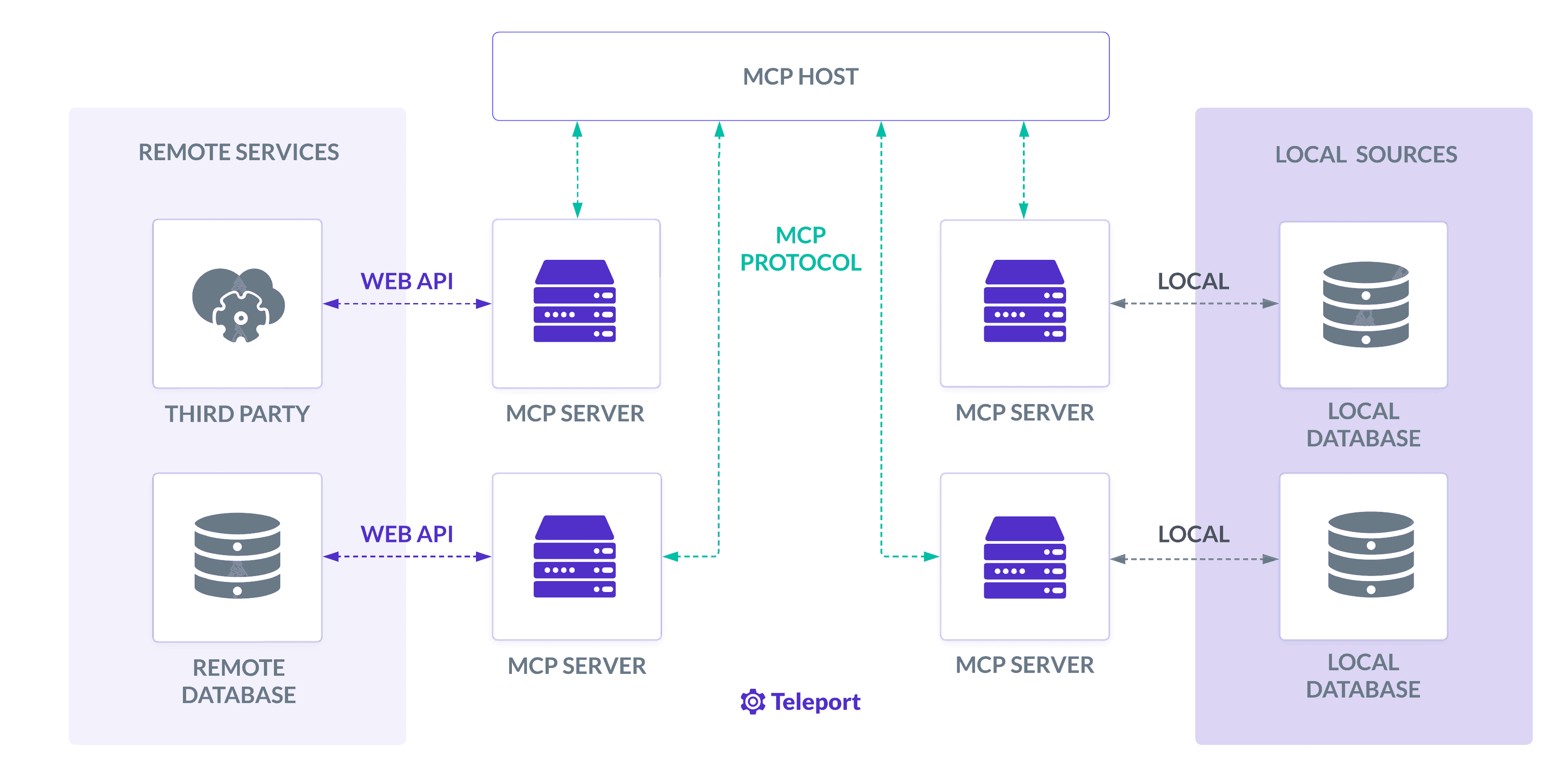
MCP follows a host-client-server architecture to maintain clear and secure responsibilities.
- The host, a key player in the MCP architecture, launches or connects clients, aggregates context, and mediates consent.
- The MCP client opens sessions, negotiates capabilities (resources, tools, prompts, roots, and sampling), and ensures isolation across servers.
- The server declares its capabilities at initialization, making them discoverable to clients.
The host is the AI application that launches or connects clients, aggregates context, and mediates consent. Each connection to a server uses one stateful client instance.
The client opens a session and negotiates capabilities like prompts, resources, tools, roots, and sampling. It maintains isolation across servers so one server cannot read unrelated context through the protocol. It also routes JSON‑RPC requests, responses, and notifications.
The server provides capabilities through three primitives. Resources expose data via URIs, prompts publish reusable templates, and tools perform actions the model can call. The protocol requires explicit declaration of these capabilities during initialization.
Initialization and handshake
The client sends an initialization request with the protocol version and capabilities.
The server responds with its own version and capabilities.
The client confirms readiness via an initialized notification.
This handshake ensures compatibility and sets the stage for the session to proceed.
How MCP servers work
Once the initial handshake between the client and server is complete, MCP defines a clear set of methods and message patterns for ongoing communication. This structure ensures that any compliant host and server can work together predictably and without the need for custom glue code, providing a sense of reassurance and security.
Core MCP server interactions
These are the primary MCP methods that clients use to discover and interact with server capabilities:
- List tools: “tools/list” returns the set of actions (tools) available, along with their names, descriptions, and JSON schemas.
- Invoke tools: “tools/call” executes a specific action using arguments validated against the tool’s input schema.
- List/read resources: “resources/list” shows available read-only data sources, while resources/read retrieves the actual data in a structured format.
- List/get prompts: The “prompts/list” endpoint identifies reusable task templates, and the “prompts/get” endpoint fetches their details.
Servers can return plain text, structured JSON, media files, or links to resources. Returning structured content allows hosts to reliably parse and combine outputs without relying on brittle text parsing, giving the audience a sense of confidence and control.
Example tool invocation
MCP tool calls follow a standardized JSON-RPC format, allowing clients to pass well-defined arguments and receive predictable outputs. For example, the name is the tool's registered identifier, and the arguments must match the tool's JSON schema.
Here’s a basic example of calling a tool where:
name is the tool’s registered identifier.
arguments must match the tool’s JSON Schema.
The response can include isError: true to indicate a domain-specific error, even if the protocol exchange itself was valid.
{
  "jsonrpc": "2.0",
  "id": 42,
  "method": "tools/call",
  "params": {
    "name": "get_customer",
    "arguments": { "customer_id": "12345" }
  }
}
Resource and prompt handling
MCP defines consistent methods for discovering and retrieving read-only data and reusable workflows:
Resources can be static or dynamic. Some servers support subscriptions to notify clients when resource data changes.
Resource templates support parameterized URIs, allowing for argument completion in complex data paths.
Prompts may include embedded resources and typed arguments, letting hosts supply context directly to a model.
Structuring responses
Structured responses in MCP let clients process results programmatically without guesswork:
Multiple content items can be returned for a single call.
A structuredContent object provides machine-readable data.
Optional annotations help hosts decide how to present or prioritize results.
Links can point to URIs for later retrieval, while embedded resources deliver small payloads directly in the response.
State and session management
MCP maintains session state to enable resumable and cancellable operations:
Streamable HTTP sessions use Mcp-Session-Id, allowing clients to resume after network interruptions.
Either side can send progress updates for long-running tasks, and requests can be cancelled via notifications/cancellations.
Sessions end cleanly: HTTP servers may return a 404 error for expired sessions, while STDIO sessions terminate when the client closes the server process.
Supported transports
MCP defines two official transports to support both local and remote use cases:
STDIO: The server runs as a local subprocess, exchanging JSON-RPC messages over standard input/output. This is fast, secure, and avoids network dependencies—ideal for developer tools or offline workflows.
Streamable HTTP: Uses HTTPS for requests and Server-Sent Events (SSE) for streaming results. Supports session resumption, event replay, and requires origin validation. OAuth is recommended for authentication.
STDIO relies on process isolation and local credentials, while HTTP adds transport-layer security and works well for remote, multi-user deployments.
MCP Server Use Cases
1. Securely exposing enterprise data
An MCP server can front databases or internal APIs, allowing the host to retrieve or update records through a single, permissioned interface. Capability negotiation, per-call approval, and host-side logging replace the need for embedding static credentials directly into models, reducing the risk of credential leaks while centralizing access control.
2. Federating multiple data silos
A host can connect to multiple servers simultaneously, such as a file system server, a Git server, and a CRM server. Each connection is isolated and described by its capabilities, allowing the host to aggregate context from multiple sources without enabling one server to read another server’s data. This enables safe cross-system reasoning for complex workflows.
3. Integrating with SaaS APIs and external services
MCP servers can wrap third-party APIs as model-callable tools with typed inputs and outputs, allowing for seamless integration. Structured results and consistent error handling enhance reliability, allowing developers to debug integrations without needing to account for host-specific quirks.
4. Automating DevOps workflows
A DevOps MCP server might provide tools for deploying services, scaling infrastructure, or running health checks. Hosts can enforce guardrails, such as role-based approvals, before any production-level change is executed.
5. Enhancing security operations
Security-focused MCP servers can query SIEM logs, run threat-hunting queries, trigger endpoint isolation, or update firewall rules. All actions are schema-bound and logged, which helps meet compliance requirements for incident response and management.
6. Supporting customer support assistants
An MCP server could connect to a ticketing platform, enabling AI to look up case histories, suggest responses, or open new tickets. Capability scopes ensure the assistant can’t close tickets or change account data without explicit human approval.
7. Enabling analytics and reporting
A business intelligence MCP server might expose resources for querying KPIs, downloading reports, or generating dashboards from a data warehouse. Typed outputs enable hosts to merge data from different reports into a single, coherent narrative for end-users.
8. Powering creative and content workflows
Content-oriented MCP servers can interact with CMS platforms, digital asset managers, or design tools. This allows AI agents to retrieve templates, update articles, or request image assets within clearly defined schemas and access scopes.
Security considerations for MCP servers
An MCP server is effectively a new surface, so every capability it exposes must be treated as a potential attack vector. Without proper controls, tools could be invoked for unauthorized actions, resources could leak sensitive data, and prompts could unintentionally reveal private context.
The trust boundary between host and server is critical. If either side is compromised, the other could be abused to escalate privileges or exfiltrate data.
The MCP specification does not include built-in authentication, authorization, credential rotation, session revocation, logging, or approval workflows. This means implementers must design and enforce their own controls.
Strategies to mitigate MCP server security risks
Reducing MCP server risks requires a layered security approach that addresses identity, validation, monitoring, and governance. Best practices typically include:
1. Enforcing least privilege
Grant each AI tool, resource, and integration only the access strictly necessary for its function. Limit sensitive operations to specific roles or approval workflows to enforce the principle of least privilege.
2. Mutual authentication
Implement mTLS or OAuth 2 with short-lived, scoped tokens. Require both client and server to verify identity before exchanging data.
3. Schema validation
Validate inputs and outputs against strict schemas to prevent malformed data, malicious payloads, or unapproved fields from passing through.
4. Real-time monitoring and anomaly detection
Watch for unusual patterns in tool usage, data access, or execution timing. Flag anomalies for investigation before they cause damage.
5. Comprehensive audit logging
Record every request, response, and approval decision, including timestamps, identities, and originating systems. Use logs for compliance verification and post-incident analysis.
6. Isolate sensitive workflows
Run high-risk or regulated operations in segregated environments or dedicated client instances, thereby limiting the potential impact if compromised.
7. Human-in-the-loop controls
Require explicit human approval for critical or irreversible actions, such as modifying production systems or changing security configurations.
Get started securing MCP server access
Explore the MCP Access Getting Started Guide to learn how to use Teleport to provide secure connections to your MCP (Model Context Protocol) servers while improving both access control and visibility.
Related articles
Frequently Asked Questions
Are MCP servers necessary for AI?
MCP servers are not required for AI to function, but they provide a standardized way for models to interact with external systems. MCP servers remove the need to build custom connectors and improve the portability of AI integrations.
Is an MCP server an actual server?
An MCP server is not a physical server. Instead, it is a program that can run locally or remotely, acting as a controlled gateway to manage communication between AI clients and systems.
Are MCP servers safe to use?
MCP servers are secure when implemented with proper security measures, such as identity verification, schema validation, and session isolation. Similar to APIs, security depends on how capabilities are defined, constrained, and monitored.
What are the security risks of MCP servers?
MCP servers can expose security risks, including unauthorized tool execution, leakage of sensitive data from exposed resources, or misuse of prompts to reveal unintended information. If either the host or server environment is compromised, attackers may attempt to escalate privileges or exfiltrate data through the protocol.
How do you secure an MCP server?
Recognized best practices for securing MCP servers include enforcing least privilege, utilizing short-lived authentication mechanisms such as mTLS or OAuth 2.1, and validating all inputs and outputs against strict schemas. Recommended protections include real-time monitoring, audit logging, and human-in-the-loop approvals for sensitive actions.