Secure AI Agent Infrastructure with Zero-Code MCP
Table Of Contents
- How the Model Context Protocol Impacts AI Security
- Teleport Makes MCP Security Automatic
- Least Privileged Access Control (Without Writing New Code)
- Just-in-Time Access for High-Risk Tools
- Protocol-Level Auditability & Human Oversight
- Applying Teleport and MCP to Real-World Workflows
- Automatic MCP Security with Simple Configuration Steps
- Make Your AI Infrastructure Secure by Default: Present and Future
- Conclusion
- More Resources
In this Blog:
Learn how to secure AI and MCP infrastructure without writing authorization code, rewriting MCP servers, or limiting agent work with Teleport’s zero-code MCP integration.
AI agents are becoming powerful participants in engineering workflows. But without meaningful authorization boundaries, they can quickly become an existential security risk.
AI agents do not behave like traditional applications. Instead, they generate actions and chain together tools in unpredictable ways. All it takes is a single misunderstood prompt to trigger high-impact action.
For example, an agent with database access might decide that "summarize our users" means dumping the entire contents of the “users” table: passwords, PII (Personally Identifiable Information), and all.
The challenge is to create strong, enforceable security boundaries without rewriting Model Context Protocol (MCP) servers, hand-coding logic, or restricting agents so heavily that they become unusable.
Let’s first explore how MCP bridges LLMs to your infrastructure.
How the Model Context Protocol Impacts AI Security
Introduced by Anthropic in November 2024, the Model Context Protocol is an open standard built to solve a fundamental problem: LLMs are isolated from the real-world data they need to be useful.
MCP, acting as a universal adapter, provides a standardized way for AI applications to access external systems without requiring custom integrations for every single data source.
MCP tools, resources, and prompts
At its core, MCP uses a client-server architecture where servers expose three types of capabilities to AI systems:
- Tools: Executable functions that the AI can invoke, like querying a database or searching files.
- Resources: Data sources that provide context, such as document contents or API responses.
- Prompts: Reusable templates that structure AI interactions for consistency and reliability.
These three capabilities define how AI interacts with production systems, which is why they are central to any MCP security model.
What a typical MCP workflow consists of
An everyday MCP workflow might look like this:
- An AI assistant (running in Claude Desktop or Cursor) needs to answer a question about recent code commits.
- The host application creates an MCP client that connects to a Git MCP server.
- The server advertises a
get_commit_historytool. - The AI determines it needs this tool, requests user approval, executes it through the MCP protocol, and receives structured data in return.
- That data then flows into the LLM's context window, enabling it to provide an accurate, grounded response rather than hallucinating information.
This example illustrates how AI agents use MCP to access real infrastructure data, which is where identity-based access control and auditability become critical.
MCP transport modes: STDIO and SSE
MCP supports two primary transport modes: STDIO and SSE.
-
STDIO (Standard Input/Output) is designed for local tools. The server runs as a child process on the same machine, communicating through standard streams with zero network overhead. This is ideal for personal development environments, command-line tools, and scenarios that require maximum performance.
-
SSE (Server-Sent Events) and Streamable HTTP enable remote deployments in which the server runs as an HTTP service, supports multiple clients, and handles standard authentication mechanisms such as OAuth and API keys, and scales across distributed infrastructure.
| STDIO | SSE / Streamable HTTP | |
|---|---|---|
| Where it runs | Local, same machine | Remote HTTP service |
| Typical use cases | Personal dev, local tools, CLIs | Shared services, multi-tenant agents, production workloads |
| Performance | Very low latency, no network overhead | Higher latency, network-bound |
| Security / networking | No network required; suitable for isolated environments | Uses HTTP, can integrate with OAuth, API keys, TLS, and reverse proxies |
MCP itself uses JSON-RPC 2.0 for all communication to enable predictable, debuggable interactions.
When a client wants to invoke a tool, it sends a structured JSON request. The server validates it, executes the function, and returns structured results, typically text but potentially including images, charts, or other data types.
MCP vs the NxM problem
The NxM problem refers to the complexity that arises when every one of “N” systems or services must integrate individually with each of “M” other systems. This results in a tangled, hard-to-maintain web of point-to-point connections.
The superpower of MCP is that it transforms otherwise complex NxM integrations into much more manageable N+M setups.
Every system plugs into MCP, and every AI client does the same. This makes it significantly easier for organizations to securely and efficiently connect AI applications to data sources.
This is why organizations like Block, OpenAI, GitHub, and Microsoft have adopted MCP; it standardizes and simplifies what was previously a fragmented, bespoke mess of integrations.
Teleport Makes MCP Security Automatic
Traditional approaches to securing MCP fall into two categories.
- Building authorization logic into every MCP server — usually via hardcoding permissions into application code; or,
- Using static API tokens for all-or-nothing access (and no audit trail) with the hope that your LLM does not perform any dangerous actions.
Teleport's MCP integration eliminates both of these problems with protocol-level access control. This applies the same zero-trust security principles you'd use for human engineers with granular control down to individual tool invocations, while simultaneously relieving you from the burden (and increased risk) of manual security enforcement.
This includes:
- Least privilege access control that automatically denies new tools by default (without new code requirements).
- Just-in-time (JIT) access requests for high-risk tools.
- Logs for every action with full audit and identity context.
- Zero trust agent access to MCP servers, databases, and Kubernetes clusters.
Despite these new capabilities and controls, your MCP servers and clients will continue to work exactly as they did before.
This means DevOps and security teams managing AI infrastructure can safely enable powerful agent workflows without custom authorization code or risking over-privileged AI. Here’s how it works.
Authenticated and policy-aware MCP gateway
When you configure Teleport to manage MCP connections, it functions as an authenticated, policy-enforcing gateway that sits transparently between your MCP clients and servers.
Every connection flows through Teleport's Infrastructure Identity Platform, which means every tool invocation is authenticated, authorized against real-time policies, and logged with a complete audit context.
The innovation here is that all of this occurs at the protocol layer, so your existing MCP servers require no modifications. Existing MCP clients only need a configuration change that points to tsh mcp connect instead of direct execution.
Teleport handles all security enforcement in the background, relieving you of manual enforcement and maintenance tasks.
Identity-based access for every AI or MCP tool invocation
The architecture works like this.
- Users authenticate to Teleport using SSO, certificates, or hardware tokens, the same authentication methods you already use for SSH or database access.
- Teleport issues short-lived certificates (12 hours by default) rather than static credentials.
- When your MCP client needs to connect to a server, it executes the
tsh mcp connect server-namecommand. - The Teleport client (tsh) establishes an authenticated session with Teleport's Authentication+Proxy Service, which either spawns the MCP server as a child process (STDIO mode) or connects to a remote HTTP endpoint (SSE/HTTP mode).
- All MCP protocol traffic flows through this secured reverse tunnel, where Teleport can inspect requests, enforce RBAC policies, and capture audit events.
For STDIO servers:
Teleport's Application Service launches the MCP server using an administrator-defined command (like docker run mcp/filesystem or npx @modelcontextprotocol/server-postgres). The server's stdin/stdout streams are proxied through Teleport with real-time protocol inspection.
For SSE and HTTP servers:
Teleport connects to remote endpoints with optional TLS validation, JWT token injection via header rewriting, and the same policy enforcement.
Your MCP server itself is unaware of Teleport. Instead, it receives standard MCP protocol requests and responds with standard MCP protocol responses. This ensures security happens at the proxy, not in your application code.
This is also what enables least privilege.
Least Privileged Access Control (Without Writing New Code)
The default security posture in Teleport's MCP integration is deny.
When you register a new MCP server, users can see it in their tsh mcp ls / Teleport Connect / Web Console output. However, they cannot use any of its tools unless explicitly granted permission via RBAC policies.
This is the opposite of standard MCP implementations, where adding a server immediately exposes all of its tools to the operative AI. With Teleport, newly onboarded servers start in a safe, read-only state from an authorization perspective, consistently enforcing the principle of least privilege.
Server-level vs tool-level permissions
Access control operates at two levels:
- Server-level permissions: These determine which MCP servers a user can connect to, configured through label-based filtering in Teleport roles. For example, you might allow developers to access MCP servers labeled '
env: dev', but require additional approvals for 'env: prod'. - Tool-level permissions: These provide granular control, determining which specific tools within an allowed MCP server the user can actually invoke.
Example role configurations and matching patterns
Here's a concrete example of a role configuration:
kind: role
version: v8
metadata:
  name: database-analyst
spec:
  allow:
    app_labels:
      "env": "prod"
    mcp:
      tools:
      - query*                    # Allow SELECT queries
      - describe_*               # Allow schema inspection
      - ^(get|list|read).*$     # Regex: any tool starting with get/list/read
  deny:
    mcp:
      tools:
      - execute*                  # Block modifications
      - delete*                   # Block deletions
      - drop_*                   # Block table drops
A user with this role can connect to production database MCP servers and use read-only tools. However, any attempt to execute, delete, or drop a table is blocked at the Teleport gateway before reaching the MCP server.
The tool call does not fail at the database; it fails at the authorization layer, with a clear audit log entry showing the denial.
This means your MCP server code requires zero modifications. The same server that previously accepted any tool call from any client now enforces per-user, per-tool authorization externally.
Tool filtering supports literal string matching, glob patterns (e.g., slack_*), and full regular expressions (e.g., ^(get|list).*$). You can use template variables to retrieve allowed tools from your SSO provider's OIDC claims or SAML assertions, enabling per-user tool assignments to be managed in your existing identity provider.
Deny rules are evaluated first and take precedence, so you can allow broad patterns like *(all tools) while explicitly blocking dangerous operations like write_file or execute_sql.
Dynamic server discovery and zero-restart deployments
The real power emerges when you combine this with Teleport's dynamic server registration.
MCP servers are registered as Teleport app resources, which can be created, updated, or deleted without requiring any service restarts. Application Services automatically discovers new servers based on label selectors.
⚙️ Zero-Code Outcome #1: Automatic security guardrails for every MCP server
With Teleport, a single YAML file applied using tctl create can onboard a new MCP server and define its security boundaries.
No additional code deployments, application restarts, or extra coordination between the dev and security teams beyond defining policy.
Just-in-Time Access for High-Risk Tools
Static permissions are fine for routine operations, but what about potentially destructive tools?
Granting database analysts permanent DELETE access violates the principle of least privilege, but requiring tickets and manual provisioning hinders productivity.
Teleport's Just-in-Time (JIT) access workflows enable users to request elevated permissions for specific tools or entire MCP servers using time-bound grants that automatically expire.
Defining just-in-time and human-in-the-loop approvals for MCP
JIT access can be defined in two ways:
- Resource-level requests: Grant access to an entire MCP server, which is proper when someone needs temporary access to a system they don't normally interact with.
- Tool-level requests: Configured through access lists and role templates, in theory, these can be used to grant specific tool permissions; however, current implementations typically operate at the MCP server resource level.
All access requests generate detailed audit events
When an access request is created, the resulting audit event captures granular details like:
- Who requested what
- Who approved it
- When it was granted
- What actions occurred during the access window
- When access expired
Suppose an analyst's AI assistant makes a destructive database change during a JIT access window. With Teleport, your audit log now links that action to the original access request, the approval justification, and the business context.
Granular approval policies
Approval policies can require multiple approvers for high-risk resources, automatically approve during business hours but require manual review outside that window, or delegate approval authority based on the requesting user's team or role.
Using Teleport’s API, teams can set conditional approval based on internal conditions, such as limiting the amount of access an identity can have at any time, or checking the current state, such as a change freeze, before approval.
Integrations with Slack, PagerDuty, ServiceNow
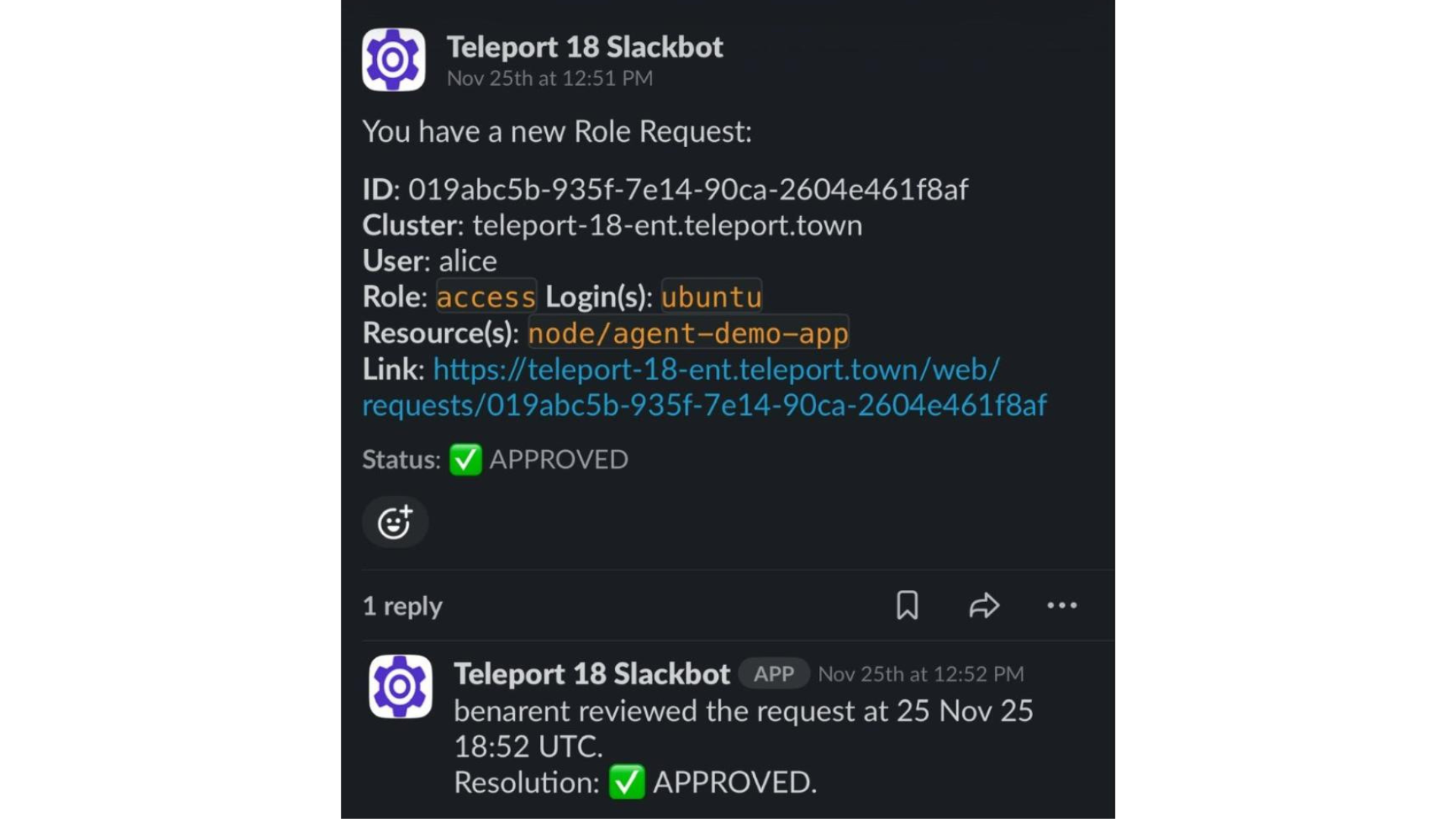
For organizations with mature approval workflows, Teleport integrates with external systems.
Access requests can trigger Slack notifications with approve/deny buttons, create PagerDuty incidents, send email alerts, or combine with ITSM tools like ServiceNow.
Example: Just-in-time MCP access to PostgreSQL
In a real-world scenario, a just-in-time request flow for MCP actions looks like this:
- A data scientist needs to run a one-time database migration that requires
executepermissions, which are generally denied to their role. - They run
tsh request create --resource /app/postgres-mcp --reason "quarterly data cleanup migration"to request access. - This creates an access request that routes to designated approvers (defined by another Teleport role).
- Approver(s) review the request context: who is requesting, what resource is being requested, and the stated business justification. They can then approve or deny the request.
- Upon approval, the user receives temporary elevated permissions for a configurable duration (typically 1-8 hours). They can now invoke the
executetool on the PostgreSQL MCP server. - When the time window expires, permissions are automatically revoked. No manual cleanup is required, and no escalated access remains, even if forgotten.
⚙️ Zero-Code Outcome #2: JIT permissions with full auditability
Teleport creates a human approval gate for dangerous operations without requiring changes to your MCP server or AI application code.
This provides the traceability needed to meet compliance requirements (including GDPR, HIPAA, SOC2, and ISO 27001) and simplify security investigations.
Protocol-Level Auditability & Human Oversight
One of the most dangerous aspects of AI agents is their speed and autonomy.
An AI assistant can query databases, modify files, and trigger APIs far faster and more frequently than any human. When things go right, this allows your users to make huge leaps in productivity. But when things go wrong, the impact can be even more catastrophic.
Preventing AI agent anonymity
AI autonomy must not also be anonymous. Teleport's MCP integration creates an immutable audit trail for every single agent action, capturing the full context needed to answer critical security questions like:
- Who authorized this action?
- What data was accessed?
- And most importantly, why did the agent take this action?
Capturing user identity and tool invocation details
Every MCP protocol interaction generates structured audit events logged to Teleport's audit system. These events capture:
- The user identity on whose behalf the agent acted, not just "AI service account".
- The specific MCP server and tool are invoked, and input parameters are sent to the tool.
- The response received, timestamp with millisecond precision, success or failure status.
- The reason for any authorization denial.
Unlike application logs that may be scattered across systems and easily tampered with, Teleport's audit trail is centralized, immutable, and stored in tamper-evident formats to meet various compliance requirements.
Example: Full query context and identity accountability
Consider this scenario: your AI assistant running in Claude Desktop queries your production PostgreSQL database for "Recent user activity."
The audit log shows that user “[email protected]” authenticated at 14:23:45 UTC, connected to MCP server postgres-prod, and invoked a tool query with parameter:
SELECT * FROM activity WHERE timestamp \u003e NOW() - INTERVAL '24 hours'", received 15,420 rows, completed successfully at 14:23:47 UTC
A later investigation reveals that this query exposed PII that should never have been accessible. This accountability is critical for both security investigations and compliance audits.
Recording denied requests and authorization failures
The audit trail also captures authorization denials.
{
  "cluster_name": "root", // Teleport cluster name.
  "code": "TDB00W", // Event code.
  "db_name": "test", // Database/schema name user attempted to connect to.
  "db_protocol": "postgres", // Database protocol.
  "db_service": "local", // Database service name.
  "db_uri": "localhost:5432", // Database server endpoint.
  "db_user": "superuser", // Database account name user attempted to log in as.
  "ei": 0, // Event index within the session.
  "error": "access to database denied", // Connection error.
  "event": "db.session.start", // Event name.
  "message": "access to database denied", // Detailed error message.
  "namespace": "default", // Event namespace, always "default".
  "server_id": "05ff66c9-a948-42f4-af0e-a1b6ba62561e", // Database Service host ID.
  "sid": "d18388e5-cc7c-4624-b22b-d36db60d0c50", // Unique database session ID.
  "success": false, // Indicates unsuccessful connection.
  "time": "2021-04-27T23:03:05.226Z", // Event timestamp.
  "uid": "507fe008-99a4-4247-8603-6ba03408d047", // Unique event ID.
  "user": "alice" // Teleport user name.
}
For example, when a junior developer's AI attempt to invoke drop_table is blocked by RBAC policies, an audit event is created that displays the attempted action and the reason for denial.
These denied access attempts are valuable security signals. Repeated denials might indicate:
- A compromised AI client;
- An overly aggressive agent attempting to exceed its boundaries; or,
- A user who simply needs training on proper tool usage.
This enables security teams to alert on patterns such as "Alice had 50 tool invocations denied in 10 minutes," which can help identify potential issues before they escalate.
Human-in-the-loop approvals with full context
Human-in-the-loop approval becomes operationally feasible through this architecture.
For truly sensitive operations, such as transferring money, modifying production access controls, or deleting customer data, you can configure workflows that require explicit human approval before the tool executes.
When the AI decides it needs to invoke a protected tool, the request pauses for approval rather than executing immediately. A human reviewer sees the full context (what tool, with what parameters, for what purpose) before making the authorization decision.
Storage, retention, and access controls for all audit data
Teleport's audit system supports multiple storage backends. You can configure tiered retention policies (including 90-day hot storage, 1-year warm storage, and 7-year cold archive) to meet regulatory requirements.
Role-based access controls (RBAC) ensure that only authorized personnel can view audit logs, with audit log access itself generating audit events (i.e., who viewed which logs at what time).
⚙️ Zero-Code Outcome #3: End-to-end accountability for every action
Instead of dead ends, the audit trail in Teleport provides a clear record of exactly what happened. The user's human identity is tied to every AI action, rather than a generic "AI-agent-user" service account.
This creates a transparent chain of accountability into:
- What actions did the AI suggest.
- Who the human reviewer was.
- Whether the human reviewer approved the action.
- If the action was executed, and if so, the result of the executed action.
Applying Teleport and MCP to Real-World Workflows
When you consider the reality of agent behavior, the practical impact of Teleport's MCP integration becomes clear. That’s because modern AI agents don't just answer questions; they orchestrate multi-step workflows across multiple systems, sometimes unpredictably.
An AI-powered incident response assistant might query Datadog for error metrics, read recent S3 logs, analyze code changes in GitHub, update a Jira ticket, and send notifications via Slack.
Each of these operations touches a different system, requires different permissions, and creates different security risks. Without Teleport, attribution and auditability depend on manual work to bridge these information gaps. This can create gaps in policy and enforcement, or if overcorrected, limit the utility of the AI tool itself.
Mapping agent actions to individual user permissions
Traditional approaches to this challenge require one of three options, each with its own set of drawbacks:
- Build custom authorization into each MCP server, requiring code changes, creating inconsistent policies, and increasing maintenance burden.
- Use service accounts with static credentials, resulting in excessive privileges, no user attribution, and limited auditability.
- Restrict the AI to read-only operations, which limits its utility.
Teleport enables a fourth option: allowing the agents to safely access multiple systems with permissions dynamically scoped to the human user's actual authority.
For example:
When Alice's AI assistant queries the database, it runs with Alice's database permissions.
When Bob queries the same database, it runs with Bob's permissions.
Meanwhile, the MCP server remains unchanged. Instead, differentiation occurs at the identity layer.
Using Machine ID to secure non-human identities
For machine workloads and automated systems, Teleport's Machine & Workload ID (tbot) extends this model beyond humans to include non-human identities.
A computerized data pipeline might utilize an AI agent to optimize query plans. This agent requires its own distinct identity, permissions, and audit trail, separate from those of any human user.
Machine ID issues short-lived identity certificates for workloads based on authentication from your existing systems. The AI agent running in your pipeline now:
- Authenticates as a machine identity.
- Receives appropriately scoped permissions.
- Has all actions audited with a clear machine identity context and attribution.
Make security an enabler of AI, not a blocker
This combination of centralized policy management, dynamic permission grants, and comprehensive audit trails enables security teams to grant AI access to workflows they would otherwise deny.
The alternative is shadow AI, where engineers use ChatGPT or Claude with copy-pasted data because the official tools are too locked down to use. This is far more dangerous.
When you can prove exactly what happened, implement least-privilege access controls without code changes, and automatically revoke time-bound permissions, the risk calculus of AI shifts in your favor.
Automatic MCP Security with Simple Configuration Steps
Getting started with Teleport's MCP integration requires minimal configuration.
Server-side setup
On the server side, you register MCP servers as Teleport application resources.
For an STDIO server, this looks like:
kind: app
version: v3
metadata:
  name: filesystem
  labels:
    env: dev
spec:
  uri: "mcp+stdio://"
  mcp:
    command: "npx"
    args: ["-y", "@modelcontextprotocol/server-filesystem", "/home/allowed"]
    run_as_host_user: "mcp-runner"
For an SSE server:
kind: app
version: v3
metadata:
  name: remote-db-mcp
spec:
  uri: "mcp+sse+https://db-mcp.company.com/mcp"
  mcp:
    rewrite:
      jwt_claims: roles-and-traits
      headers:
      - "Authorization: Bearer {{internal.jwt}}"
Apply with tctl create mcp-config.yaml, and the server becomes immediately available based on the label selectors.
Learn more about enrolling STDIO MCP servers and SSE MCP servers with Teleport.
Client-side setup
On the client side, users run tsh mcp config --all --client-config=claude, which automatically updates Claude Desktop's configuration to use Teleport for all MCP connections. Any MCP client can be used in place of Claude Desktop (e.g., Cursor, Windsurf, VS Code).
The modified config simply points to tsh mcp connect instead of direct server execution. That is the entire "code change" required on the client side.
When a user runs Claude Desktop after this configuration, they authenticate to Teleport once (via 'tsh login'), and then all MCP connections use that authenticated session. Their MCP tool invocations are authorized against their Teleport roles, their actions are audited with their identity attached, and their permissions automatically expire when their certificate expires (forcing re-authentication).
The user experience is virtually identical to that of a standard MCP; security occurs transparently.
Role configuration
Role configuration follows Teleport's existing RBAC patterns. If you already have roles defining database access, SSH server access, or Kubernetes cluster access, adding MCP access uses the same syntax and mental model.
You can start with the preset mcp-user role, which grants access to all servers and tools (convenient for initial testing). Then, progressively restrict access to specific servers, labels, and tools as you become more familiar with usage patterns.
The deny-by-default posture means that adding a new MCP server doesn't automatically expose new capabilities; you must explicitly allow new tools in roles.
Production deployment considerations
For production deployments, configure Application Services with label selectors to automatically discover and proxy MCP servers. One Application Service might handle env: prod servers, another handles env: dev, providing workload isolation.
High availability is built in; multiple Application Services can proxy the same MCP servers with automatic failover.
Certificate rotation is automatic when user certificates near expiration. Teleport prompts for re-authentication without disrupting active MCP sessions (tool calls will fail until re-authentication, but connections don't need to be restarted).
Make Your AI Infrastructure Secure by Default: Present and Future
The strategic shift Teleport's MCP integration represents is treating AI agents as infrastructure identities rather than black-box applications. Just as you wouldn't give an intern permanent root access to production servers, you shouldn't give AI agents unrestricted access to your data and systems.
Yet that's precisely what happens with most MCP implementations: tools are exposed via static API tokens with all-or-nothing permissions, authorization decisions are hardcoded into application logic, and audit trails (if they exist) don't capture the human user's actual identity.
With Teleport as an MCP gateway, organizations gain infrastructure-grade security controls for AI workflows, including:
- Role-based access control that scopes permissions to actual needs.
- Just-in-time workflows for temporary elevated access with human approval.
- Comprehensive audit trails that capture who, what, when, where, why, and how for every agent action.
- Identity propagation that ensures AI actions are attributed to the human user rather than a generic service account.
All of which happens without modifying your MCP servers or substantially changing your MCP clients. Security becomes a deployment-time configuration concern rather than a development-time code concern.
The impact on security teams
Enforceable policies rather than wishful, ad hoc engineering.
When you instruct an LLM "not to access customer data," it’s merely a suggestion. When you configure Teleport roles that cannot access tools that access customer data, that is actual enforcement.
The impact on engineering teams
Velocity without compromise.
Developers receive powerful AI assistants with production access; however, this access is time-bound, requires justification, and is automatically revoked upon completion.
The impact on compliance teams
Audit trails that satisfy regulatory requirements.
Logs provide proof of what happened with immutable, timestamped, and identity-attributed records.
Teleport's transparent, protocol-level security and centralized policy management scale in ways that alternatives cannot.
Conclusion
The promise of zero-code AI security is real.
With Teleport’s protocol-level access control, securing AI agent infrastructure no longer requires choosing between utility and control. Instead:
- Your AI agents and assistants operate within explicit security boundaries.
- Your existing MCP servers, whether they are from Docker Hub, npm packages, or custom implementations, can run unmodified.
- Your MCP clients (Claude Desktop, Cursor, VS Code) require only a configuration change to point to
tsh mcp connect.
For organizations deploying AI agents in production, this architecture provides a foundation for safe, scalable agent workflows. Teleport secures infrastructure with proper authentication, authorization, least-privilege access, and consistent zero trust principles, whether the entity requesting access is a human engineer or an AI agent.
The future of infrastructure access isn't choosing between humans and AI; it's about unifying them under a single, trusted identity layer.
Secure your path to AI agent infrastructure with Teleport.
More Resources
- Read: Best Practices for Secretless Engineering Automation
- Read: 4 Ways to Secure Bedrock Agent-Initiated Actions
- Read: Putting an “S” in MCP: Delivering Identity to Agentic AI Implementations Securely
- Read: Securing Identity in the Age of AI: A Buyer’s Guide to Teleport
- Read: Securing Model Context Protocol (MCP) with Teleport and AWS
- Learn: MCP Access Getting Started Guide
- Learn: How to Configure MCP Access Controls
Table Of Contents
- How the Model Context Protocol Impacts AI Security
- Teleport Makes MCP Security Automatic
- Least Privileged Access Control (Without Writing New Code)
- Just-in-Time Access for High-Risk Tools
- Protocol-Level Auditability & Human Oversight
- Applying Teleport and MCP to Real-World Workflows
- Automatic MCP Security with Simple Configuration Steps
- Make Your AI Infrastructure Secure by Default: Present and Future
- Conclusion
- More Resources
Teleport Newsletter
Stay up-to-date with the newest Teleport releases by subscribing to our monthly updates.
Tags
Tags
Teleport Newsletter
Stay up-to-date with the newest Teleport releases by subscribing to our monthly updates.