How to Eliminate Shared Database Passwords: MySQL, PostgreSQL, and More
Traditionally, engineers have relied on shared database passwords. When someone needs to run a query, they either already have standing access granted via a static credential everyone on the team knows, or someone has to scramble to create a quick workaround. Every new user, exception rule, or port forward through a bastion host becomes a “just this once” fix.
But as teams and infrastructure scales, those “one time” fixes can grow into larger problems. For example, a shared database username can make it impossible to attribute actions to an individual identity. When it comes time for incident review or a compliance audit, logs may tell you something happened in that database, but not who is responsible. And as AI agents join your infrastructure and start touching production data, understanding which human or agent can reach your databases has never been more urgent.
Read this guide to learn:
- How short-lived database privileges eliminate static credentials
- How to use Teleport to access MySQL, PostgreSQL, and other databases using short-lived certificates
- How to configure database roles and require hardware key approval for write access
- What query-level attribution looks like in Teleport's audit log
How short-lived database privileges eliminate static credentials
These challenges stem from static credentials or network location. While a password grants access to whoever holds it and a VPN provides access to whatever sits behind it, neither answers what user or machine is actually connecting, what they are permitted to do, or when their privileges should expire.
Cryptographic identity solves these challenges by attaching task-based privileges to the requesting identity (drawn from your IdP) rather than a secret or IP range. Permissions follow that identity, apply only while the role does, and tie every action back to the person or workload responsible. The sections that follow walk through how Teleport establishes this identity, enforces policy against it, and records what each identity does once connected to a MySQL, PostgreSQL, or other critical databases.
How Teleport database access works
With Teleport, every database connection uses a short-lived X.509 certificate with the user's cryptographic identity encoded in it, so there are no shared passwords or standing privileges. Instead, task-based, short-lived permissions are granted via SSO identity and expire when the certificate does. Every action and query is attributed to that identity in the audit log, whether it was performed by a human, machine, or AI agent.
From the user's perspective, the flow is simple: authenticate using verified identity instead of shared secrets and Teleport handles the secure path to the database via reverse tunnels.
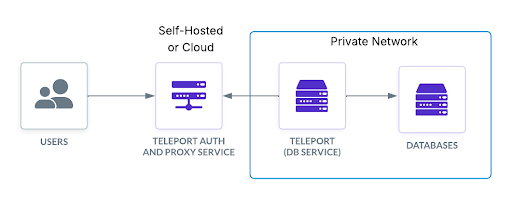
Database enrollment
Enrolling database resources with Teleport can be either automatic or manual. You can configure IAM-based trust with cloud providers like AWS, GCP, and Azure, and Teleport can automatically discover new databases as they come online. For self-hosted databases, Teleport uses client certificate authentication.
Role-based policies in Teleport map directly to your IdP so that permissions reflect each user's current organizational role, not a static assignment someone made months ago. Administrators can grant read-only or read/write permissions, or configure Teleport to dynamically provision database users as needed. Every query is attributed to a cryptographic identity in the audit log regardless of the underlying database username, ensuring there is always a traceable record of who ran what and when.
Connecting via CLI
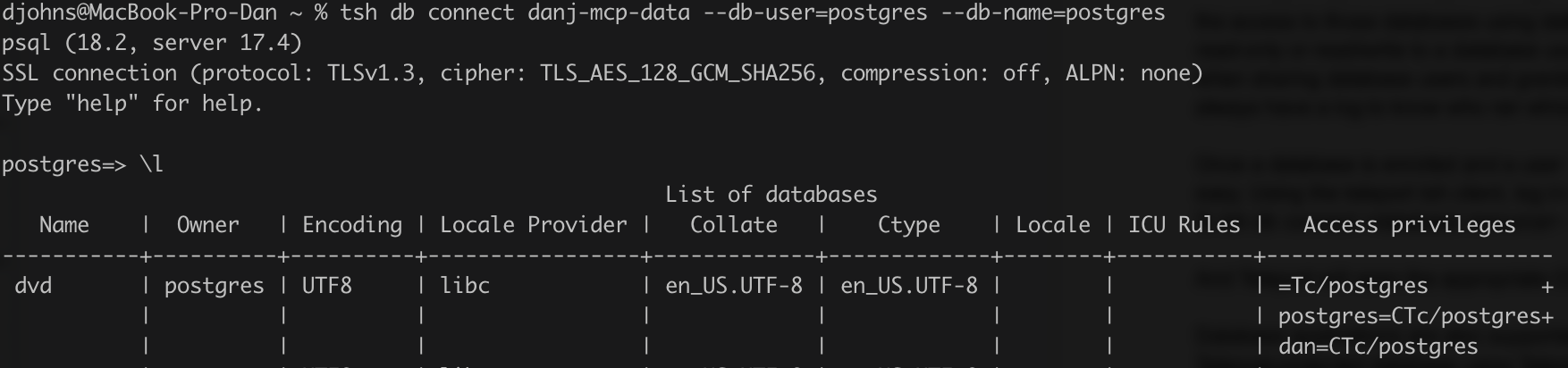
After a database is enrolled and a user's role includes database permissions, connecting via CLI is easy using the tsh client, Teleport’s primary command-line interface. Using tsh, simply log in and run:
% tsh db connect <database resource> --db-user=<user> --db-name=<database name>
In this example, Teleport opens the appropriate CLI client (psql for PostgreSQL, mysql for MySQL, etc.) as if you had connected directly.
Connecting via GUI
In addition to the CLI, you can also use GUI tools to connect to database resources. Teleport Connect, which provides easy and secure access to SSH servers, databases, applications, MCP servers, and Kubernetes clusters, allows you to authenticate once and open a local port that any database client can connect to. Most GUI clients — like PGAdmin, DBeaver, MongoDB Compass, and others — can all connect via localhost on an assigned tunnel port. This allows you to retain your existing database tools and workflows while eliminating the need for shared credentials and VPNs, and ensures every action taken is attributed to a cryptographic identity in the audit log.
For example, Teleport Connect allows you to log into Teleport and set a local port listener for PGAdmin to connect to.
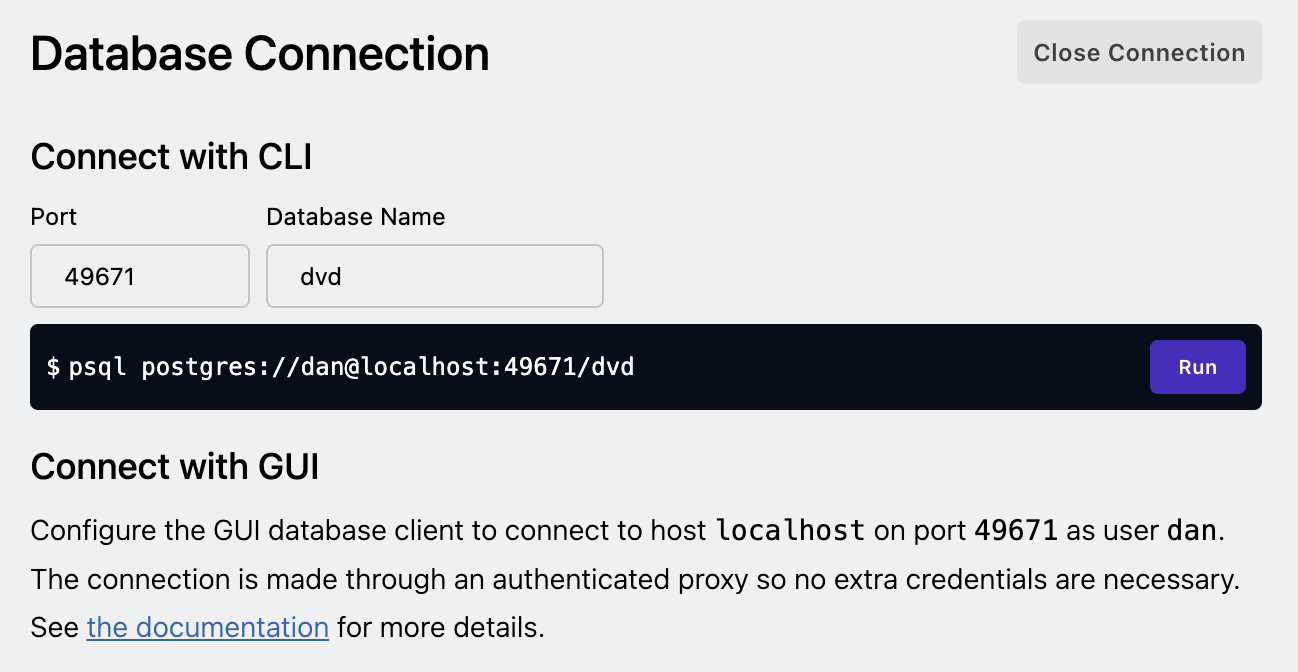
Configuring Teleport Connect to open a local port.
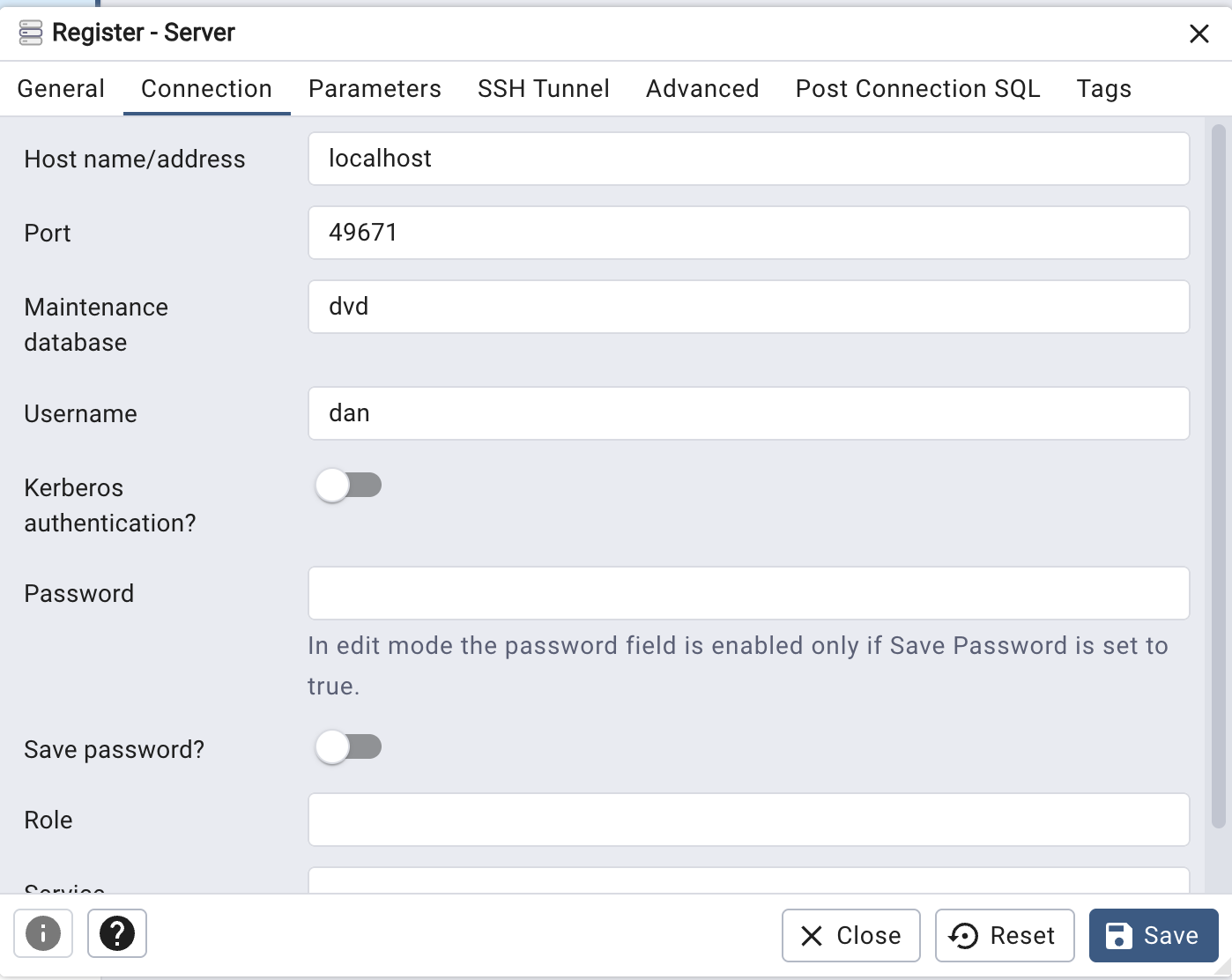
Using the local port to connect to PGAdmin.
Teleport roles as database policy
Teleport roles define what each identity can do in a database, including which users they can connect as, which databases they can reach, and with what permissions. Roles map directly to your SSO provider, so policy follows the user's organizational attributes: team, group, or manager. When someone changes roles or leaves, privileges update automatically.
Here's an example Teleport role that grants read-only access to a PostgreSQL database with dynamic user creation, creating a user called “analyst” with SELECT permissions:
kind: role
version: v7
metadata:
  name: db-analyst
spec:
  allow:
    db_labels:
      env: production
    db_names:
      - analytics
    db_users:
      - analyst
    db_permissions:
      - match:
          object_kind: table
        permissions:
          - SELECT
  options:
    create_db_user_mode: keep
The role defined here is inherited based on the user’s group; there is no credential handoff or shared password. This ensures that the user gets in and does their work, but if they leave the analyst team, the role no longer applies and they can no longer reach the database with this policy. This is especially useful for teams with many databases or environments where people shouldn't have standing privileges.
Hardware key enforcement for database roles
In sensitive databases, read access should be gated separately from write access. The security requirements should always be higher for roles able to write to a database, and especially so with the rise of AI agents.
Teleport allows you to require per-session multi-factor authentication (MFA) for specific roles, meaning a user must re-authenticate with a hardware key or biometric (like Touch ID on a Mac) before the session is opened. As an example, here’s a role that grants read-write access, but requires Touch ID re-authentication for every session:
kind: role
version: v7
metadata:
  name: db-engineer
spec:
  allow:
    db_labels:
      env: production
    db_names:
      - analytics
    db_users:
      - engineer
    db_permissions:
      - match:
          object_kind: table
        permissions:
          - SELECT
          - INSERT
          - UPDATE
          - DELETE
  options:
    create_db_user_mode: keep
    require_session_mfa: hardware_key_touch
When a user with this role runs tsh db connect, Teleport prompts for a physical tap on a hardware security key before opening the database session.
This also applies to AI agents as well as human users. While agents may be configured to query databases, write access — the kind that can modify, delete, or exfiltrate data — is gated behind a role that requires a human to physically approve it. For example, a user with Claude Code on their desktop would have to manually approve a task requiring write access using biometrics. This ensures agents can't escalate their own privileges or proceed without a human in the loop. And even if an agent discovers an embedded credential, is given broader instructions, or is prompt injected, it is unable to act beyond what the role permits.
Database session recording with identity attribution
While access controls tell you who should be in your databases, the audit log tells you what they actually did. Teleport captures a complete, tamper-resistant audit trail for every query issued, against which database, by which identity, and when, all attributed to a cryptographic identity in the audit log, not just the database user they connected as.
Here's what a typical audit event looks like for a read query:
{
  "event": "db.session.query",
  "uid": "a3c2e891-4f12-4b56-8932-1234abcd5678",
  "code": "TDB03I",
  "time": "2026-05-20T14:32:11.204Z",
  "cluster_name": "teleport.example.com",
  "db_service": "postgres-prod",
  "db_name": "analytics",
  "db_user": "analyst",
  "teleport_user": "[email protected]",
  "db_query": "SELECT order_id, total FROM orders WHERE customer_id = 42",
  "success": true
}
The teleport_user field is the person, workload, or AI agent responsible for the query, not just the database user. This ensures that even if multiple people share the same database username, you will always know who actually ran the query. The audit log is stored in Teleport's backend and can be streamed to your SIEM of choice — including Splunk, Datadog, Elastic, and others— or an S3 bucket for long-term retention.
Explore the audit event reference documentation for more examples of Teleport database audit events, along with examples from MCP, Kubernetes, and other sessions.
Why databases need unified infrastructure identity
The shared password era is over. Not because compliance requires it, but because your infrastructure, and the AI agents now running inside it, demand something more accountable.
Teleport establishes a unified identity layer across your databases, servers, Kubernetes clusters, and cloud consoles that establishes cryptographic identity, short-lived certificates, zero standing privileges, and a complete audit trail for every resource, every identity, human or machine. This means that your engineers still use psql, pgAdmin, or whatever client they prefer, databases don't need to move to a DMZ or require a VPN hop, and agents operate without standing privileges to production data.
Learn more about Teleport for database access.
How Turo eliminates static database credentials with Teleport
Read this case study to learn how Turo, the world’s largest peer-to-peer car-sharing marketplace, uses Teleport to:
- Eliminate static database credentials and standing privileges
- Automate policy enforcement across Amazon RDS, EKS, and more
- Give engineers fast, frictionless access to the databases they need
Table Of Contents
Teleport Newsletter
Stay up-to-date with the newest Teleport releases by subscribing to our monthly updates.
Tags
Tags
Teleport Newsletter
Stay up-to-date with the newest Teleport releases by subscribing to our monthly updates.
Related Articles
Make PostgreSQL Access Easier and More Secure with Teleport
Learn how to simplify and secure PostgreSQL access with unified, just-in-time access across clouds and data centers that keeps your engineers moving at lightning speed.
Access AWS RDS Databases in EKS Using Teleport Machine ID Without Passwords
Discover how to secure database access in Kubernetes workloads. Eliminate secrets, keep databases in private networks, and improve audit logging with Teleport.
How Database Access Controls Evolved to Meet Modern Security Needs
Discover how Teleport's Database Access Controls—including object-level permissions and Identity Security integration—offer enhanced security and usability.