SSH Tunneling Explained
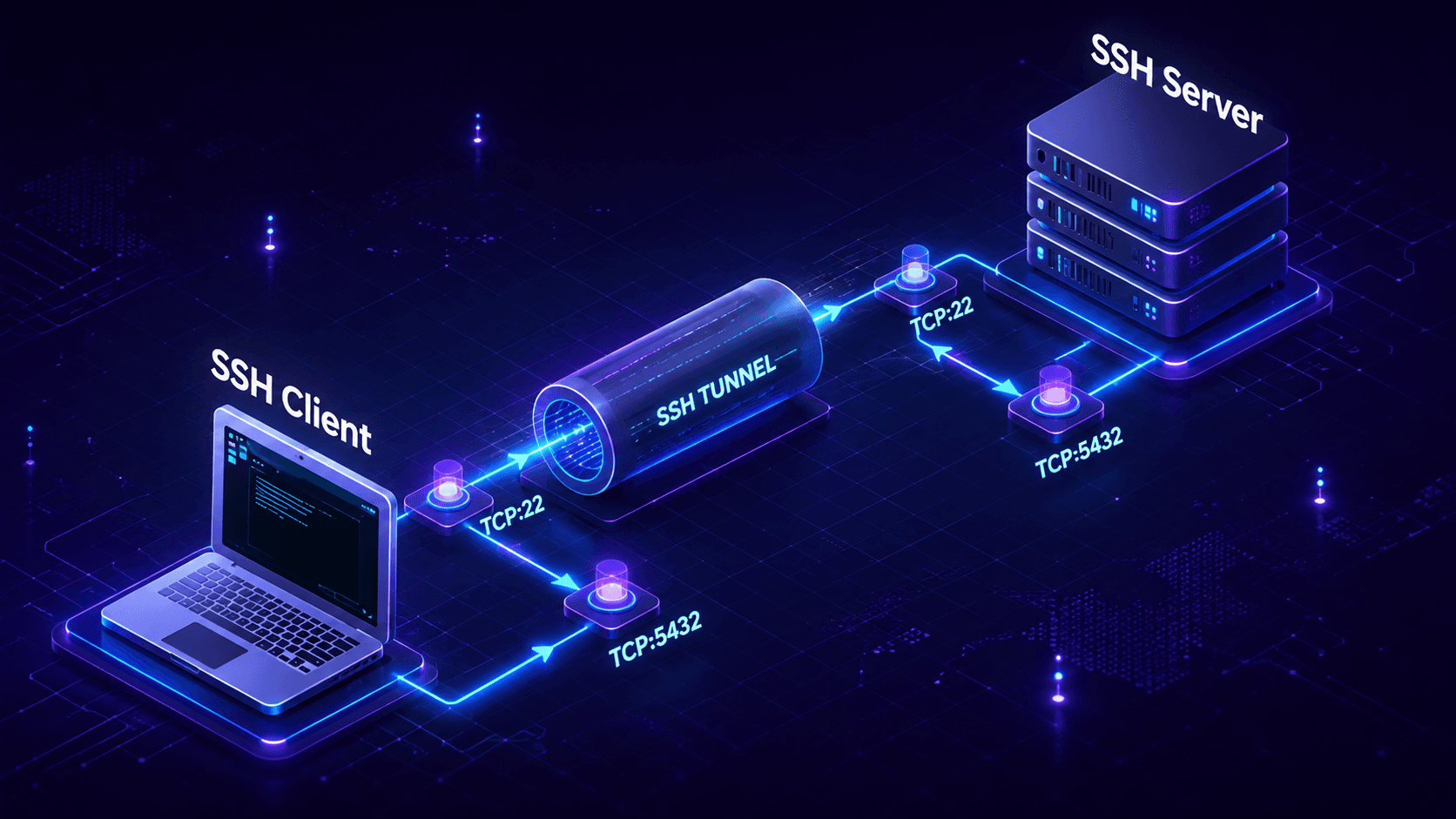
Table Of Contents
- Listen to this blog post.
- What is SSH tunneling?
- How does the SSH tunnel work?
- Local port forwarding
- Remote port forwarding (reverse tunneling)
- Dynamic port forwarding
- SSH TUN/TAP tunneling
- Bonus: SSH tunnel over TOR
- Security concerns of SSH tunneling
- SSH tunneling at scale: From forwarding ports to identity-based access
- Frequently asked questions
An SSH tunnel is an encrypted connection created by the Secure Shell (SSH) protocol that carries other network traffic inside it, letting you reach a service you could not connect to directly.
Although the typical use case of SSH is to access a remote server securely, you can also transfer files, forward local and remote ports, mount remote directories, redirect GUI, or even proxy arbitrary traffic (need I say SSH is awesome?). All of this is just a small set of what's possible with SSH.
This post covers the different tunneling features supported by OpenSSH, the most widely used open-source SSH server, which comes pre-installed on the vast majority of Linux distributions. Each forwarding type comes with a copy-ready command and clear instructions on when each command should be used. We will also demonstrate the security and scalability trade-offs associated with manual SSH tunneling.
Listen to this blog post.
What is SSH tunneling?
SSH tunneling is a method to transport additional data streams within an existing, encrypted SSH session. SSH was built to give you a secure remote shell on another machine, but the protocol can multiplex more than your terminal over that one connection. Tunneling, also called port forwarding, takes a port on one machine and maps it across the encrypted link to a host and port reachable from the other side.
With an SSH tunnel, traffic that would normally travel in the clear, or that could not cross a firewall or a NAT (Network Address Translation) boundary at all, instead travels encrypted inside the SSH connection and emerges on the other side as if it originated there. This provides a secure method for accessing remote web services without exposing a port on the internet, reaching a server behind NAT, or exposing a local port to the internet, and without changing the application sending the traffic.
An SSH tunnel wraps another connection inside an encrypted SSH session so it can travel securely and reach a host it otherwise could not.
How does the SSH tunnel work?
When you connect to a server using SSH, you receive the server's shell. Under the hood, your SSH client creates an encrypted session between the client and the SSH server, and the data transported within that session can be of any type. During shell access, the transported data is binary streams, which describe the pseudo-terminal and the ASCII characters of your commands. During port forwarding, transportedthis data is a binary stream of whatever protocol you are tunneling over SSH (for example, SQL over SSH).
Here is the flow for a forwarded connection. First, your SSH client listens on a local port. When an application connects to that port, the client then wraps the bytes, sends them through the encrypted SSH channel to the SSH server, and the server opens a plain connection onward to the real destination and relays the response back. The application at either end never knows it is talking through a tunnel. It just sees an open socket.
Two factors establish this connection as trustworthy. The session is encrypted with keys derived during the handshake, and the server (and often the client) is authenticated with cryptographic keys rather than a reusable password. The security of that encrypted session depends in part on which SSH key algorithm you use; see our comparison of SSH key types to learn the differences between RSA, ECDSA, and Ed25519, and how the SSH handshake works for what happens before any data is forwarded.

SSH tunneling is just a way to transport arbitrary data with a dedicated data stream (tunnel) inside an existing SSH session. This can be achieved with local port forwarding, remote port forwarding, dynamic port forwarding, or by creating a TUN/TAP tunnel. Each is selected with a single flag (-L, -R, or -D), and the one you pick depends on which side initiates the connection and which side can reach the destination.
Local port forwarding
Local port forwarding reaches a service you cannot connect to directly, usually because it sits behind a firewall. OpenSSH creates a separate tunnel inside the SSH connection that forwards traffic from a local port to the remote server's port, using the -L flag. Internally, SSH allocates a socket listener on the client on the given port; when a connection is made to it, the connection is forwarded over the existing SSH channel to the remote server's port. Local port forwarding is one method used to secure an insecure protocol or to make a remote service appear local.
When to use local port forwarding?
Accessing insecure protocol
If a service running on a remote server does not natively support an encrypted transport, local port forwarding can carry it inside an encrypted SSH session so the traffic is protected in transit.
Secure access to remote service
For security reasons it is good to bind services only to the local interface rather than a public one. Local port forwarding is how a user reaches such a service from outside. Consider a PostgreSQL database on a remote server that listens only on the remote loopback (127.0.0.1:5432) and accepts no outside connections. The client cannot connect directly but can reach the server over SSH, so it commands SSH to forward its local port 5432 to the server's local 5432. When a program such as pgAdmin connects to port 5432 on the client, SSH forwards the connection to PostgreSQL on the remote machine.
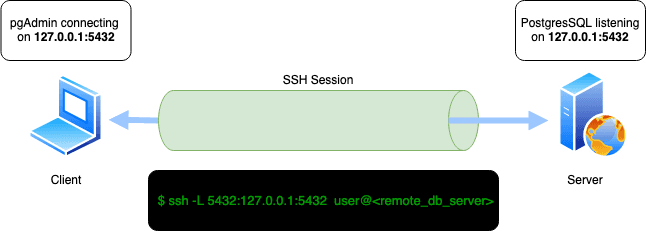
The command for the depicted scenario is:
bash $ ssh -L 5432:127.0.0.1:5432 user@<remote_db_server>
There is no limit on how many ports you forward. Below, SSH forwards two local ports, 3338 and 3339, to the same remote ports:
bash $ ssh -L 3338:localhost:3338 -L 3339:localhost:3339 user@<remote_server>
By default an interactive session is created when you forward a port. To prevent it, add -N, which tells SSH not to execute a remote command (pair it with -f to drop to the background):
bash $ ssh -N -L 3339:localhost:3339 user@<remote_server>
Remote port forwarding (reverse tunneling)
Often called SSH reverse tunneling, remote port forwarding redirects a port on the remote server back to a port on the localhost where the SSH connection started. The client first connects to the server with SSH. SSH then creates a tunnel inside that session that redirects incoming traffic on the remote port back to the local machine. This is achieved with the -R flag: SSH allocates a socket listener on the remote server, and connections to it are forwarded over the existing channel to the client's port. This is how you expose a local service that sits behind NAT or a firewall with no inbound path.
When to use remote port forwarding?
Exposing a service behind NAT to the internet
Suppose the client runs a web server on port 3000 but cannot expose it publicly because the machine is behind NAT. However, the remote server is reachable on the internet and the client can SSH into it. Via a reverse tunnel, the client can publish the local web server through the remote host.
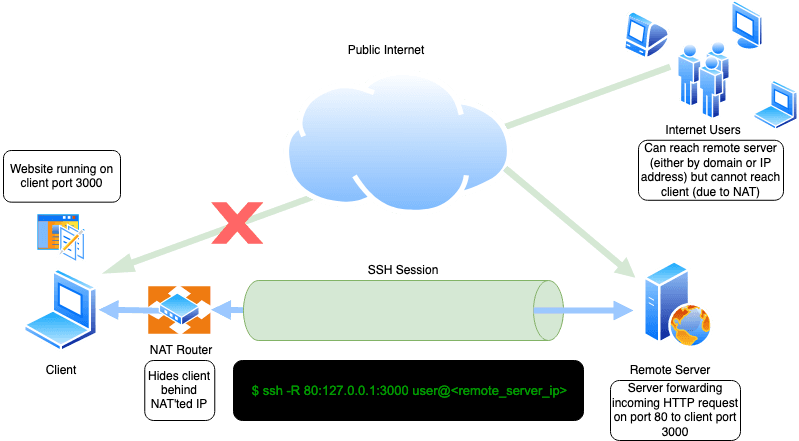
This is accomplished in a few steps:
- Run a web server on the client's
localhostport3000. - Configure the reverse tunnel:
bash $ ssh -R 80:127.0.0.1:3000 user@<remote_server_ip>
- When users on the internet visit port
80of the remote server (http://<remote_server_ip>), the request is redirected back through the tunnel to the client's local server on port3000, which handles the request and response.
By default, the reverse tunnel binds only to the remote server's loopback. To let it listen on the public interface, set GatewayPorts yes in the server's sshd_config.
Alternative to local port forwarding
Local port forwarding does not work if inbound SSH to the remote server is disabled. For example, administrators may choose to block inbound SSH entirely, but allow outbound SSH connections. In this case, remote port forwarding creates an outbound connection and still lets clients reach the local port even though inbound connections are blocked.
Dynamic port forwarding
Both local and remote port forwarding require defining specific ports. But what if the destination is unknown beforehand, or you want to relay traffic to arbitrary hosts?
Dynamic port forwarding (the -D flag), also known as dynamic tunneling or an SSH SOCKS5 proxy, specifies a connect port that forwards every incoming connection to the remote server dynamically. Dynamic port forwarding turns your SSH client into a SOCKS (Socket Secure) proxy server, with SOCKS being an old but widely used protocol for programs to request outbound connections through a proxy.
When to use dynamic port forwarding?
Bypassing content filters
By tunneling traffic inside SSH, you can reach services such as HTTP web pages that may be blocked by an ISP or organization. Because a SOCKS5 proxy can carry any protocol, you can tunnel HTTP inside SSH.
Suppose the client cannot reach certain pages because of a content filter at the firewall, but can SSH to a remote server with unrestricted internet access. The client can open an SSH connection with dynamic port forwarding in order to create a SOCKS5 proxy, and can point the browser at the proxy on local port 6000 in order to reach the restricted pages.
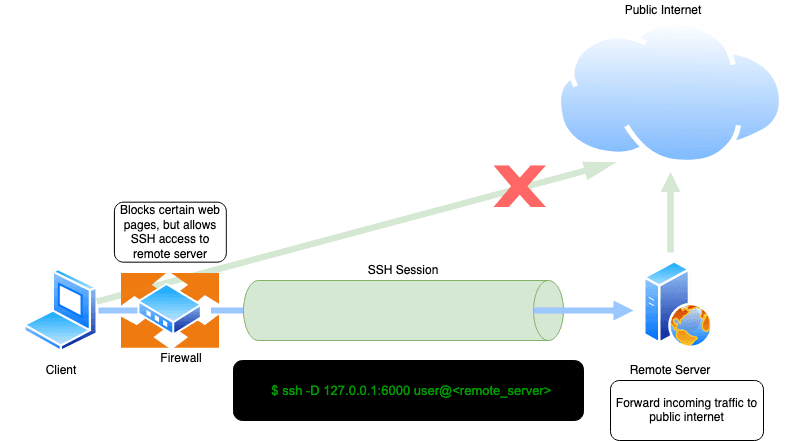
The command for this scenario appears as:
bash $ ssh -D 127.0.0.1:6000 user@<remote_server>
SSH TUN/TAP tunneling
SSH also supports tunnel device forwarding, known as TUN/TAP. TUN (network layer) and TAP (link layer) are virtual network interfaces used to create a point-to-point tunnel between two servers. This tunnel establishes a rudimentary VPN that carries full IP packets rather than only forwarded ports, which enables routing, ICMP, and non-TCP protocols to pass.
To establish a working SSH-forwarded TUN/TAP tunnel, you first add a tun device and configure routing between the two servers, which requires root on both sides and PermitTunnel yes in the server's sshd_config.
The format is -w local_tun[:remote_tun], and the command appears as:
bash $ ssh -w 0:0 root@<vpn-host>
Refer to the OpenSSH Cookbook ad-hoc VPN guide for a complete setup. TUN/TAP is more challenging to set up than port forwarding and is rarely the most convenient tool, but exists as an option when a layer-3 tunnel over SSH becomes necessary.
Bonus: SSH tunnel over TOR
So far, we have discussed how SSH tunnels other traffic inside an SSH session. But SSH itself can be tunneled over other protocols such as SOCKS.
TOR is a popular anonymity network that supports tunneling any protocol over its SOCKS5 proxy. SSH already provides a secure, encrypted channel, so if you require additional anonymity (concealing the origin of the SSH session), you can relay the SSH connection over TOR with torsocks:
bash $ torsocks ssh user@<remote_server>
You can also use netcat:
bash $ ssh -o ProxyCommand="nc -X 5 -x localhost:9050 %h %p" user@<remote_server>
ProxyCommand and its modern counterpart ProxyJump (-J) are also each useful for chaining SSH connections through intermediary hosts. See our guide to SSH ProxyJump and ProxyCommand for the differences and how they are used. The intermediary host is often a bastion host, the single audited entry point into a private network.
Security concerns of SSH tunneling
Because SSH tunnels are encrypted and authenticated, the data inside a tunnel is protected in transit. However, this also means that SSH tunnels can be misused, including to hide .malicious traffic in order to travel undetected inside a network. Real campaigns have done exactly this, from Android malware using SSH tunnels to reach corporate networks to the Fox Kitten espionage campaign.
There are three security risks that are important to highlight.
- Exposed ports: These can include reverse tunnels with GatewayPorts enabled or a forwarded port left running, which can publish an internal service to a wider network than originally intended.
- Tunnels as a path for an attacker: Because tunnel traffic is encrypted and appears as ordinary SSH traffic, a tunnel is a convenient channel for an attacker who already has a foothold to exfiltrate data or pivot deeper into the network without being detected by network monitoring.
- Persistence and sprawl: When tunnels outlast the task they were created for, and nobody remembers they are open, they become a persistent security risk. Over time, the amount of open tunnels can accrue dramatically as an organization's infrastructure expands.
Because SSH is encrypted and you cannot see what is transported underneath, detecting SSH tunnel misuse is challenging. The most effective defensive posture is to restrict forwarding on the server (AllowTcpForwarding, PermitOpen, GatewayPorts) to only what is needed, prefer key-based authentication over passwords, run continuous traffic analysis to flag patterns that do not match expected SSH use, and treat any long-lived tunnel as something to be tracked and torn down. Port 22 hygiene matters here, too; our guide on port 22 and forwarding security explains this in more detail.
SSH tunnels encrypt traffic, but an open or forgotten tunnel can expose internal services and give an attacker an encrypted path to move data. Limit forwarding to what you need and tear tunnels down.
SSH tunneling at scale: From forwarding ports to identity-based access
Because tunnels are created per-session and per-engineer, each one must be set up by hand and closed (or not) when that task ends. There is no shared record of who opened which tunnel, to what, or whether the tunnel is still active.
That creates three gaps that get worse as a team or a fleet grows:
- Auditing: Once traffic is inside the encrypted session, you cannot see what crossed it, and you certainly cannot reconstruct who reached which database during an audit or compliance review.
- Revocation: If access depends on static SSH keys or shared bastion credentials, removing one person's access across every host they could reach is slow and error-prone.
- Scale: Bastions and VPNs grant broad network reach, granting more access than what the task at hand requires. This broad standing access is exactly what an attacker inherits with one stolen credential.
The fix is to stop forwarding ports by hand and make identity the basis of access. Rather than building tunnels, bastions, and VPNs, Teleport issues a short-lived, cryptographic certificate scoped to a specific identity and role. This ensures engineers can connect to only the exact resource they are authorized for, every session is recorded to an immutable audit log, and there are no SSH keys or tunnels left behind to steal or forget. The same model extends to machines, workloads, and AI agents, ensuring that service-to-service and CI/CD traffic receives the same short-lived, certificate-based identity instead of a shared key in a config file.
Manual SSH tunneling vs Teleport
| Manual SSH tunneling + bastion | Teleport | |
|---|---|---|
| Setup | Requires manual configuration per-session and per-engineer | Connect to the resource directly; access is governed centrally by role and policy |
| Audit | Encrypted traffic is not visible, leaving no record of what crossed the tunnel | Immutable audit log and session recordings for every connection |
| Revocation | Must manually revoke static keys or shared credentials host by host | Automatic; access expires with the short-lived certificate |
| Secrets | Must manage static SSH keys and shared bastion credentials to manage | Short-lived certificates leaving no static keys or standing privileges |
| Access | Broad network access once on the network | Least-privileged, just-in-time access to specific resources |
Frequently asked questions
Is an SSH tunnel secure?
What is the difference between local and remote port forwarding?
-L) opens a port on your machine and forwards connections out to a destination the SSH server can reach, so you can reach in. Remote forwarding (-R) opens a port on the SSH server and forwards connections back to a destination your client can reach, so something outside can reach in. The difference is which side initiates and which side can see the destination.What is a reverse SSH tunnel?
-R). It exposes a local service through an SSH server, which is how you reach a machine behind NAT or a firewall that has no inbound path. Connections to the chosen port on the server are forwarded back to your local service.What is dynamic port forwarding?
-D) turns your SSH client into a SOCKS5 proxy. Instead of forwarding one fixed destination, it forwards arbitrary traffic to any host the SSH server can reach, which is useful for browsing through a remote network or reaching many internal hosts through one hop.Is SSH tunneling the same as a VPN?
How do I close an SSH tunnel?
exit or Ctrl-D). For a backgrounded tunnel started with -f, find the process with ps aux | grep ssh and stop it with kill <pid>. You can also use SSH's escape sequence (~.) in an interactive session to drop the connection.
Sakshyam Shah
Sakshyam is a cybersecurity architect with experience building offensive and defensive solutions for businesses and teams. Before joining Teleport as a Developer Relations Engineer focused on educating the engineering community about the principles of secure infrastructure access techniques, he was the founder and CEO of the cybersecurity company Seknox.
Table Of Contents
- Listen to this blog post.
- What is SSH tunneling?
- How does the SSH tunnel work?
- Local port forwarding
- Remote port forwarding (reverse tunneling)
- Dynamic port forwarding
- SSH TUN/TAP tunneling
- Bonus: SSH tunnel over TOR
- Security concerns of SSH tunneling
- SSH tunneling at scale: From forwarding ports to identity-based access
- Frequently asked questions
Teleport Newsletter
Stay up-to-date with the newest Teleport releases by subscribing to our monthly updates.
Tags
Tags
Teleport Newsletter
Stay up-to-date with the newest Teleport releases by subscribing to our monthly updates.
Related Articles

SSH ProxyJump and ProxyCommand: How to Use Jump Hosts
Use SSH ProxyJump and ProxyCommand to reach private hosts through a jump host. Copy-paste config for single and multi-hop jumps, plus what replaces bastions at scale.
SSH Port 22: Custom Ports, Port Forwarding Security, and Production SSH Hardening
Learn about SSH port 22, its limitations, port forwarding security, and how to harden production SSH.
Setting Up an SSH Bastion Host
In this blog post, we’ll go over the installation and configuration of SSH bastion hosts using two open source products.