3 VNet Use Cases to Simplify Internal Access (Without VPNs)
VPNs have their time and place. But at Teleport, we don’t think accessing internal engineering resources is one of them. VPNs create friction, slow down development workflows, and often become security bottlenecks. That's where VNet comes in.
Teleport VNet was designed to give engineers a secure way to access internal applications without VPNs or port forwarding. Instead, VNet works by routing traffic through a virtual IP network, enabling direct CLI and dev tool access to private infrastructure with much fewer steps and better security.
In this blog, we'll explore three real world use cases to demonstrate how Teleport VNet simplifies access to internal APIs, private registries, and supports custom DNS for smooth VPN migrations. But first, a quick introduction to VNet, starting with the basics.
What is Teleport VNet?
VNet provides secure access to internal TCP-based applications and services using familiar developer tools like cURL, Docker, or Git clients.
VNet eliminates the need for legacy VPNs and manual tunnels by setting up a local virtual IP subnet with DNS routing. This means engineers can directly connect to internal tools or APIs, container registries, and dev environments as if they were on the same local network.
VNet also supports custom DNS zones, which we'll expand on further into the blog.
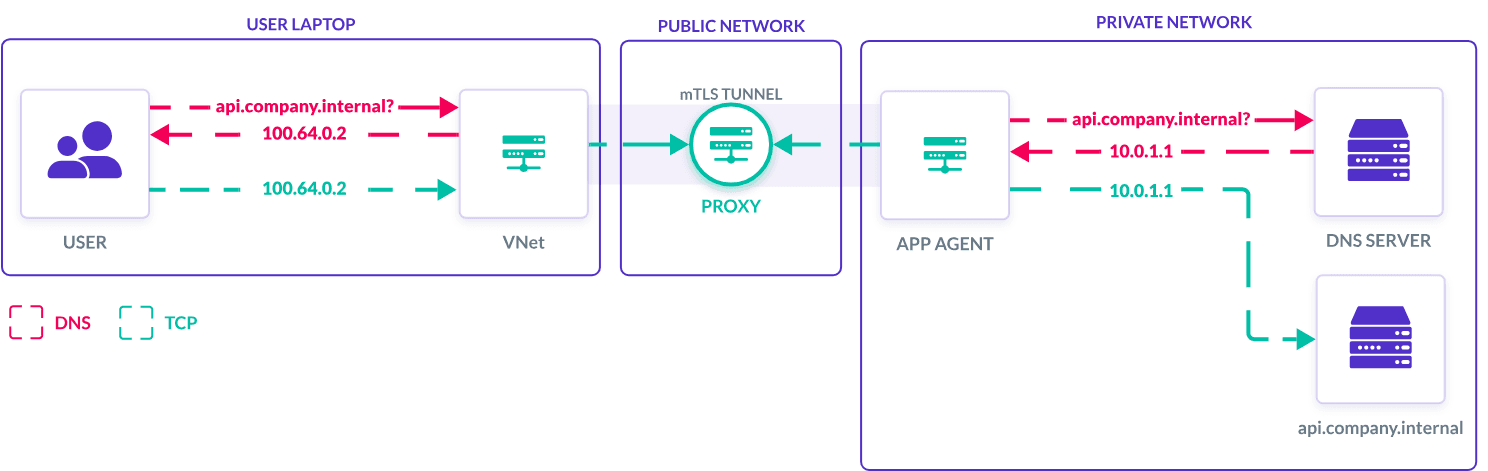
How VNet connects users to internal tools and resources.
For security teams, VNet applies Teleport’s access controls by using the user’s authenticated identity and assigned roles to determine which TCP applications they can access. Role-based access control (RBAC) policies, label-based permissions, and session restrictions are all validated before proxying any connection. This provides greater control and visibility over access sessions than the IP address-based tracking of many VPNs.
Now you know the basics behind VNet. But how does it get utilized in the real world?
1. Direct CLI Access to Internal APIs
Many engineering teams work with APIs that are not meant for public access. These services typically live in a private network, only reachable from inside the company infrastructure.
Before VNet, developers would have to use SSH tunnels or local proxies to reach these endpoints. This can require additional coordination with security for infrastructure teams and become a time sink.
With VNet, this process becomes quick and easy. Developers can interact with internal APIs directly using tools like Postman or their command line interface. Instead of opening a browser or setting up a special tunnel, they can now make a secure request to the API as if it were running on their own machine.
Each request is routed through Teleport’s access layer and audited automatically. This makes it easier for teams to debug applications, test endpoints, or integrate backend services into their development workflows without needing to modify how their tools work.
Example use case: Private REST API access
A developer needs access to a private REST API. Once VNet is active, they use a tool like Postman or the command line to connect directly to the endpoint.
VNet securely proxies the connection through Teleport using the user's identity, applies the appropriate access controls, and logs connection activity for audits. Now, internal API development is faster and more secure, and the developer can spend much less time on access setup.
2. Push and Pull From Private Container Registries
Organizations that host their own Docker or container registries typically limit access to protect intellectual property and infrastructure.
These registries are often hidden behind firewalls or internal-only domains. Accessing them from a local workstation or CI/CD pipeline usually requires connecting through a VPN or jumping through several authentication steps.
VNet simplifies this process. Once VNet is active, engineers can log in to their internal container registry and use it as if it were publicly available. In reality, it remains fully protected and completely unexposed.
Example use case: Direct registry access
An organization hosts its own container registry inside a private network. Engineers can’t reach it from their local machines or CI tools without connecting to a VPN.
With VNet enabled, developers log in to the registry and push or pull images directly, while all access is logged and governed by organizational policies.
3. Migrating from VPNs With Custom DNS Zones
Many organizations still rely on legacy VPNs to access internal tools and environments, even if they are fragile. These configurations often rely on specific domain names that developers hardcode in scripts, tools, or even internal documentation. Slowly migrating from or outright replacing a VPN without breaking all of those references is not an easy task.
VNet addresses this by supporting custom DNS zones. This means you can keep using your existing domain names even after the service moves off the VPN. VNet maps those domains to virtual IPs locally and automatically routes traffic to the correct internal service.
Example use case: GitLab domain continuity
A team previously accessed their internal GitLab instance at “gitlab.internal.company.com” (using a valid TLS certificate) by connecting via VPN.
With VNet's custom DNS zones, developers can continue using the same internal domain name without the VPN. VNet maps this domain to a virtual IP and securely routes traffic to the GitLab instance. The existing TLS certificate continues to work perfectly since the domain name remains unchanged, completely avoiding certificate warnings, Git authentication issues, or broken automation issues.
Conclusion: Easy Internal Access, No VPN Needed
Teleport VNet supplies internal application access that fits naturally into developer workflows. Access private services without the VPN overhead, use CLI to access internal tools, and simplify access to private registries and services.
Whether you're migrating off a legacy VPN or trying to reduce access friction across your infrastructure, VNet provides a consistent, secure experience for engineers and clear controls for security teams.
Check out the Teleport VNet User Guide to explore more technical details. For a visual demonstration of VNet, check out our in-depth video walkthrough.
Table Of Contents
Teleport Newsletter
Stay up-to-date with the newest Teleport releases by subscribing to our monthly updates.
Teleport Newsletter
Stay up-to-date with the newest Teleport releases by subscribing to our monthly updates.