Remote Access That Works Behind NAT, CGNAT, and Uncontrolled Firewalls
Table Of Contents
- Why inbound SSH and VPNs fail on remote networks
- Fix #1: Use reverse tunnels for remote access
- Fix #2: Multiplex through a single outbound tunnel
- Fix #3: Replace IP addresses with device identity so policy survives network changes
- Implementation with Teleport
- Building fleet infrastructure on identity instead of IP addresses
A device in your fleet encounters an issue. You try to SSH in only to discover that the IP changed overnight, the customer's firewall blocks inbound connections, and the VPN they set up six months ago stopped working when the device switched from Wi-Fi to cellular. The next several hours disappear into a Slack thread with the customer's IT team trying to get a port opened.
Every engineer who has shipped hardware into a customer's environment has a version of this story.
Read this guide to learn:
- Why SSH and VPNs fail when devices sit behind NAT, CGNAT, or a customer-controlled network
- How to reverse the connection direction so devices reach out instead of waiting to be reached
- How to route SSH, Kubernetes, and database access through a single outbound tunnel
- How to replace IP addresses with device identity so authorization policy survives network changes
Why inbound SSH and VPNs fail on remote networks
SSH and VPNs were designed for networks engineers control, including servers with a stable IP, networks that allow inbound connections, and devices on a consistent transport. However, these assumptions no longer hold when the device is a robot in a customer's warehouse, a charger on a highway, or a sensor on a mobile generator.
NAT and CGNAT make inbound connections unroutable
Inbound SSH requires two things that remote device networks rarely provide: a stable, publicly routable IP address and an open inbound port.
Network Address Translation (NAT) is the first obstacle. A standard NAT router shares a single public IP address among all devices on the local network, and only allows inbound connections if a port-forwarding rule has been manually configured for a specific device. Carrier-Grade NAT (CGNAT) is a second, more restrictive layer that mobile carriers and many ISPs apply at the network edge, sharing a single public IPv4 address across thousands of subscribers. With CGNAT, the carrier assigns a private address to the device and performs address translation upstream, which prevents outside systems from initiating a TCP connection to the device. Port forwarding is not an option because the fleet operator does not control the carrier's NAT device.
As an example, consider these two commands run on a device connected to a cellular network:
$ ip addr show wwan0 | grep "inet "$ curl -s ifconfig.me
The first command prints the IP address assigned to the device's cellular interface, and the second command queries an external service to see what public IP the rest of the internet sees for that device. When those two addresses do not match, the device is behind at least one layer of NAT, and if the public IP belongs to a shared carrier range, inbound SSH connections cannot reach the device at all.
# On the device, check the local interface address
$ ip addr show wwan0 | grep "inet "
    inet 10.224.17.43/24 brd 10.224.17.255 scope global wwan0

# Then check the public IP the outside world sees
$ curl -s ifconfig.me
198.51.100.12

# The local address (10.224.17.43) does not match the public IP (198.51.100.12).
# The device is behind NAT. If 198.51.100.12 is shared across thousands of
# carrier subscribers via CGNAT, no inbound SSH connection can reach this device.
Any device that shows this mismatch between its local address and its public address is unreachable via inbound SSH, and the fleet operator has no way to fix the problem because the NAT translation happens at the carrier level, outside the operator's control.
Customer firewalls block persistent connections
Customer-controlled networks add another layer of restriction. Warehouses, retail locations, and field operations centers run their own firewalls and enforce policies that prohibit persistent inbound connections from external vendors.
Even when a customer's security team is willing to allow a VPN, fleet operators often inherit responsibility for maintaining split-tunnel configurations at each site. Split tunneling is the routing decision that determines whether all traffic from the device flows through the VPN tunnel or only traffic destined for specific subnets. Configuring this incorrectly can either route customer traffic through the fleet operator's network or cut the device off from local resources it needs to function. On top of that, fleet operators must manage DNS resolution and IP allocation for each site, meaning that each new customer relationship adds another VPN configuration to manage.
Transport switching kills VPN tunnels
Mobile and roaming devices introduce a third failure mode: transport switching. This is when a sudden change in location causes a change in the underlying transport and commonly impacts field-deployed devices, such as a sensor switching from a cellular tower to a satellite terminal. Because a VPN tunnel binds to a specific network interface, this handoff kills the tunnel and any systems relying on it.
For fleets that use both cellular and satellite as backup transports, cellular can reach public endpoints, but satellite connectivity is typically restricted to private network addresses. A device that needs to switch between cellular and satellite connections needs a new tunnel and a new connection to a different cluster endpoint. The same problem applies to any device that roams between 5G towers or switches between Wi-Fi and cellular. In these scenarios, the carrier can reassign the device's IP at any time with no notification to the fleet operator.
Long-lived VPN credentials
Because devices may need to reconnect after reboots and power cycles without human intervention, VPN credentials stored on remote devices are not typically rotated automatically, if at all.
This means that a stolen device or decommissioned unit that still holds valid VPN credentials can be used to tunnel into the fleet network until someone manually revokes the credential. At the scale of most modern fleets, tracking thousands of credentials between hundreds to thousands of devices requires significant manual overhead; for example, many large fleet operators may choose to provision dedicated cloud jump hosts for each deployed device.
Per-site port forwarding
Port forwarding through the customer's router is the last resort when everything else fails. However, port forwarding also introduces its own problems. Every new device at a customer site requires coordinating with the customer's IT team to open a specific port, a task that sits at the bottom of their priority list. When the rule does get configured, the fleet operator has no way to verify it was done correctly until the next time an engineer tries to connect and is unable to.
Fix #1: Use reverse tunnels for remote access
The most reliable way to reach a device on a network you do not control is to stop trying to reach it at all. Instead, it’s to have the device reach out to you. This requires a reverse tunnel, where the device opens a persistent outbound TCP connection to a proxy server, and then multiplexes engineer sessions back to the device over that same connection.
Unlike a traditional SSH tunnel where the client initiates a connection to a remote server, a reverse tunnel ensures the device behind the firewall is the one establishing the connection. This also means that the proxy server can run as a cloud-hosted service managed by a vendor, a self-hosted instance in your team’s cloud account, or a hybrid deployment with proxy instances in multiple regions for latency optimization. The right choice depends on the organization's compliance requirements and tolerance for external dependencies, but the connectivity behavior is the same regardless of where the proxy lives.
When configured correctly, an outbound-only reverse tunnel addresses each of the challenges described in the previous section, including NAT, CGNAT, customer firewalls, transport switching, and credential management.
Outbound-only tunnels eliminate the firewall problem
The root of the firewall challenge is that inbound traffic requires cooperation from the network owner. For engineering teams deploying into customer environments, this means an open port, routable address, or VPN endpoint that the customer's security team controls. However, because each deployment site has its own firewall policy, security team, and approval process, the team that deployed the device typically has no authority to change any of it.
Using an outbound-only connection removes the dependency on the customer's network configuration. Teams install an agent on the device that initiates an outbound connection to a proxy server they control. This enables the device to connect out on port 443 (the same port used by HTTPS web traffic), which most commercial and industrial networks permit. This makes the customer's firewall policy irrelevant to day-to-day diagnostic or maintenance work.
Networks that run SSL/TLS inspection proxies add considerations to this approach, as some corporate and government networks terminate outbound TLS connections at a proxy appliance, decrypt the traffic for inspection, and then re-encrypt it with a different certificate before forwarding it to the destination. In most cases, the solution is to configure the agent to pin the expected certificate fingerprint of the fleet operator's proxy, and then work with the customer's IT team to exempt the proxy destination from TLS inspection. Organizations deploying into classified or air-gapped networks where outbound 443 is also blocked will need a different connectivity approach, such as a proxy hosted within the restricted network boundary.
Reverse tunnels survive remote network handoffs
An outbound reverse tunnel solves the transport-switching problem described earlier. The agent on the device detects the broken TCP connection through a combination of keep-alive probes and write failures on the socket, and most implementations detect the failure within seconds rather than waiting for the operating system's default TCP timeout (which can take 15 to 30 seconds depending on the kernel configuration).
After detecting the failure, the agent opens a new outbound connection to the proxy on whatever network interface is now available, and the proxy resumes routing sessions to the device. The reconnection does not leave a stale session state behind so engineers do not need to manually intervene. The same behavior applies when a device enters a dead zone, powers down for maintenance, or loses connectivity for any other reason.
Reverse tunnels simplify network onboarding
Onboarding a new customer site with traditional remote access tooling requires negotiating a custom set of ports, protocols, and VPN configurations specific to that site's network environment. The engineering team responsible for the deployment must learn the customer's firewall rules, coordinate with their IT staff, and test the configuration before a single device can be reached. Each new customer site adds another one-off configuration to maintain and adds to the support burden.
Consolidating access through a single proxy simplifies this process by eliminating much of the site-to-site complexity. Instead of different requirements for each deployment location, your team only needs outbound HTTPS to the proxy address on port 443. Every customer site gets the same instruction and each device uses the same connection method, ensuring that the support burden does not grow with the number of deployment sites.
Fix #2: Multiplex through a single outbound tunnel
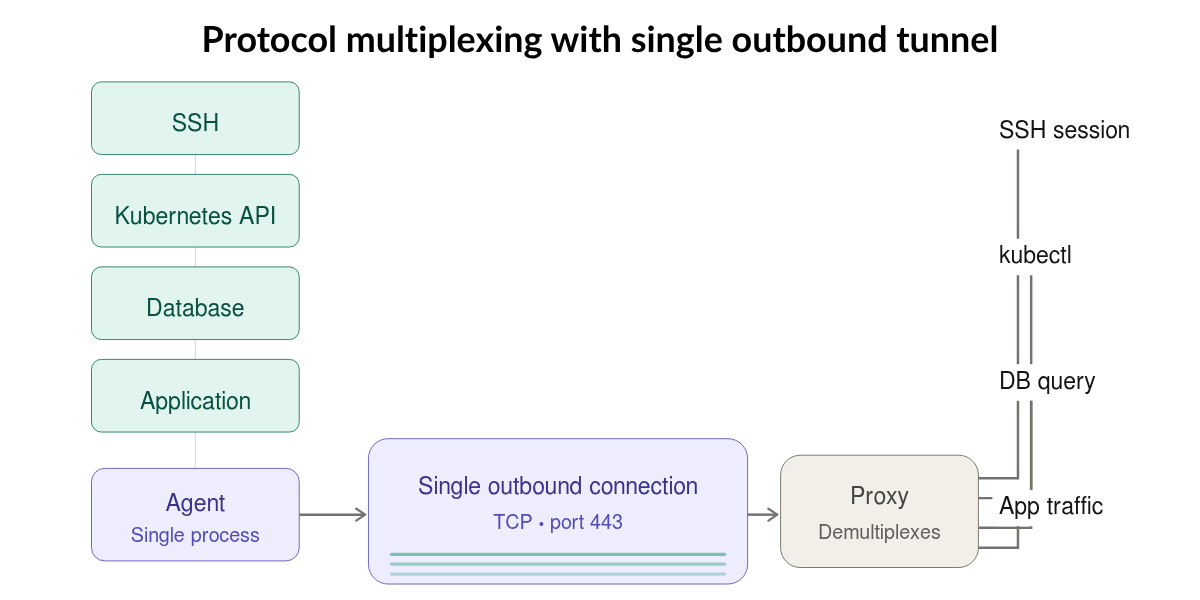
With the outbound tunnel in place, the next question is how many separate connections the device needs to maintain. Field-deployed devices rarely run a single service, and engineers troubleshooting an issue often need access to several protocols on the same device in the same session. The answer is to carry all of that traffic through one tunnel via multiplexing instead of running parallel connections for each.
Multiplexing protocols decreases risk
Many field-deployed devices, from warehouse robots to edge compute nodes, run containerized workloads on Kubernetes distributions like K3s or MicroK8s alongside traditional Linux daemons, telemetry collectors, over-the-air (OTA) update agents, or local databases. For example, an engineer troubleshooting a device issue might need shell access to inspect system logs, access through kubectl (the standard command-line client for Kubernetes clusters) to debug a crashing pod, and database access to query a local telemetry store, all in the same session. However, each of these protocols requires its own credentials, firewall rules, and audit trail, creating problems that grow with the fleet and increased reliance on unsecure workarounds.
Multiplexing SSH, Kubernetes, and database traffic through a single outbound tunnel removes this overhead. Engineers authenticate once, and all traffic shares a single policy that governs authentication, authorization, and structured audit events instead of requiring each protocol to maintain separate static credentials, rules, and logs.
Multiplexing frees up compute on constrained hardware
Many edge devices typically run on hardware with tight compute and memory constraints. A gateway or sensor controller is unlikely to have the headroom necessary to run four separate daemons for SSH, a Kubernetes API proxy, a database proxy, and an application gateway. Every additional daemon consumes memory, CPU cycles, and battery life that the device needs for its primary workload.
Multiplexing all protocols through one agent process frees up memory and compute for the device's primary workload rather than spending resources on parallel connectivity infrastructure.
Multiplexing introduces bandwidth savings
When each protocol runs through its own tunnel, every tunnel sends its own keep-alive packets and consumes its own connection overhead. Across a fleet of thousands of devices on metered satellite or cellular links, the aggregate overhead from four parallel tunnels per device adds up to a measurable line item.
A single multiplexed tunnel eliminates this duplication. For teams running devices on metered satellite or cellular links, the difference between one tunnel and four shows up in bandwidth consumption. A single tunnel requires only one set of keep-alive packets and one reconnection event, rather than four that must be re-established on the new transport.
Multiplexing keeps the Kubernetes API off the public internet
Finally, multiplexing removes the need to expose the Kubernetes API publicly. When kubectl access routes through the same tunnel as SSH, the Kubernetes API server listens only on localhost. Engineers connect through the tunnel rather than to a publicly routable endpoint, and the API server never appears on an external network interface.
Fix #3: Replace IP addresses with device identity so policy survives network changes
In a fleet running on VPNs or static IPs, the IP address was the only claim to a device's identity. Engineers found devices by IP, access control lists were written in terms of IP ranges, and asset inventories were a spreadsheet of addresses. However, this system was always fragile because cellular, satellite, and customer networks assign unstable IPs.
The fix is to give every device a cryptographic identity issued at enrollment that stays with the device regardless of what network it connects from. That identity becomes the anchor for discovery, authorization, and audit. The identity itself persists, but the privileges granted by that identity are short-lived and expire automatically rather than accumulating as standing permissions on the device. Metadata attached to the identity describes where the device is deployed, which customer it belongs to, what firmware it runs, and what type of device it is. The identity is what the system trusts, and the metadata is how engineers and policies find and filter devices based on that trust.
Device identity makes every device discoverable
Engineers discover devices by querying identity metadata instead of memorizing network addresses. A query like "show me all devices at Customer A's Dallas site running firmware 3.2" works regardless of what IP each device holds at that moment. Any engineer with the correct role can search by function, location, or status without asking a colleague, which eliminates the tribal knowledge problem where only a few senior engineers know which IP ranges map to which sites.
Device identity keeps access control correct when devices move
Mapping role-based access control (RBAC) to identity metadata instead of IP ranges means access policy stays correct even as devices move between sites. When a device is relocated from one customer to another, updating its metadata adjusts the access policy automatically. For teams managing multi-customer fleets, identity-based authorization enforces tenant isolation. If an engineer's account is compromised, the blast radius is limited to the customer fleet that engineer was authorized to access. Engineers only see devices whose metadata matches their role, which prevents accidental connections to the wrong customer's production devices. For customers who require data isolation, identity-based tenant isolation provides auditable evidence that access was properly segregated.
Device identity speeds up incident response and simplifies lifecycle management
Mapping role-based access control (RBAC) to identity metadata instead of IP ranges means access policy stays correct even as devices move between sites. When a device is relocated from one customer to another, updating its metadata adjusts the access policy automatically.
Identity metadata also encodes lifecycle state. Firmware version tags enable rules that restrict access to devices running vulnerable versions without manual list editing, and lifecycle attributes like "active," "under maintenance," or "decommissioned" remove retired devices from the engineer's catalog without anyone filing a ticket.
Implementation with Teleport
Teleport's Infrastructure Identity Platform establishes a unified identity layer for humans, machines, workloads, and AI agents that is secured cryptographically, delivering location-independent, identity-based access that eliminates the complexity and risk of VPNs. For teams managing distributed devices such as robots, charging stations, drones, or remote sensors, this means field devices connect without stored credentials, engineer sessions expire automatically, and access policy survives all network changes.
The three design decisions this guide describes are how Teleport is built.
Reverse tunnels and edge device enrollment
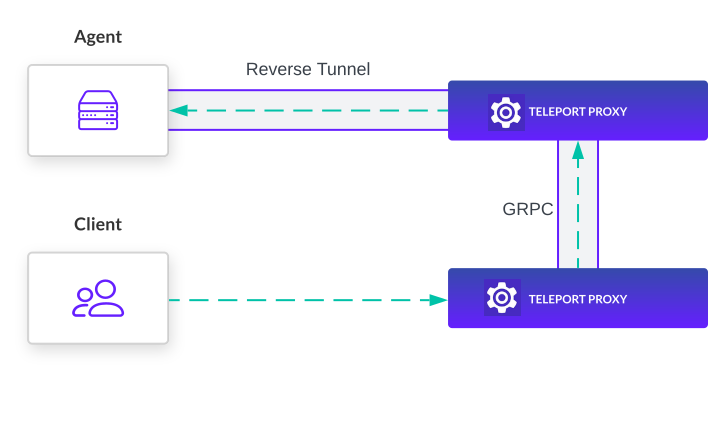
The Teleport Agent on each device initiates an outbound connection to the Teleport Proxy Service on port 443. When the network changes, the agent reconnects on its own and pending sessions resume without re-authentication. Because the device never exposes a listening port, the attack surface is limited to the outbound agent process.
For constrained hardware such as IoT sensors and edge gateways, teams can configure the agent to run only the SSH Service, reducing the resource footprint on the device. In standard mode, a single agent process handles SSH, Kubernetes, database, and application traffic simultaneously, and caches session recordings on the device if the proxy connection drops. Which services run on each device is configurable based on available hardware resources.
A single tunnel, policy, and audit record
Teleport routes SSH, Kubernetes, database, and application traffic through the same reverse tunnel. Engineers use their standard tools (terminal, kubectl, native database clients) and the Teleport Proxy handles protocol routing. The same RBAC policy governs all protocols, so an engineer cannot bypass SSH-level restrictions by going through the Kubernetes path.
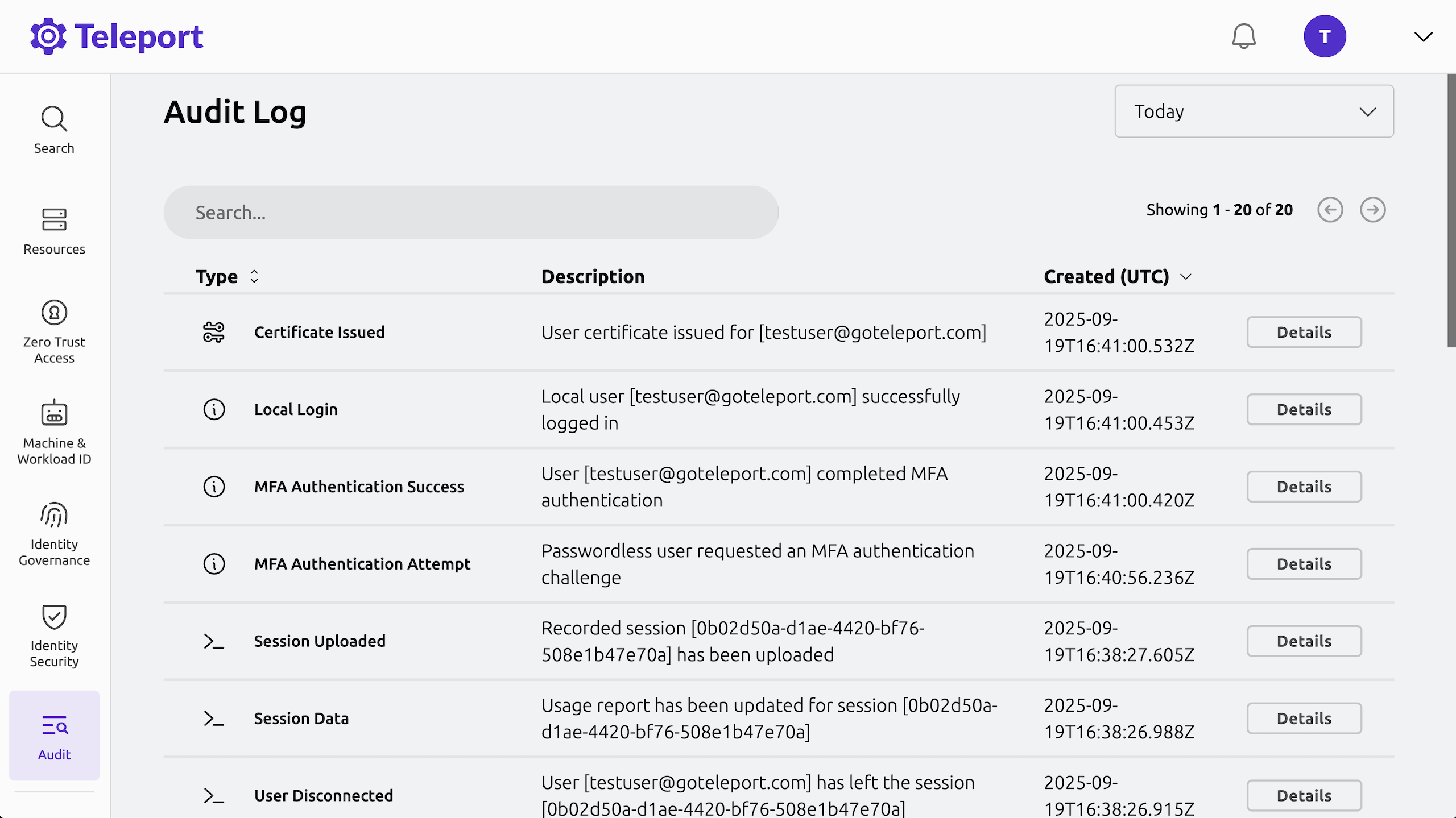
Every interactive session is recorded as a structured event stream (not a video file) that captures commands, output, and kubectl activity, all attributed to the authenticated engineer. Auditors get one continuous timeline per session regardless of which protocols were used.
Cryptographic identity, label-based RBAC, and audit
Teleport issues each device a cryptographic certificate at enrollment that, combined with resource labels, replaces IP addresses as the foundation for device discovery, authorization, and incident response. Engineers discover devices by querying labels rather than tracking IP addresses. For instance, a search for all devices labeled customer: acme and firmware: 3.2.1 returns matching results regardless of what network each device currently occupies. Authorization policies bind directly to those labels instead of IP ranges, so policy stays correct when devices move between sites or customers.
The following role grants an engineer SSH access to any device carrying both the customer: acme and region: us-central labels, restricts which Linux users the engineer can sign in as, and expires the access certificate after eight hours.
# acme-field-tech.yaml
kind: role
version: v7
metadata:
  name: acme-field-tech
spec:
  allow:
    node_labels:
      customer: acme
      region: us-central
    logins:
      - diagnostics
      - readonly
  options:
    max_session_ttl: 8h
For teams managing multi-customer fleets, this label-bound authorization enforces tenant isolation. If an engineer's account is compromised, this limits the potential impact in two ways:
- The role only grants access to devices whose labels match its defined conditions
- Any unauthorized access is time-bound because privileges expire automatically
The same label structure improves incident response. When a security event occurs, the operations team queries the audit log by device labels to identify every affected device by customer site, firmware version, or network type in seconds. Lifecycle labels like firmware: 3.2.1 enable rules that restrict access to devices running vulnerable versions without manual list editing, and status labels like lifecycle: decommissioned remove retired devices from the engineer's catalog without anyone filing a ticket.
Lastly, because every session is tied to a cryptographic identity, role, and the device's labels at the time of access, the audit trail can answer questions like "who accessed devices at Customer A's Dallas site in the last 90 days" with a single filtered query.
Read the documentation to learn more about Teleport’s network architecture.
Building fleet infrastructure on identity instead of IP addresses
Each of these three design decisions determines whether remote access to field-deployed devices holds up at fleet scale.
Reversing the connection direction eliminates firewall dependencies and survives network handoffs. Multiplexing SSH, Kubernetes, and database traffic through a single tunnel keeps the Kubernetes API off the public internet, reduces agent footprint, and eliminates per-protocol overhead. Replacing IP-based device management with cryptographic identity and metadata labels makes discovery, authorization, tenant isolation, and incident response durable across device relocations and network changes. Because privileges are ephemeral rather than standing, a compromised credential cannot be reused to maintain persistent access.
Teleport implements all three as a unified identity layer, eliminating static credentials, enforcing ephemeral privileges, and giving every device a cryptographic identity from the moment it enrolls.
Secure remote fleets at scale with unified identity
Learn how Teleport establishes cryptographic identity and access control for every robot, device, and resource to secure autonomous fleet infrastructure at scale with:
- Outbound-only NAT traversal
- Short-lived, identity-based certificates
- Kernel-level black box recordings for every session
- And more

Steven Martin
Steven Martin is an experienced Solution Engineer at Teleport with over 20 years of enterprise IT experience. He has led multiple large enterprise application implementations at corporate and government sites using on-prem and cloud resources.
Table Of Contents
- Why inbound SSH and VPNs fail on remote networks
- Fix #1: Use reverse tunnels for remote access
- Fix #2: Multiplex through a single outbound tunnel
- Fix #3: Replace IP addresses with device identity so policy survives network changes
- Implementation with Teleport
- Building fleet infrastructure on identity instead of IP addresses
Teleport Newsletter
Stay up-to-date with the newest Teleport releases by subscribing to our monthly updates.
Teleport Newsletter
Stay up-to-date with the newest Teleport releases by subscribing to our monthly updates.
Related Articles
How to Secure Third-Party Remote Access to Data Centers (Without SSH Keys)
Explore the key challenges of third-party access to data center infrastructure and how to secure remote access without static credentials or identity blind spots.
Reverse Proxy: How It Works & Example Architecture
Learn what reverse proxies are, how they work, how they compare to VPNs, and what an example architecture looks like.
Four Ways Teleport Overcomes the Limitations of VPNs and Bastions
Discover how Teleport overcomes VPN and bastion host limitations with zero trust principles, ephemeral certificates, and seamless access that improves security.