 Get a Demo
Privileged Access Management (PAM)
This article defines privileged access management (PAM) and explains its importance in cybersecurity practices. Learn how PAM works step-by-step, best practices for implementation, common challenges, practical applications for compliance and AI, and future trends.

Article Contents
- What Is PAM?
- What Are Privileges?
- How Are Privileges Created?
- What Is Privileged Access?
- What Are Privileged Accounts?
- How Does Privileged Access Management Work?
- What does PAM look like in everyday operations?
- Step-by-Step: How PAM Administers Privileged Access
- Why Is PAM Needed?
- 8 Best Practices for Privileged Access Management
- PAM Use Cases and Real-World Applications
- The Key Benefits of PAM
- PAM Implementation Challenges and Security Risks
- Credential Rotation and Vaulting in Legacy PAM
- The Role of PAM in AI
- PAM for Compliance
- The Future Outlook of PAM
What Is PAM?
Privileged access management encompasses the strategies and technologies used to secure, control, and monitor access to privileged accounts, credentials, and sensitive data within an organization.
These privileged accounts, often administrator accounts or superuser accounts on Linux, Unix, Windows, and other operating systems, hold the "keys to the kingdom," granting extensive permissions to critical resources and systems. Mismanagement of these administrator accounts or their privileged credentials can have devastating consequences, potentially leading to security breaches, data exfiltration, and significant business disruption.
PAM ensures only authorized people, systems, or services are able to perform actions like deploying code, accessing sensitive data stores, or managing key infrastructure. Access is granted only under the right conditions, only for the right duration, and with full visibility into their actions.
PAM controls and secures heightened access permissions to ensure that only authorized users or systems are able to access critical infrastructure, and only under the right conditions, for the right duration, and with full visibility.
What Are Privileges?
In the context of cybersecurity, privileges are special permissions that allow users, accounts, or systems to perform actions beyond what a regular user can do. Examples include installing software, changing security settings, creating new accounts, accessing sensitive data, or modifying system configurations.
The National Institute of Standards and Technology (NIST) defines a privileged user as “a user that is authorized (and therefore, trusted) to perform security-relevant functions that ordinary users are not authorized to perform.”
Privileges can exist at different levels. For example, a database administrator might have system-wide privileges to delete or modify tables, while a regular user (or a non-privileged account) may only have permission to view or update their own records.
→ Privileges define what users or systems can do.
How Are Privileges Created?
Privileges are created through a structured mix of policy decisions, role design, and technical configuration.
An organization defines access policies, or rules about who should have which types of privileges. Roles like “administrator,” “developer,” or “service account” are mapped to specific permissions based on business needs and foundational security principles, such as the principle of least privilege.
Privileges are then provisioned when an account is created or updated. This process assigns the necessary permissions, often using automated tools or processes that ensure the right approvals and security checks are in place before access is granted.
In practice, privileges are implemented by adding users to privileged groups, assigning access tokens, or configuring “user rights” in system settings. PAM solutions extend this process by managing privilege assignment dynamically and ensuring privileges are actively monitored and controlled throughout their lifecycle.
→ Privileges are defined by policy, assigned through roles, and provisioned to exert control over who or what can perform specific actions within a system.
What Is Privileged Access?
Privileged access refers to the use of elevated permissions to perform actions that affect systems, applications, or sensitive data. This is the moment when privileges are exercised to perform sensitive tasks and modify system controls, like changing system configurations, managing user roles, accessing data stores, and more.
As a result, privileged access is one of the most sought-after targets for attackers. A single compromised administrator or service account can be used to disable defenses, move laterally within networks, and exfiltrate or destroy sensitive information.
Privileged access is at the center of security challenges and attack techniques, including:
- Lateral movement: Attackers use stolen credentials to pivot between systems.
- Insider threats: Trusted users may intentionally or accidentally misuse their access.
- Credential theft: Weak password practices and long-lived credentials increase exposure.
- Compliance violations: Failure to audit privileged activity can breach regulatory requirements.
→ Privileged access is the active use of elevated permissions to interact with or change system or data sources.
What Are Privileged Accounts?
Privileged access is exercised through privileged accounts, which are specific user or system accounts that have elevated permissions beyond those of standard users. They allow administrators to configure, maintain, and troubleshoot critical IT systems.
These accounts are powerful because they can bypass normal security restrictions. Misuse or compromise of a privileged account can lead to full control of critical resources, including operating systems, databases, and cloud services.
Types of Privileged Accounts
- Local administrative accounts: Accounts created on individual servers or endpoints with full control over that device. Often used for maintenance and troubleshooting.
- Domain administrative accounts: Accounts with authority over entire network domains, including user management, group policies, and system configurations.
- Service accounts: Non-human accounts used by applications or services to communicate with operating systems, databases, or APIs. They often operate with persistent, high-level privileges.
- Emergency or break-glass accounts: Accounts used in crisis situations, such as system outages, where normal authentication methods may be unavailable. They require strict auditing and post-use review.
- Application and API accounts: Accounts or tokens that allow software components to interact securely with other services. These must be managed carefully to prevent secret sprawl.
- Privileged business accounts: High-level accounts used by senior personnel, such as financial administrators or compliance officers, who handle sensitive data.
→ Privileged accounts are user or system identities with elevated permissions that typically grant expanded access permissions or administrative control over infrastructure.
How Does Privileged Access Management Work?
Privileged access management works by identifying all privileged accounts across systems, applications, and cloud environments, defining how they are used, and enforcing strict policies to control and monitor their activity.
Once all accounts are cataloged, PAM then applies security and governance measures to ensure only the right people, systems, and services can access sensitive resources, only under the right conditions and for the right duration.
Key Functions of PAM:
- Privileged credential management: Secures and rotates privileged credentials like passwords, SSH keys, and API tokens. In PAM solutions like Teleport, these are replaced with short-lived certificates.
- Privileged session management: Establishes secure, auditable sessions for administrators and services, with real-time monitoring and optional session recording for auditing and investigations.
- Privilege elevation and delegation: Enforces the principle of least privilege through just-in-time (JIT) access, granting temporary elevated permissions only when required and automatically revoking them afterward.
- Access governance and control: Centralizes visibility into privileged accounts and access workflows, defining who can approve access, what resources can be reached, and under what conditions.
- Audit and compliance: Records every privileged action and session for traceability, compliance, and forensic analysis. Detailed logs provide proof of policy enforcement for frameworks like PCI DSS, HIPAA, and ISO 27001.
What does PAM look like in everyday operations?
In everyday security and engineering workflows, PAM software powers many operations behind the scenes. For example:
- Identity and access security: PAM ensures that only authorized users have administrative privileges, helping organizations maintain control over who can access sensitive systems and data.
- Access requests and approvals: Users can request elevated access for specific tasks, such as system updates or deployments. Approved requests are granted for a limited time, then automatically revoked.
- Account lifecycle management: When employees join, change roles, or leave the organization, PAM provisions and deactivates privileged accounts automatically to prevent orphaned credentials.
- Session monitoring and auditing: Administrative sessions are recorded in real time, capturing commands and activity logs that support accountability and compliance audits.
- Secure remote access: Authorized users can connect securely to internal systems from any location through encrypted, multifactor-authenticated sessions managed by PAM.
- Vendor or third-party access: External partners or contractors can be given time-limited access to specific systems for maintenance or support, with PAM automatically expiring their permissions once the work is complete.
Step-by-Step: How PAM Administers Privileged Access
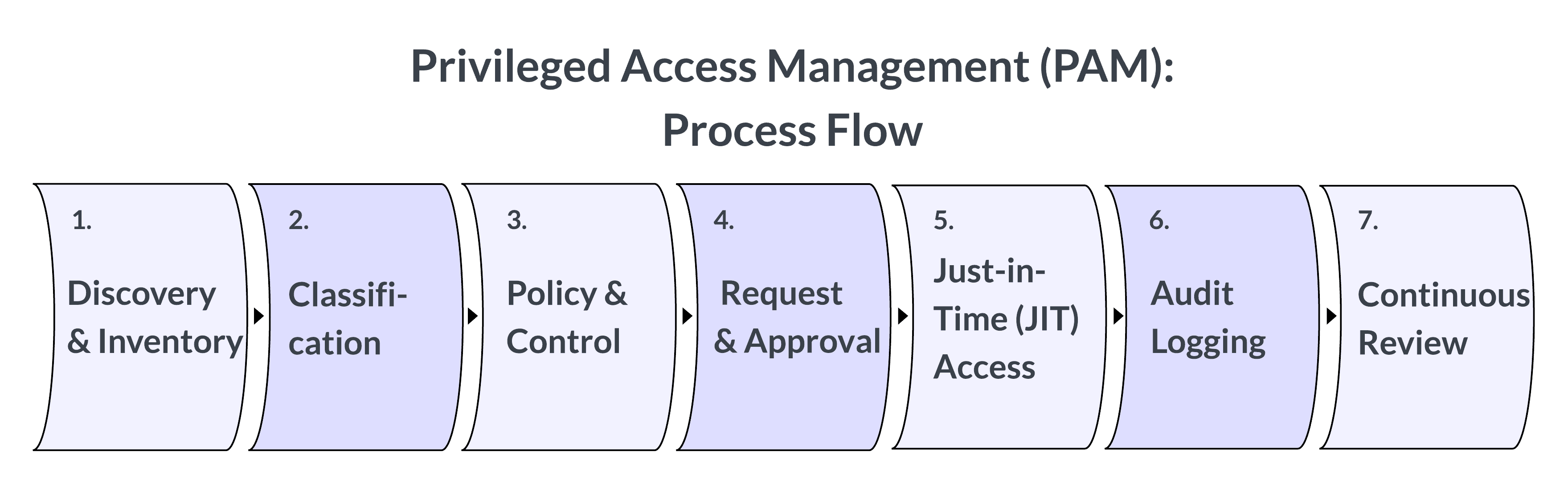
PAM follows a structured process to discover, control, and monitor privileged accounts, to ensure access is granted securely, used responsibly, and revoked consistently.
- Discovery and inventory: Identifying all privileged accounts across systems, applications, cloud services, and devices.
- Classification and risk assessment: Each discovered account is evaluated based on its level of access and the sensitivity of the systems it can reach. This classification helps prioritize controls for the most critical assets, such as production servers or directory services, where compromise would have the greatest impact.
- Policy definition and access control: Organizations define clear access policies rooted in the principle of least privilege, specifying who can access which resources, under what circumstances, and for how long. These policies govern request and approval workflows, session duration, and conditions for elevated access.
- Access request and approval: Users follow a standardized request process when privileged access is needed. Access is granted only after the required approvals and security checks, such as MFA or peer validation, are completed.
- Session establishment and monitoring: Once access is approved, PAM brokers the session between the user and the target resource. During the session, user activity, commands, keystrokes, and changes are monitored and recorded in real time to detect suspicious behavior and maintain accountability.
- Just-in-time (JIT) access enforcement: Modern PAM approaches like Teleport use temporary, time-bound credentials that expire automatically once a session ends. This limits standing privileges and eliminates the risk of credential compromise.
- Audit logging and reporting: Privileged activity is logged and stored for auditing, compliance, and forensic investigations. Detailed records, showing who accessed what, when, and what actions were taken to maintain visibility and demonstrate adherence to regulatory requirements.
- Continuous review and revocation: Privileged accounts and permissions are continuously reviewed to identify outdated, unused, or excessive access. Automated revocation mechanisms ensure that privileges are removed as soon as they are no longer required, preventing privilege creep and maintaining a consistent security posture.
Why Is PAM Needed?
Privileged accounts are prime targets for cyberattacks. Compromising a single administrator account can grant attackers control over an organization's entire IT infrastructure. PAM helps organizations mitigate these security risks by enforcing the principle of least privilege, limiting user access to only what is necessary for their job function. This minimizes the attack surface and reduces the potential impact of security breaches.
PAM is also essential for compliance. Security and privacy standards typically require organizations to document, control, monitor, and record privileged activity. For example, ISO/IEC 27001 (Annex A 8.2) mandates that “the allocation and use of privileged access rights shall be restricted and managed.” Likewise, PCI DSS Requirement 7.1.2 directs organizations to “restrict access to privileged user IDs to the minimum privileges necessary to perform job responsibilities.”
Today, modern infrastructure generates large numbers of privileged accounts as the amount of non-human identities expands. Without the centralized management of PAM, these untracked privileges create serious security gaps.
→ PAM mitigates breach risks and aligns with regulatory and compliance requirements by enforcing the principle of least privilege and controlling and monitoring how privileged access is used.
8 Best Practices for Privileged Access Management
The following eight practices outline how organizations can apply PAM to strengthen security, reduce risk, and maintain control over privileged access.
1. Limiting local admin accounts and endpoints
Local administrator accounts on laptops or servers give users full control and are often targeted by attackers. Reducing or removing these accounts helps prevent unauthorized access and limits the spread of attacks across systems.
💡 To manage local admin access securely:
- Review administrator groups regularly
- Use tools that grant limited access instead of full control
- Disable unused accounts and apply strong authentication for any that remain active
2. Multifactor authentication (MFA)
Multifactor authentication (MFA) adds an extra step to the sign-in process by asking users to verify their identity in more than one way. This makes it much harder for attackers to use stolen passwords to gain control of important accounts.
💡 For proper implementation of MFA:
- Require MFA for all accounts with administrative or remote access
- Add MFA directly to access workflows for command-line tools, remote sessions, and web consoles
- Adjust MFA requirements based on risk, such as device health or location
- Using hardware tokens or biometric authentication, such as fingerprint or facial recognition, for systems that store sensitive data
3. Just-in-time (JIT) access
Just-in-time access allows users to receive elevated privileges only when they are needed and for a limited time. This approach helps prevent misuse by ensuring that no one keeps unnecessary or permanent administrator rights.
💡 To use and implement JIT access effectively, you should:
- Set up automatic approval or request systems for temporary access
- Make sure privileges expire immediately after the task or session ends
- Combine JIT with additional checks, such as device security or time of access
4. Zero Standing Privileges (ZSP)
Zero Standing Privileges (ZSP) means no user or system keeps permanent administrative access when they are not actively using it. Removing always-on administrator accounts reduces the risk that attackers can steal and misuse those credentials.
💡 Maintaining a zero standing privilege posture requires:
- Replacing permanent passwords with short-lived access tokens or certificates
- Requiring users to request access each time they need elevated permissions
- Regularly checking systems for inactive or forgotten privileged accounts
5. Role-based access control (RBAC)
Role-based access control assigns permissions based on a user’s role within the organization rather than on an individual basis. This simplifies administration, reduces human error, and ensures that users have only the access needed for their responsibilities.
💡 To implement RBAC effectively:
- Define clear roles and responsibilities for each department or function
- Group users with similar job duties and assign access permissions by role
- Review role definitions regularly
- Combine RBAC with least privilege principles to limit access within each role to the minimum required
6. Activity-based access control (ABAC)
Activity-based access control dynamically adjusts privileges based on actual usage and behavior, closing the gap between granted and actually required permissions.
💡 To manage access based on activity:
Analyze historical access patterns to determine which systems and resources users actually need
Configure access to be automatically revoked after a defined activity period
Combine ABAC with contextual signals such as location, role, or workload
Continually refine access policies to align controls with real activity
7. Security automation
Automation reduces human error and ensures consistent enforcement of security policies across privileged environments. This automation also enables PAM systems to respond faster to suspicious behavior or configuration changes.
💡 The most effective use cases for security automation in PAM include:
- Automatically removing or disabling access when unusual activity, such as unexpected logins, occurs
- Sending alerts or taking immediate action when risky behavior is detected
- Using policies to automatically grant or expire privileges without manual review
8. Behavioral baselines and monitoring deviations
Understanding what normal behavior looks like makes it easier to detect when something is wrong. Tracking activity patterns helps identify unusual access attempts or configuration changes before they become serious issues.
💡 To benchmark behaviors and monitor effectively:
- Define what normal access and usage patterns look like for privileged users
- Watch for logins from new devices or unexpected locations
- Identify changes made outside of approved maintenance periods
- Investigate unexpected data transfers or failed access attempts immediately
PAM Use Cases and Real-World Applications
The principles and technologies of privileged access management are applicable across nearly all IT and security domains:
- AI access: Managing access for AI agents and automation systems to prevent key exposure.
- Infrastructure administration: Protecting administrator access to critical systems such as servers, databases, and network devices through controlled sessions.
- DevOps and automation: Securing automated processes by issuing temporary credentials for CI/CD pipelines, API integrations, and infrastructure-as-code deployments.
- Cloud operations: Managing privileged access across cloud environments by granting short-lived permissions to consoles, virtual machines, and management APIs.
- Operational technology (OT): Protecting industrial and IoT systems by granting monitored access to devices, such as SCADA controllers, during maintenance, or remote access for firmware updates on industrial equipment.
- Third-party and vendor privileged access: Providing contractors and support vendors with limited, monitored access windows to perform maintenance or troubleshooting tasks.
- Incident response: Supporting rapid recovery during outages or breaches with emergency “break-glass” accounts that are auditable and automatically revoked after use.
- Compliance and audit: Demonstrating traceability and accountability for privileged activity with detailed logs and reports that satisfy regulatory and security requirements.
The Key Benefits of PAM
A well-implemented PAM program provides measurable improvements in both security and operational resilience, including:
- Reduced attack surface: PAM reduces the number of standing privileged accounts and secures credentials, closing pathways that attackers could exploit to reach critical systems.
- Breach containment: PAM enforces the principle of least privilege, limiting attacker movement across systems and containing damage after an initial compromise.
- Audit visibility: PAM records every privileged session and action, giving organizations a complete audit trail and real-time visibility into administrative activity.
- Improved incident response: Detecting unusual privileged behavior can trigger alerts during potential security events, and audit logs can support post-incident analysis.
- Compliance and regulatory assurance: Centralizes access controls and reporting, enabling organizations to meet regulatory requirements such as ISO 27001, SOC 2, PCI DSS, and HIPAA.
- Operational efficiency: Automates password rotation, access approvals, and privilege assignments, allowing administrators to manage permissions consistently and reduce manual effort.
- Zero Trust: PAM solutions can validate user identity, device security, and session context before granting access, reinforcing the Zero Trust principle of "never trust, always verify" across all privileged workflows.
PAM Implementation Challenges and Security Risks
Despite its clear benefits, implementing a comprehensive PAM solution is not without its difficulties. Organizations frequently face common challenges and security risks:
Complexity: Traditional PAM systems depend on vaults, agents, and network proxies, which can be difficult to deploy, maintain, and scale in fast-changing or cloud-native environments.
User friction: Manual credential checkout, multi-step approval processes, or restrictive access workflows can slow down operations and reduce user adoption of PAM solutions.
Integration gaps: PAM often operates in isolation from identity governance, automation, and security monitoring tools, limiting visibility and creating operational silos across IT and security teams.
Scalability: Large enterprises find it challenging to maintain consistent PAM policies and monitoring across thousands of accounts, diverse platforms, and globally distributed systems.
Resource constraints: Implementing PAM requires significant time, technical expertise, and budget, and organizations without dedicated security resources may find it difficult to maintain continuous policy enforcement and monitoring.
- Credential sprawl: Organizations frequently struggle to control credentials that spread across CI/CD pipelines, configuration files, and third-party applications, leaving many privileged secrets outside centralized oversight.
→ Modern PAM approaches address these limitations by emphasizing identity-based access, ephemeral credentials, and direct, auditable connections, reducing reliance on centralized vaults and static secrets.
Credential Rotation and Vaulting in Legacy PAM
A common, though more traditional architectural pattern for many PAM implementations involves a vault-and-rotate architecture. In this model, privileged credentials — such as administrator passwords, SSH keys, and API tokens — are stored in a centralized vault and rotated periodically to reduce the exposure time of any single credential.
While this methodology can reduce the initial attack surface, this legacy approach still exposes significant risks in several areas:
- Static credentials: Credential rotation reduces risk only temporarily because secrets remain static between rotations. Attackers who obtain a credential before it is changed can continue to use it until the next rotation, maintaining hidden access and moving laterally across systems.
- Identity complexity: Vault and rotation policies become harder to enforce as the number of human, machine, and service identities increases, creating security gaps attackers can exploit.
- Vaults as a centralized attack target: Vaults centralize control of privileged credentials, concentrating risk. In 2025, Vault Fault vulnerabilities like CVE-2025-4656 and CVE-2025-49827 demonstrated this risk when flaws in enterprise vault solutions allowed attackers to bypass authentication, escalate privileges, and, in some cases, assume control over the vault itself.
The Role of PAM in AI
The rise of artificial intelligence (AI) and automation introduces new types of privileged identities, including machine accounts, service tokens, and autonomous agents that operate without direct human oversight. These entities often hold sensitive permissions, such as API access to data lakes, model weights, or production environments, all without human intervention.
PAM solutions are increasingly extending governance to these non-human identities to ensure consistent control and accountability.
PAM’s role in AI environments
Focus Area | Challenge | How PAM Addresses It |
AI Agent Access | AI systems and large language models (LLMs) need access to sensitive data and APIs | Applies least-privilege and time-bound credentials for agent operations |
Machine Identity Governance | Non-human accounts often outnumber users and go unmanaged | Tracks, rotates, and revokes service account credentials automatically |
AI-Enhanced Threat Detection | Human monitoring can’t keep up with fast-moving anomalies | Uses machine learning to detect unusual privileged behavior in real time |
Model and Data Security | Privileged access to model weights or training data risks leakage or tampering | Records and audits all administrative and API access to model artifacts |
Compliance and Ethics | Regulatory bodies now expect oversight of automated decision-making | Provides audit trails of AI agent actions and access patterns |
PAM for Compliance
PAM plays a central role in helping organizations meet global security and privacy compliance requirements. Most major regulatory and security frameworks explicitly require organizations to limit privileged access, enforce authentication controls, and maintain audit trails of administrative activity.
Framework / Standard | Primary Objective | How PAM Addresses It |
Information security management and access control | Enforces least-privileged access, manages administrator roles, and provides auditable records of privileged activity | |
Identify, protect, detect, respond, and recover from cyber threats | Controls privileged access to critical systems, integrates with monitoring tools, and supports identity verification for privileged sessions | |
Security, availability, and confidentiality of systems and data | Session recordings, detailed access logs, and role-based access policies to demonstrate control over administrative access | |
Protection of payment card data and systems | Restricts privileged access to cardholder data environments, enforces MFA, and records privileged user activity | |
Protection of healthcare and patient information | Limits administrative access to systems handling protected health information (PHI) and maintains audit logs for all privileged actions | |
SOX (Sarbanes–Oxley Act) | Integrity and accountability in financial systems and reporting | Enforces segregation of duties, controls administrative access to financial systems, and ensures privileged changes are fully auditable |
GDPR | Privacy and protection of personal data | Limits privileged access to personal data systems, enforces need-to-know permissions, and ensures traceability of administrative actions |
Secure management of U.S. federal and cloud systems | Enforces least privilege, continuous monitoring, and MFA for privileged users to meet federal compliance requirements | |
CIS Critical Security Controls | Practical security controls to reduce cyber risk | Addresses administrative privilege management, credential rotation, and continuous session monitoring |
ISO/IEC 27701 | Privacy information management and accountability | Restricts privileged access to personal data repositories and maintains audit trails for privacy-related operations |
The Future Outlook of PAM
Privileged access management remains a cornerstone of modern cybersecurity, providing control and visibility over the most powerful accounts in an organization. As infrastructures evolve towards a mix of cloud-native, on-premises, and AI infrastructure, PAM must shift from allocating privileged access based on static credentials and vaulted secrets to dynamic, identity-based access.
Modern, vault-free PAM software enforces least privilege through short-lived certificates, continuous monitoring, and just-in-time authorization. These principles strengthen security, reduce operational friction, and lay the foundation for a true Zero Trust architecture.
Learn more about vault-free, zero trust privileged access management for cloud, on-premises, and AI infrastructure with Teleport.
Frequently Asked Questions
What is PAM used for?
PAM is used to control, monitor, and secure privileged access to critical systems, data, and administrative functions across an organization.
What is an example of PAM?
A PAM system might grant a database administrator temporary elevated access to update configurations, then automatically revoke it once the task is complete.
What is the difference between PAM and a VPN?
A VPN secures network connectivity, while PAM governs who can access specific systems and what privileged actions they can perform after connecting.
What is the difference between PAM and IAM?
IAM manages general user identities and authentication, whereas PAM focuses on managing and auditing privileged or administrative access within those identities.
Is PAM difficult to implement?
Implementation complexity depends on existing infrastructure. Modern PAM platforms, including Teleport, integrate with SSO, cloud, and automation tools to simplify deployment and reduce manual setup.
What are the disadvantages of PAM?
Traditional PAM solutions can be complex to scale, often relying on credential vaults and manual processes that add operational overhead and slow down users.
Related articles
- Principle of Least Privilege: What It Is & How to Implement It
- Time-Based Access Control (TBAC): A Complete Guide
- What is RBAC?
- What is ABAC?
- What is Just-In-Time (JIT) access?
- What is Authorization?
- Authentication vs Authorization
- What are Ephemeral Privileges?
- What is MAC (Mandatory Access Control)?
- The Failures of Shared Secrets and How We Can Replace Them