How to Tie Kubernetes Audit Logs to Individual Engineers
Table Of Contents
- IN THIS BLOG
- Audit Logging Is On, but Who Did This?
- The Credential Sets the Attribution Limit
- A Proxy Can Replace the Engineer
- Cloud IAM Must Preserve the Person
- Record Enough Without Copying Secrets
- The Audit Log Stops at the Exec Connection
- Choose What to Do About Interactive Shells
- Summary
- Connect Identity and Session Records With Teleport
IN THIS BLOG
Kubernetes audit logs may show multiple engineers as one user and do not capture what is typed after a kubectl exec session starts. Assign each engineer a unique identity, make sure it stays consistent through proxies and cloud IAM, and use a session recorder if you need to review terminal activity.
How to Tie Kubernetes Audit Logs to Individual Engineers
Audit Logging Is On, but Who Did This?
An engineer investigating an incident opens a Kubernetes audit log and finds that someone started an interactive shell in a production Pod.
The event names a user, a namespace, a Pod, and the time when the connection opened.
At first, the record seems complete, but the engineer still needs to check if only one person used that username and if the log shows anything typed after the shell started.
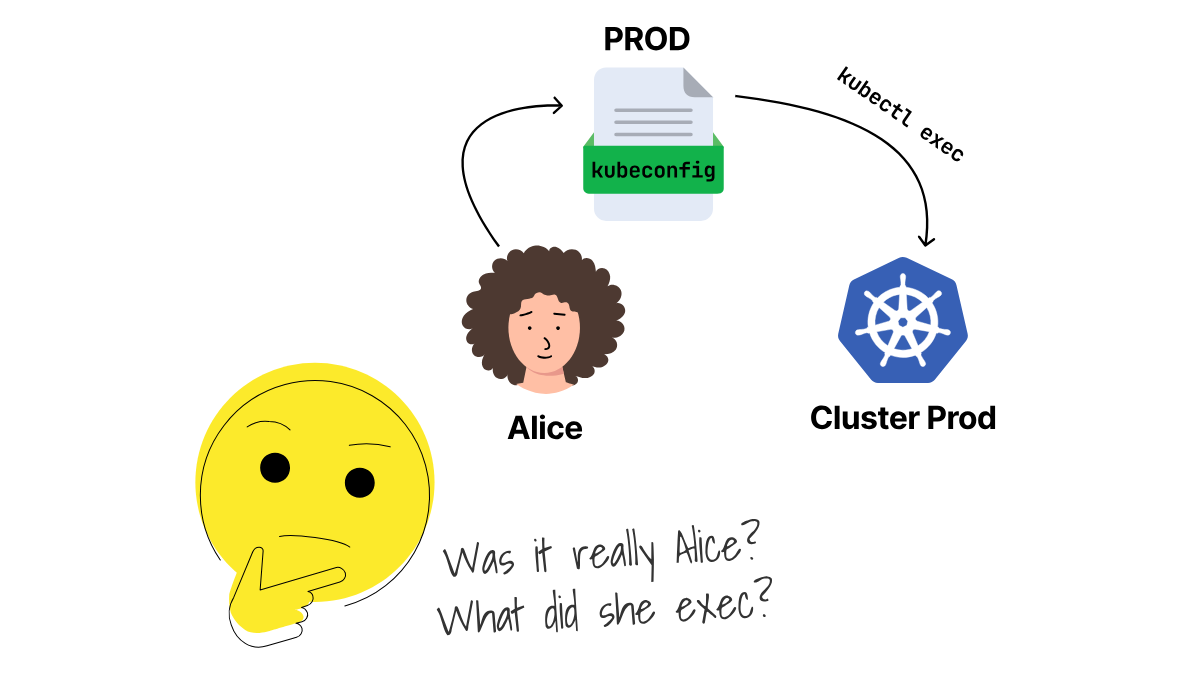
The API server sets the username when it checks Alice's credentials, but any commands typed in the shell come after the exec connection is open.
Consider Alice, an engineer with her own kubeconfig.
Her client certificate has this subject:
subject=CN=alice, O=platform-engineers
The example cluster contains an audit namespace and a Pod named identity-target.
When Alice sends a request, the Kubernetes API server creates an audit event and authenticates her certificate.
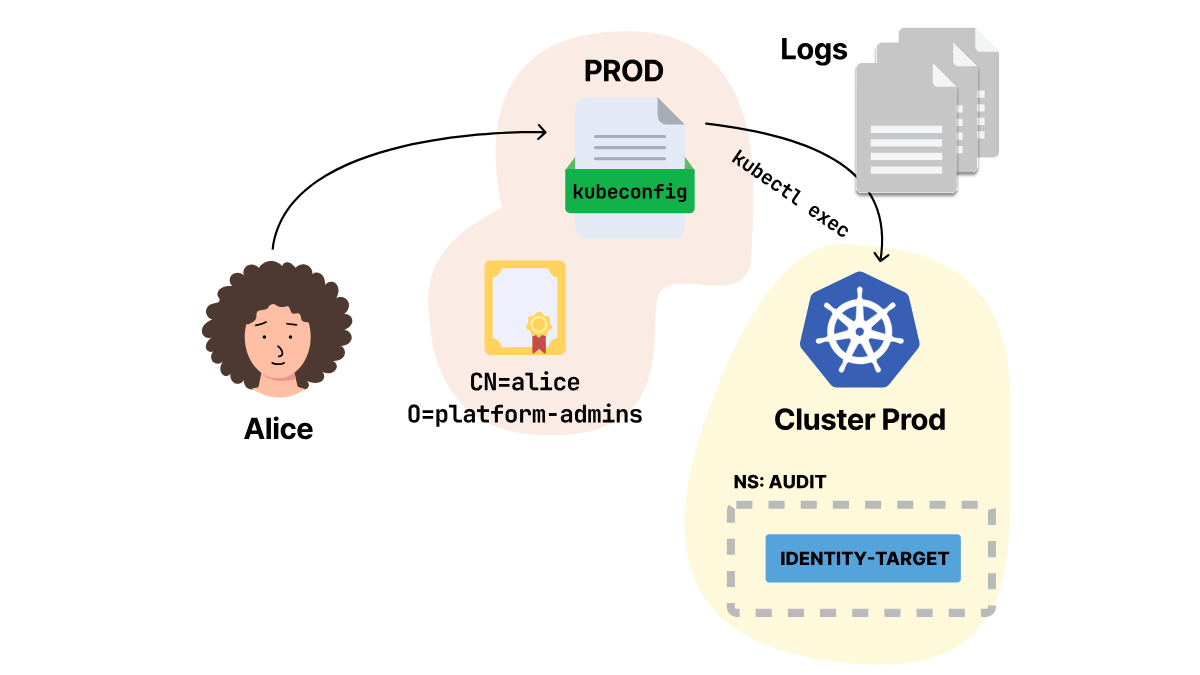
This cluster uses the audit log backend, which writes each event as a single JSON line to /var/log/kubernetes/audit.log.
When the API server checks a client certificate, it takes the username from the subject common name and the groups from the organization fields.
The kubectl auth whoami command shows the username, groups, and extra information that the API server accepted:
kubectl --kubeconfig=/tmp/alice-audit.yaml auth whoami

ATTRIBUTE                                           VALUE
Username                                            alice
Groups                                              [platform-engineers system:authenticated]
Extra: authentication.kubernetes.io/credential-id   [X509SHA256=07228a274806...d2d8a6e0]
The platform-engineers group comes from the certificate's organization field, while the API server adds system:authenticated after successful authentication.
The X509SHA256 value is a SHA-256 fingerprint of the raw client certificate.
The fingerprint helps you spot the same certificate in future records, but it does not include the certificate or the private key needed to make a request.
Does granting access to the group replace Alice with the group name?
No, because Kubernetes role-based access control (RBAC) checks the authenticated username and groups before allowing the request, which lets the group grant access without replacing Alice's username.
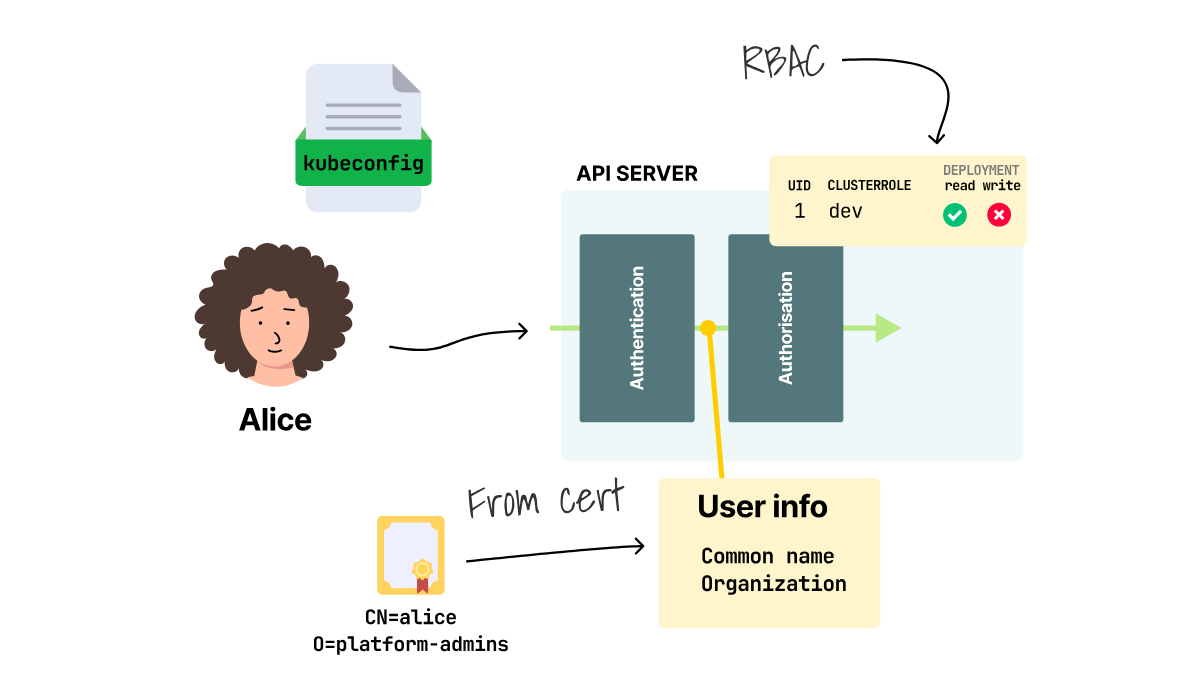
Give the platform-engineers group the built-in view role with a ClusterRoleBinding:
kubectl create clusterrolebinding platform-engineers-view \
  --clusterrole=view \
  --group=platform-engineers

clusterrolebinding.rbac.authorization.k8s.io/platform-engineers-view created
List the Pods as Alice:
kubectl --kubeconfig=/tmp/alice-audit.yaml get pods

NAME              READY   STATUS    RESTARTS   AGE
identity-target   1/1     Running   0          23s
If you inspect /var/log/kubernetes/audit.log after Alice lists the Pods, the matching event contains these fields:
{
  "user": {
    "username": "alice",
    "groups": ["platform-engineers", "system:authenticated"],
    "extra": {
      "authentication.kubernetes.io/credential-id": [
        "X509SHA256=07228a274806...d2d8a6e0"
      ]
    }
  },
  "sourceIPs": ["192.168.49.1"],
  "verb": "list",
  "objectRef": {
    "resource": "pods",
    "namespace": "audit"
  },
  "responseStatus": {
    "code": 200
  }
}
The request came in as alice, listed Pods in the right namespace, used the recorded source IP, and ended with a 200 response.
Alice's certificate supplies her identity, while the ClusterRoleBinding grants access through her group.
The audit event then connects that identity to the request. However, the audit log still cannot show if someone else used the same certificate and also appeared as alice.
Does the username prove that Alice was the person holding the credential?
The Credential Sets the Attribution Limit
Kubernetes does not store normal human users as API objects.
Before Kubernetes can write a username to the audit event, the API server checks the certificate or token and turns it into a username, groups, and optional extra fields.
If two engineers use the same credential, the API server sees the same identity twice.
What does that look like when two kubeconfigs carry the same client certificate?
Consider a certificate with this subject:
subject=CN=shared-platform-engineer, O=platform-engineers
The organization places the shared identity in platform-engineers, so the existing ClusterRoleBinding grants it read access.
Two kubeconfigs contain the same certificate and private key:
# The relevant user entry in engineer-a.yaml and engineer-b.yaml
users:
  - name: shared-platform-engineer
    user:
      client-certificate-data: <same-certificate>
      client-key-data: <same-private-key>
Both kubeconfigs point to the same cluster and namespace.
Will the two filenames give the audit log two identities?
Run the same request from both files:
kubectl --kubeconfig=/tmp/engineer-a.yaml get pods --no-headers

identity-target   1/1   Running   0   105s

kubectl --kubeconfig=/tmp/engineer-b.yaml get pods --no-headers

identity-target   1/1   Running   0   105s
The relevant fields from the two recorded events are identical:
[
  {
    "requestReceivedTimestamp": "2026-08-31T20:09:11.074143Z",
    "user": {
      "username": "shared-platform-engineer",
      "extra": {
        "authentication.kubernetes.io/credential-id": [
          "X509SHA256=8c55056f4f13...107b8e24"
        ]
      }
    }
  },
  {
    "requestReceivedTimestamp": "2026-08-31T20:09:11.120040Z",
    "user": {
      "username": "shared-platform-engineer",
      "extra": {
        "authentication.kubernetes.io/credential-id": [
          "X509SHA256=8c55056f4f13...107b8e24"
        ]
      }
    }
  }
]
The common name gives the same username, and the matching fingerprint shows both requests used the same certificate.
Neither field can reveal which person held a copy of its private key.
Does authorizing a group erase the individual username?
No, because a RoleBinding can give permissions to a group while authentication keeps each engineer's username.
Alice and Bob have separate client certificates and kubeconfigs:
Alice: subject=CN=alice, O=platform-engineers
Bob:   subject=CN=bob, O=platform-engineers
Different common names keep their usernames separate, while the shared organization puts both engineers in platform-engineers.
The group binding gives Bob the same view permission as Alice, and both engineers can now list the same Pod:
kubectl --kubeconfig=/tmp/alice-audit.yaml get pods --no-headers

identity-target   1/1   Running   0   3m

kubectl --kubeconfig=/tmp/bob-audit.yaml get pods --no-headers

identity-target   1/1   Running   0   3m
The last Pod-list event for each username keeps the person and the shared group:
[
  {
    "user": {
      "username": "alice",
      "groups": ["platform-engineers", "system:authenticated"]
    }
  },
  {
    "user": {
      "username": "bob",
      "groups": ["platform-engineers", "system:authenticated"]
    }
  }
]
Give the platform-engineers group the view role, but keep alice and bob as separate usernames.
The first pair of kubeconfigs shares the same certificate, so both requests produce a single audit identity.
Separate credentials keep Alice and Bob distinct while their group grants the same permission.
Using separate credentials keeps Alice's and Bob's actions distinct when they connect directly to the API server.
But many teams route Kubernetes access through a proxy to centralize SSO, access policy, and network entry.
Alice authenticates to the proxy, but the proxy opens a second connection to Kubernetes with its own workload credential.
Does the Kubernetes audit event record Alice, the proxy, or both?
A Proxy Can Replace the Engineer
When Alice connects directly, her credentials are sent to the Kubernetes API server, and the audit event records her username.
Once you put a proxy in that path, Alice connects to the proxy, which then opens a separate connection to the API server.
Teams often use a proxy to check company sign-ins, enforce access rules, or give clusters a single, controlled way in.
The API server sees the proxy's connection because that is where the Kubernetes credentials arrive.
If the proxy sends only its own token, Kubernetes authenticates the proxy and writes the proxy's username into the audit event, even though Alice signed in one step earlier.
Does putting a proxy in front of the cluster always erase Alice from the audit trail?
No, because Kubernetes user impersonation gives the proxy a way to pass Alice's identity with the request.
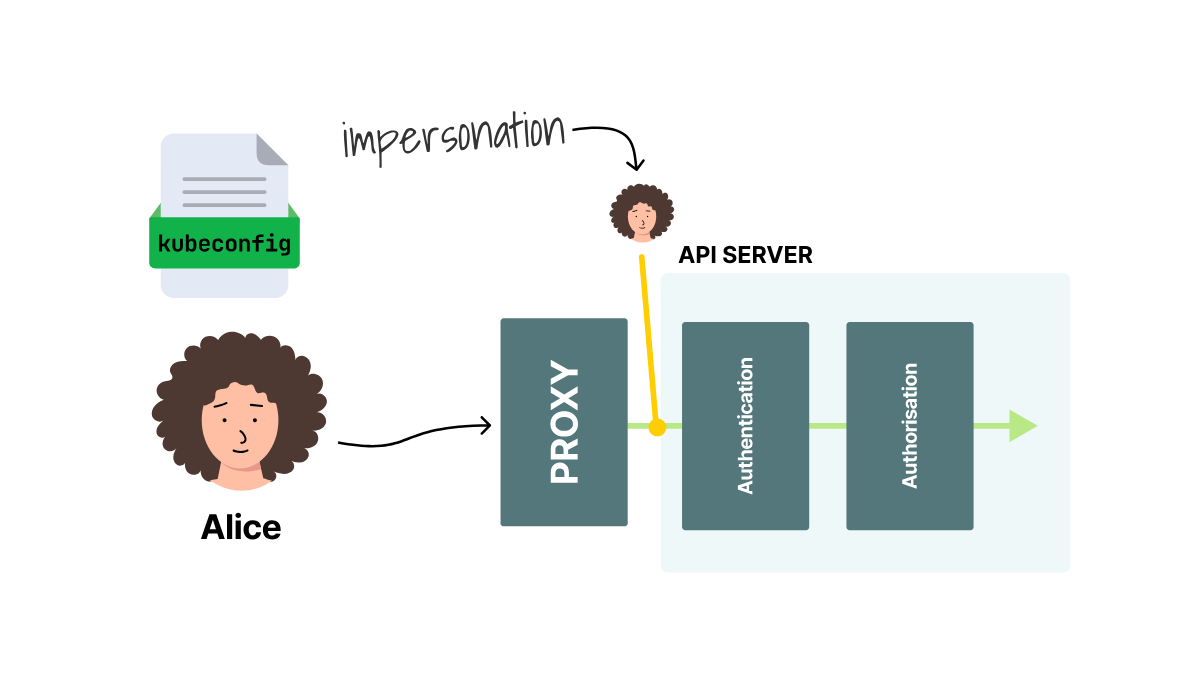
The API server first authenticates the proxy, checks whether it may use Alice's username and group, and then checks Alice's permissions for the requested action.
The proxy uses the proxy ServiceAccount in the audit namespace.
Allow it to send only Alice's username and the platform-engineers group that gives her read access:
apiVersion: rbac.authorization.k8s.io/v1
kind: ClusterRole
metadata:
  name: proxy-impersonate
rules:
  - apiGroups: [""]
    resources: ["users"]
    verbs: ["impersonate"]
    resourceNames: ["alice"]
  - apiGroups: [""]
    resources: ["groups"]
    verbs: ["impersonate"]
    resourceNames: ["platform-engineers"]
A ClusterRoleBinding assigns this permission to the proxy ServiceAccount.
The two resourceNames values stop the proxy from naming another user or group.
They do not restrict the actions that the proxy can take as Alice because impersonate permits every request that Alice can make.
Alice can already list Pods through the platform-engineers binding from the previous section.
A separate RoleBinding grants the proxy read access under its own identity, allowing us to compare two successful requests.
The proxy first sends its short-lived ServiceAccount token without any information about Alice:
GET /api/v1/namespaces/audit/pods/identity-target
Authorization: Bearer <proxy-ServiceAccount-token>
Kubernetes returns 200, but it authenticates only the proxy.
The proxy then sends the same request with Alice's username and group:
GET /api/v1/namespaces/audit/pods/identity-target
Authorization: Bearer <proxy-ServiceAccount-token>
Impersonate-User: alice
Impersonate-Group: platform-engineers
Kubernetes again returns 200, this time after it checks Alice's permissions as a member of platform-engineers.
Did Kubernetes lose the proxy's identity when it switched to Alice?
No, and the two audit events make the difference visible.
The relevant fields from the two recorded events show the difference:
[
  {
    "user": {
      "username": "system:serviceaccount:audit:proxy"
    }
  },
  {
    "user": {
      "username": "system:serviceaccount:audit:proxy"
    },
    "impersonatedUser": {
      "username": "alice",
      "groups": ["platform-engineers", "system:authenticated"]
    }
  }
]
In an impersonation audit event, user keeps the identity that connected to the API server, while impersonatedUser shows the identity whose permissions Kubernetes checked.
The first event contains only the ServiceAccount, while the second connects Alice's action to both Alice and the proxy that carried it.
The event shows only the proxy unless the request includes Alice's username and group. In that case, the proxy appears under user and Alice under impersonatedUser.
You can check any proxy with the same pair of requests, because its sign-in page only proves that the proxy recognized Alice, while the audit events show whether her identity reached Kubernetes.
Without impersonation, Kubernetes knows only the proxy.
With impersonation, the same event keeps the proxy as the connecting identity and Alice as the authorized identity.
A proxy can send Alice's username to Kubernetes, but what happens when a managed Kubernetes service does that work?
Cloud IAM Must Preserve the Person
A proxy is not the only way Alice's name might be lost.
In a managed cluster, Alice signs in to the cloud provider before her request reaches Kubernetes, and the provider chooses the username and groups that Kubernetes receives.
If the provider gives Alice and Bob the same Kubernetes username, the audit log cannot tell which engineer made the request.
The EKS, GKE, and AKS clusters below share the same audit namespace and identity-target Pod, allowing Alice to make the same harmless Pod request in each cluster.
Start with EKS, where the AWS role session becomes part of Alice's Kubernetes username.
Alice and Bob both get cluster access through an AWS Identity and Access Management (IAM) role named platform-engineer.
They use the same role, but AWS Security Token Service (STS) gives each engineer temporary credentials and a separate session name when they sign in.
Does EKS pass only platform-engineer to Kubernetes?
No, because an EKS access entry specifies which Kubernetes usernames and groups to grant to an AWS user or role.
An Amazon Resource Name (ARN) is the full AWS identifier for the role.
Use an AWS identity that manages the cluster to create the access entry without a username:
aws eks create-access-entry \
  --cluster-name production \
  --principal-arn arn:aws:iam::111122223333:role/platform-engineer \
  --type STANDARD \
  --kubernetes-groups platform-engineers
Point kubectl at the EKS cluster:
aws eks update-kubeconfig \
  --name production
Give the group the same view permission used earlier:
kubectl create clusterrolebinding platform-engineers-view \
  --clusterrole=view \
  --group=platform-engineers
Create an AWS CLI role profile that uses Alice's existing alice profile to assume platform-engineer with the session name [email protected]:
aws configure set role_arn \
  arn:aws:iam::111122223333:role/platform-engineer \
  --profile alice-platform

aws configure set source_profile alice \
  --profile alice-platform

aws configure set role_session_name [email protected] \
  --profile alice-platform
Ask AWS which identity the profile now uses:
AWS_PROFILE=alice-platform aws sts get-caller-identity \
  --query Arn \
  --output text

arn:aws:sts::111122223333:assumed-role/platform-engineer/[email protected]
The output confirms that Alice is using the shared role under her own session name.
Because the access entry does not set a username, EKS uses the role ARN and adds {{SessionName}} at the end.
Run kubectl auth whoami to see the username that Kubernetes received:
AWS_PROFILE=alice-platform kubectl auth whoami \
  -o jsonpath='{.status.userInfo.username}{"\n"}'

arn:aws:sts::111122223333:assumed-role/platform-engineer/alice-example.com
EKS uses {{SessionName}} to build the username and swaps the @ in [email protected] for a -, but the username still tells Alice and Bob apart.
If you want to keep the email unchanged, update the access entry to use {{SessionNameRaw}}:
aws eks update-access-entry \
  --cluster-name production \
  --principal-arn arn:aws:iam::111122223333:role/platform-engineer \
  --username 'platform:{{SessionNameRaw}}' \
  --kubernetes-groups platform-engineers
The --principal-arn value identifies the shared role, while {{SessionNameRaw}} inserts the current session name without changing the email address.
AWS requires a colon before the session placeholder, which is why the username starts with platform:.
Access entry changes can take several seconds to reach the cluster.
After the change reaches the cluster, display Alice's complete identity:
AWS_PROFILE=alice-platform kubectl auth whoami

ATTRIBUTE   VALUE
Username    platform:[email protected]
Groups      [platform-engineers system:authenticated]
The username shows it's Alice, and the group gives her the same RBAC permissions as the rest of the platform team.
Enable the EKS audit log before Alice sends the request:
aws eks update-cluster-config \
  --name production \
  --logging \
    '{"clusterLogging":[{"types":["audit"],"enabled":true}]}'
Wait for the control plane to finish the change:
aws eks wait cluster-active \
  --name production
List the Pods as Alice:
AWS_PROFILE=alice-platform kubectl \
  -n audit get pods --no-headers

identity-target   1/1   Running   0   7m
EKS now sends the control plane audit events to CloudWatch Logs because the audit log type is enabled.
Filter the EKS log group by the username that kubectl auth whoami returned.
The newest matching event contains these fields:
{
  "user": {
    "username": "platform:[email protected]",
    "groups": ["platform-engineers", "system:authenticated"]
  },
  "verb": "list",
  "objectRef": {
    "resource": "pods",
    "namespace": "audit"
  },
  "responseStatus": {
    "code": 200
  }
}
Could Bob start a session named [email protected]?
Yes, if the role's rules allow each engineer to choose any session name.
The alice and bob profiles used here authenticate as IAM users with the same names.
Add a trusted email tag to each IAM user:
aws iam tag-user \
  --user-name alice \
  --tags Key=email,[email protected]

aws iam tag-user \
  --user-name bob \
  --tags Key=email,[email protected]
Make the role's sts:RoleSessionName match that email in trust-policy.json:
{
  "Version": "2012-10-17",
  "Statement": [
    {
      "Effect": "Allow",
      "Principal": {
        "AWS": "arn:aws:iam::111122223333:root"
      },
      "Action": "sts:AssumeRole",
      "Condition": {
        "StringEquals": {
          "sts:RoleSessionName": "${aws:PrincipalTag/email}"
        }
      }
    }
  ]
}
Apply the trust policy:
aws iam update-assume-role-policy \
  --role-name platform-engineer \
  --policy-document file://trust-policy.json
Use Alice's AWS CLI profile to request her session name.
AWS accepts the request because the profile uses the IAM user tagged with [email protected]:
AWS_PROFILE=alice aws sts assume-role \
  --role-arn arn:aws:iam::111122223333:role/platform-engineer \
  --role-session-name [email protected] \
  --query 'AssumedRoleUser.Arn' \
  --output text

arn:aws:sts::111122223333:assumed-role/platform-engineer/[email protected]
Request Alice's session name from Bob's profile.
AWS rejects it because Bob's IAM user is tagged with [email protected]:
AWS_PROFILE=bob aws sts assume-role \
  --role-arn arn:aws:iam::111122223333:role/platform-engineer \
  --role-session-name [email protected]

An error occurred (AccessDenied) when calling the AssumeRole operation:
User: arn:aws:iam::111122223333:user/bob is not authorized to perform: sts:AssumeRole
on resource: arn:aws:iam::111122223333:role/platform-engineer
Do not let engineers edit their own email tags.
Otherwise, Bob can change his tag to [email protected] and satisfy the trust policy.
In this setup, Alice and Bob can share the platform-engineer role because AWS requires each session name to match the protected email tag on the IAM user who starts it.
Should the RoleBinding use platform:[email protected]?
No, because the username changes with the engineer, while the platform-engineers group stays the same.
The access entry passes that group to Kubernetes RBAC, and the binding in this EKS cluster grants the shared permission.
Keep the individual in the username and the team in the group.
What if your managed cluster stores the person somewhere other than user.username?
Google Kubernetes Engine stores Kubernetes API events in Cloud Audit Logs.
Inside each event, serviceName is k8s.io, and protoPayload.authenticationInfo.principalEmail contains the caller's email address.
This GKE project has Data Access logs enabled, which allows Cloud Logging to keep Alice's Pod list request.
With Alice signed in to gcloud, add the GKE cluster to her kubeconfig:
gcloud container clusters get-credentials production \
  --location us-central1
This command selects the GKE API endpoint and configures kubectl to use Alice's active Google identity.
Make a harmless request that the Data Access log can record:
kubectl -n audit get pods --no-headers

identity-target   1/1   Running   0   7m
The successful response proves that Alice can access the Pod list.
But it does not yet prove that Cloud Audit Logs preserved her identity.
Search Cloud Logging for that Pod request and Alice's email address:
gcloud logging read \
  'resource.type="k8s_cluster" AND
   protoPayload.methodName:"io.k8s.core.v1.pods" AND
   protoPayload.authenticationInfo.principalEmail="[email protected]"' \
  --limit=1 \
  --format='value(protoPayload.authenticationInfo.principalEmail)'

[email protected]
The returned principalEmail links the stored event to Alice's Google identity.
GKE always writes Admin Activity logs for administrative changes, while Data Access logs contain reads and other access to stored data and remain off until you enable them.
If the request belongs in Data Access and that log is off, the query returns nothing because GKE never stored the event.
Where does AKS put the same username?
When AKS uses Microsoft Entra ID to sign engineers in, the Kubernetes request appears in the kube-audit log.
With Alice signed in to Azure, add the AKS cluster to her kubeconfig:
az aks get-credentials \
  --resource-group platform \
  --name production \
  --overwrite-existing \
  --output none
Ask Kubernetes which username it received:
kubectl auth whoami \
  -o jsonpath='{.status.userInfo.username}{"\n"}'

[email protected]
The output shows that the AKS API server sees the caller as Alice.
Azure does not keep kube-audit until you create a diagnostic setting that sends the log to a destination.
Send kube-audit to a Log Analytics workspace in resource-specific mode, which stores each event as a row in the AKSAudit table.
Replace the two resource-ID placeholders with the IDs from your Azure account:
az monitor diagnostic-settings create \
  --name kube-audit-to-log-analytics \
  --resource '<AKS-resource-ID>' \
  --workspace '<Log-Analytics-workspace-ID>' \
  --export-to-resource-specific true \
  --logs '[{"category":"kube-audit","enabled":true}]' \
  --output none
With logging ready, list the Pods under Alice's identity:
kubectl -n audit get pods --no-headers

identity-target   1/1   Running   0   7m
Place the username returned by kubectl auth whoami in this Log Analytics query:
let Alice = "[email protected]";
AKSAudit
| extend Username = tostring(User.username)
| where Username == Alice
| where ObjectRef.resource == "pods"
| project Username, Verb,
          Resource = tostring(ObjectRef.resource)
| take 1

Username           Verb   Resource
[email protected]  list   pods
The same [email protected] value now appears in kubectl auth whoami and the AKSAudit event.
Use kube-audit when you need reads because kube-audit-admin omits get and list.
For EKS, GKE, or AKS, run kubectl auth whoami and check the saved log query. Both should show Alice's name.
Once the event names Alice, how much of her request should the audit log keep?
Record Enough Without Copying Secrets
The current policy records resource requests at RequestResponse.
A Secret read shows whether that level copies the value returned to Alice.
The built-in view role does not allow access to Secrets.
In this example, a narrow Role allows Alice to read Secrets only in the audit namespace.
That namespace contains this harmless Secret:
apiVersion: v1
kind: Secret
metadata:
  name: audit-sample
  namespace: audit
data:
  api-key: c2FtcGxlLXZhbHVl
Read its data field as Alice:
kubectl --kubeconfig=/tmp/alice-audit.yaml \
  -n audit get secret audit-sample \
  -o jsonpath='{.data.api-key}{"\n"}'

c2FtcGxlLXZhbHVl
Kubernetes gives back values from a Secret's data field as base64-encoded strings, but base64 does not encrypt or protect the value.
The recorded event contains the returned Secret value:
{
  "level": "RequestResponse",
  "user": {
    "username": "alice"
  },
  "verb": "get",
  "objectRef": {
    "resource": "secrets",
    "name": "audit-sample",
    "namespace": "audit"
  },
  "responseObject": {
    "data": {
      "api-key": "c2FtcGxlLXZhbHVl"
    }
  }
}
The value Alice gets and the value in responseObject.data are the same.
At the RequestResponse level, reading a Secret puts its returned values into the audit log.
Do we need the response body to prove that Alice read this Secret?
No, because the event metadata already names Alice, the get verb, the audit-sample Secret, its namespace, and the response status.
The Request level omits the response body, but it can still copy Secret values from create and update request bodies.
You can use Metadata when the identity, action, target, and result provide enough evidence:
apiVersion: audit.k8s.io/v1
kind: Policy
omitStages:
  - RequestReceived
rules:
  - level: None
    nonResourceURLs:
      - /healthz*
      - /livez*
      - /readyz*
  - level: Metadata
    resources:
      - group: ""
        resources:
          - secrets
  - level: Metadata
After the API server applies the policy, read the Secret again:
kubectl --kubeconfig=/tmp/alice-audit.yaml \
  -n audit get secret audit-sample \
  -o name

secret/audit-sample
The new event keeps the attribution fields and omits both bodies:
{
  "level": "Metadata",
  "user": {
    "username": "alice"
  },
  "verb": "get",
  "objectRef": {
    "resource": "secrets",
    "name": "audit-sample",
    "namespace": "audit"
  },
  "responseStatus": {
    "code": 200
  }
}
The event has no requestObject or responseObject field.
The audit log still shows that Alice read the Secret, but it does not copy the returned value anymore.
What should the policy keep for other requests?
Secret responses are not the only values you may want to keep out of the audit log.
ConfigMaps can carry sensitive configuration, while a request to serviceaccounts/token returns a working token.
Set Secrets, ConfigMaps, and ServiceAccount token requests to the Metadata level, since the username, action, target, and response code are enough without including their bodies.
Start the policy by removing health checks and the initial RequestReceived stage:
apiVersion: audit.k8s.io/v1
kind: Policy
omitStages:
  - RequestReceived
rules:
  - level: None
    nonResourceURLs:
      - /healthz*
      - /livez*
      - /readyz*
Add the sensitive-resource rule next, at Metadata:
- level: Metadata
  resources:
    - group: ""
      resources:
        - secrets
        - configmaps
        - serviceaccounts/token
Keep RequestResponse for RBAC changes when you need both the submitted permissions and the object that Kubernetes returned:
- level: RequestResponse
  verbs: ["create", "update", "patch", "delete"]
  resources:
    - group: rbac.authorization.k8s.io
      resources:
        - roles
        - rolebindings
        - clusterroles
        - clusterrolebindings
Finish with a general rule for writes and a Metadata fallback for all other requests:
- level: Request
  verbs: ["create", "update", "patch", "delete"]
- level: Metadata
Put the rules for Secrets, ConfigMaps, ServiceAccount tokens, and RBAC changes before the general write rule, since Kubernetes uses the first rule that matches a request.
If one of your custom resources stores credentials, add it to the same Metadata rule before the general write rule can record its body.
The audit level determines whether the event contains only attribution fields or also copies the request and response bodies.
After the policy keeps Alice, the action, the target, and the response code without copying the Secret value, where should the API server send the event?
The policy controls what an event contains, while the audit backend controls where the API server sends it.
This cluster uses the log backend we inspected earlier, which writes JSON lines to the control-plane filesystem.
Check who owns that file:
docker exec minikube \
  stat -c "%A %U:%G %n" /var/log/kubernetes/audit.log

-rw------- root:root /var/log/kubernetes/audit.log
If an administrator can edit /var/log/kubernetes/audit.log, they can also delete records of their own requests.
The API server can send the same events through its webhook backend to a system outside the control-plane node.
Cluster administrators may need to read those records, but a separate account should own the permissions to change or delete them.
Can an event disappear before it reaches that separate account?
Yes, and the webhook delivery setting decides what happens when the destination cannot keep up.
The default batch mode queues events before sending them together, which keeps API requests moving but drops events if the queue fills.
If losing the initial event is unacceptable, blocking-strict rejects the API request when it cannot write RequestReceived.
Whichever mode you choose, alert on apiserver_audit_error_total because it counts events lost during export.
That keeps the stored event out of the cluster administrator's hands, but does it also show what Alice types after she opens a shell with kubectl exec?
The Audit Log Stops at the Exec Connection
kubectl exec runs a command inside an existing container and carries the terminal input and output over the connection it opens.
The request goes to pods/exec, the part of the Pod API used to open that connection.
The example cluster contains a running Pod named exec-target.
Kubernetes maps the HTTP POST request to the RBAC verb create.
Alice's Role contains this rule:
rules:
  - apiGroups: [""]
    resources: ["pods/exec", "pods/attach"]
    verbs: ["create"]
A RoleBinding assigns the Role to Alice.
Let's open a shell as Alice, type a marker that we can search for later, and exit:
printf 'echo exec-marker-12345\nexit\n' \
  | kubectl --kubeconfig=/tmp/alice-audit.yaml \
      exec -i exec-target -- sh

exec-marker-12345
The event that opened the connection contains these fields:
{
  "level": "Metadata",
  "stage": "ResponseComplete",
  "user": {
    "username": "alice"
  },
  "verb": "create",
  "objectRef": {
    "resource": "pods",
    "namespace": "audit",
    "name": "exec-target",
    "subresource": "exec"
  },
  "responseStatus": {
    "code": 101
  }
}
The event names Alice, the Pod, and the exec part of its API, while HTTP status 101 marks the switch from the API response to the live connection.
The event contains command=sh in requestURI because Alice asked Kubernetes to start that command when the connection opened.
Alice typed echo exec-marker-12345 after the connection had switched, and that text traveled through the open stream instead of another API request.
Did the audit log keep the marker Alice typed inside the shell?
No. The marker appears in neither the recorded audit event nor the container log.
Kubernetes logs when an exec session starts, but it does not record the commands or output sent through the open connection.
An audit level can keep an API request or response body when one exists.
However, kubectl exec carries later terminal traffic over a streaming connection that is no longer part of either body.
Would kubectl attach put those commands in the audit event?
No, because kubectl attach connects the terminal to the process already running in the container without turning the terminal traffic into separate API requests.
The container log can still look different because attach uses the standard input and output of the container's main process.
The attach-shell Pod runs an interactive shell as its main process:
apiVersion: v1
kind: Pod
metadata:
  name: attach-shell
  namespace: audit
spec:
  restartPolicy: Never
  containers:
    - name: shell
      image: busybox:1.36
      command: ["sh"]
      stdin: true
      tty: true
Attach a terminal and type another marker:
kubectl --kubeconfig=/tmp/alice-audit.yaml \
  attach -it attach-shell

All commands and output from this session will be recorded in container logs,
including credentials and sensitive information passed through the command prompt.
If you don't see a command prompt, try pressing Enter.

/ # echo attach-marker-67890
attach-marker-67890
/ # exit
The warning comes from kubectl, and the Pod log confirms it for this shell:
kubectl --kubeconfig=/tmp/alice-audit.yaml logs attach-shell

/ # echo attach-marker-67890
attach-marker-67890
/ # exit
Did that marker also enter the Kubernetes audit log?
The recorded attach event contains these fields:
{
  "level": "Metadata",
  "user": {
    "username": "alice"
  },
  "verb": "create",
  "objectRef": {
    "resource": "pods",
    "namespace": "audit",
    "name": "attach-shell",
    "subresource": "attach"
  },
  "responseStatus": {
    "code": 101
  }
}
No, the audit event again stops at the connection, but the marker appears in the Pod log because the attached shell wrote it to the main process's output.
Kubernetes nodes store each container's standard output and standard error streams.
The kubectl logs command reads that stored output.
Both commands create an audit event for the connection, but only the attach session also puts its terminal content in the container log.
Both API requests stop at the streaming boundary.
The attached shell also writes to the container's main output stream, which is why its marker appears in the container log.
Changing the audit level cannot turn the later terminal traffic into new audit events because the API request has already opened the stream.
If the audit log records only the connection, what can you do with interactive shell access?
Choose What to Do About Interactive Shells
You can set up alerts when an engineer opens a shell, block shell access, or record what is typed in the terminal.
Do you only need to know that Alice opened a shell?
The audit event already contains enough information to identify Alice, the Pod, the namespace, the initial command, and whether the connection opened.
Those fields can produce an alert such as:
alice opened an exec connection to audit/exec-target with command=sh; response=101
Use the Kubernetes audit event if you only need to know when a connection was made, not to replay the session.
What if engineers should not open shells in production?
Remove Alice's RoleBinding:
kubectl -n audit delete rolebinding alice-interactive-session

rolebinding.rbac.authorization.k8s.io "alice-interactive-session" deleted
Use kubectl auth can-i to check whether Kubernetes will still let her open an exec connection:
kubectl --kubeconfig=/tmp/alice-audit.yaml \
  auth can-i create pods/exec

no
Try the request itself to confirm that the denial is more than a permission check on paper:
kubectl --kubeconfig=/tmp/alice-audit.yaml \
  exec exec-target -- true

Error from server (Forbidden): pods "exec-target" is forbidden:
User "alice" cannot create resource "pods/exec" in API group "" in the namespace "audit"
Kubernetes returns Forbidden before true runs inside the Pod, and Alice cannot open a shell through pods/exec either.
Remove create on pods/exec if engineers do not have a valid reason to open shells in production.
What if engineers still need a shell and the investigation must replay what happened inside it?
The terminal connection must pass through a recorder because the Kubernetes audit event cannot see the bytes inside the open stream.
A recorder sits between the engineer and Kubernetes, preserves the engineer's identity, and stores the terminal traffic passing through it.
For example, Teleport Kubernetes Access records the complete PTY output from kubectl exec when the connection passes through its Kubernetes proxy.
After Alice opens audit/exec-target and types echo exec-marker-12345, an administrator can replay the session from Teleport's audit interface.
The saved session should be named alice, identify audit/exec-target, and show exec-marker-12345 during playback.
Direct pods/exec access through another kubeconfig bypasses the Teleport proxy and its recorder.
The playback shows what was sent to the terminal, but it is not a clean list of shell commands, as scripts and full-screen programs also produce terminal output.
Handle these recordings as sensitive data, restrict who can replay them, and make sure users cannot access pods/exec directly if a recorder is needed.
Summary
An audit log can only identify Alice if her identity actually reaches the API server.
If Alice and Bob share a credential, Kubernetes gives both requests the same username.
If a proxy or cloud sign-in replaces Alice's username, the audit event stores that replacement instead of Alice.
Give each engineer their own credential, use groups to grant permissions, and make sure proxies and cloud sign-ins keep the person's username all the way to Kubernetes.
The audit event should keep the username, action, target, and result, but not copy any Secret values.
Metadata kept alice, create, exec-target, and 101 in the exec event, while the earlier RequestResponse event also copied c2FtcGxlLXZhbHVl into the audit log.
Send these events to a separate system where the cluster administrators mentioned in them cannot change or delete the records.
A kubectl exec audit event shows who opened the connection, but not what commands were typed after that.
Detect the connection if that is enough, remove pods/exec access if production shells are not allowed, or use a recorder if you need to replay the session.
Connect Identity and Session Records With Teleport
An investigation needs both a reliable identity and a record of what happened after the shell opened.
Teleport Kubernetes Access combines individual SSO access, Kubernetes impersonation, and session recording for connections through its proxy.
Learn more about Kubernetes access with Teleport.

Daniele Polencic
Daniele is the founder of LearnKube, where he writes and teaches about Kubernetes. His work turns complex infrastructure topics into practical guidance for engineers who build and operate production systems.

Gulcan Topcu
Gulcan is a Kubernetes engineer and instructor at LearnKube. She writes about Kubernetes security, networking, and the challenges engineers face in production.
Table Of Contents
- IN THIS BLOG
- Audit Logging Is On, but Who Did This?
- The Credential Sets the Attribution Limit
- A Proxy Can Replace the Engineer
- Cloud IAM Must Preserve the Person
- Record Enough Without Copying Secrets
- The Audit Log Stops at the Exec Connection
- Choose What to Do About Interactive Shells
- Summary
- Connect Identity and Session Records With Teleport
Teleport Newsletter
Stay up-to-date with the newest Teleport releases by subscribing to our monthly updates.
Tags
Tags
Teleport Newsletter
Stay up-to-date with the newest Teleport releases by subscribing to our monthly updates.
Related Articles
How to Eliminate Shared Production Kubeconfigs
Learn how to eliminate shared Kubernetes kubeconfigs.
SSO-Backed kubectl Access Across Many Clusters
Learn how to configure multi-cluster kubectl access.
Kubernetes for Agentic AI: Best Practices for Security and Observability
Discover 18 Kubernetes security, observability, and availability best practices for container-based agentic workloads.