How to Eliminate Shared Production Kubeconfigs
TL;DR: A production kubeconfig that contains a certificate or token is a production credential, and every copy then accesses the cluster with the same identity. You should use individual single sign-on (SSO) logins and short-lived credentials for your clusters.
What the Kubeconfig Actually Controls
Let's use a k3d cluster to parse the file.
First, read the kubeconfig from disk:
cat ~/.kube/config
The file looks like this, with the encoded data shortened:
apiVersion: v1
kind: Config
current-context: k3d-lms-cluster

clusters:
  - name: k3d-lms-cluster
    cluster:
      certificate-authority-data: LS0tLS1CRUdJTi...
      server: https://0.0.0.0:54780

contexts:
  - name: k3d-lms-cluster
    context:
      cluster: k3d-lms-cluster
      user: admin@k3d-lms-cluster

users:
  - name: admin@k3d-lms-cluster
    user:
      client-certificate-data: LS0tLS1CRUdJTi...
      client-key-data: LS0tLS1CRUdJTi...
- The
servervalue tellskubectlwhere to send a request. - The
certificate-authority-datavalue letskubectlverify the API server. - The
client-certificate-dataandclient-key-datafields contain the working certificate and private key.
If you copy this kubeconfig, you copy the login details, not just the cluster address.
In this file, user: admin@k3d-lms-cluster is only the name of a configuration entry.
But it's the certificate that supplies the real request username and groups.
You can inspect kubectl auth whoami to reveal the identity that the API server accepted:
kubectl auth whoami \
  -o jsonpath='{.status.userInfo.username}{"\n"}{.status.userInfo.groups}{"\n"}'

system:admin
[system:masters system:authenticated]
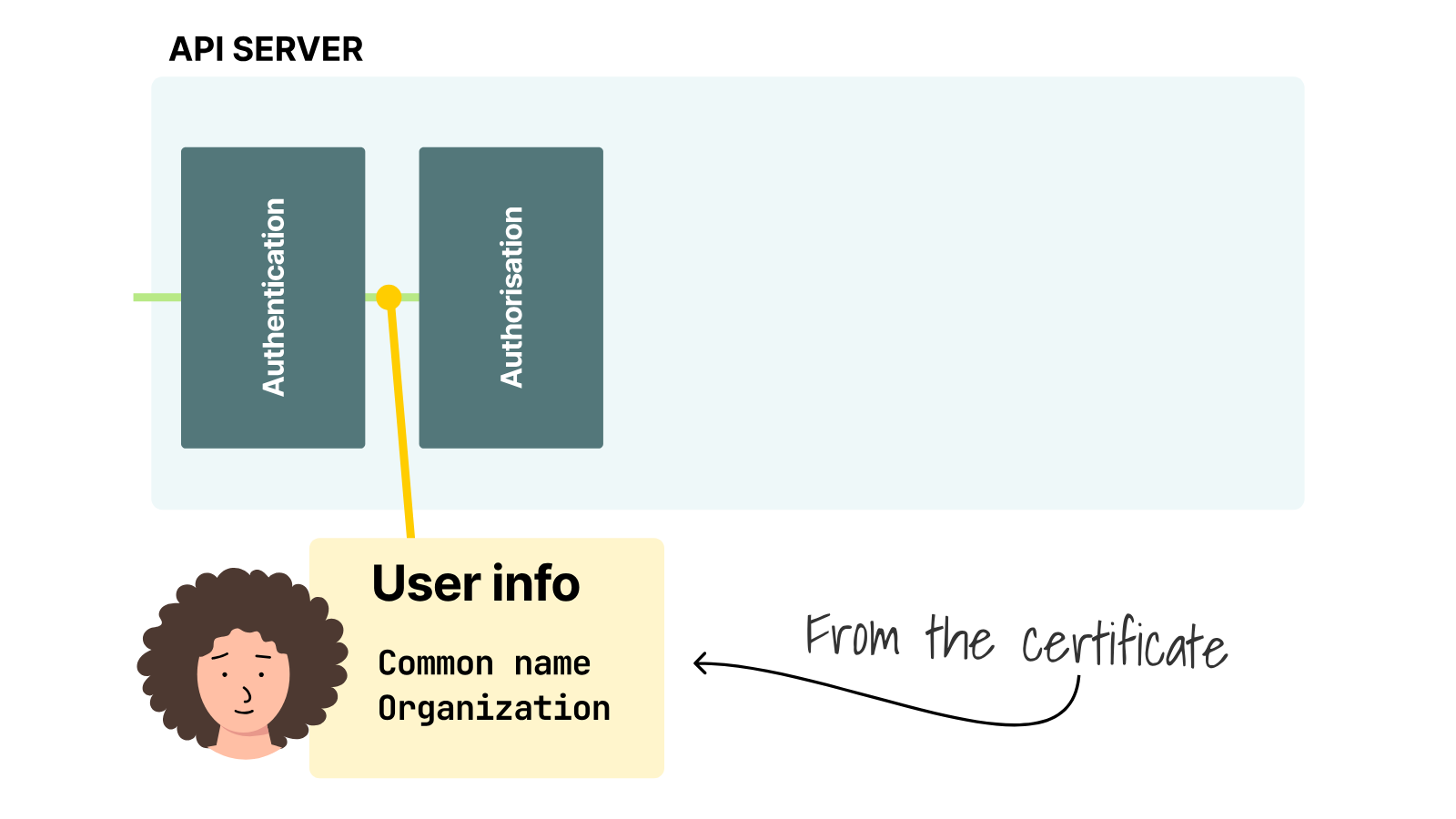
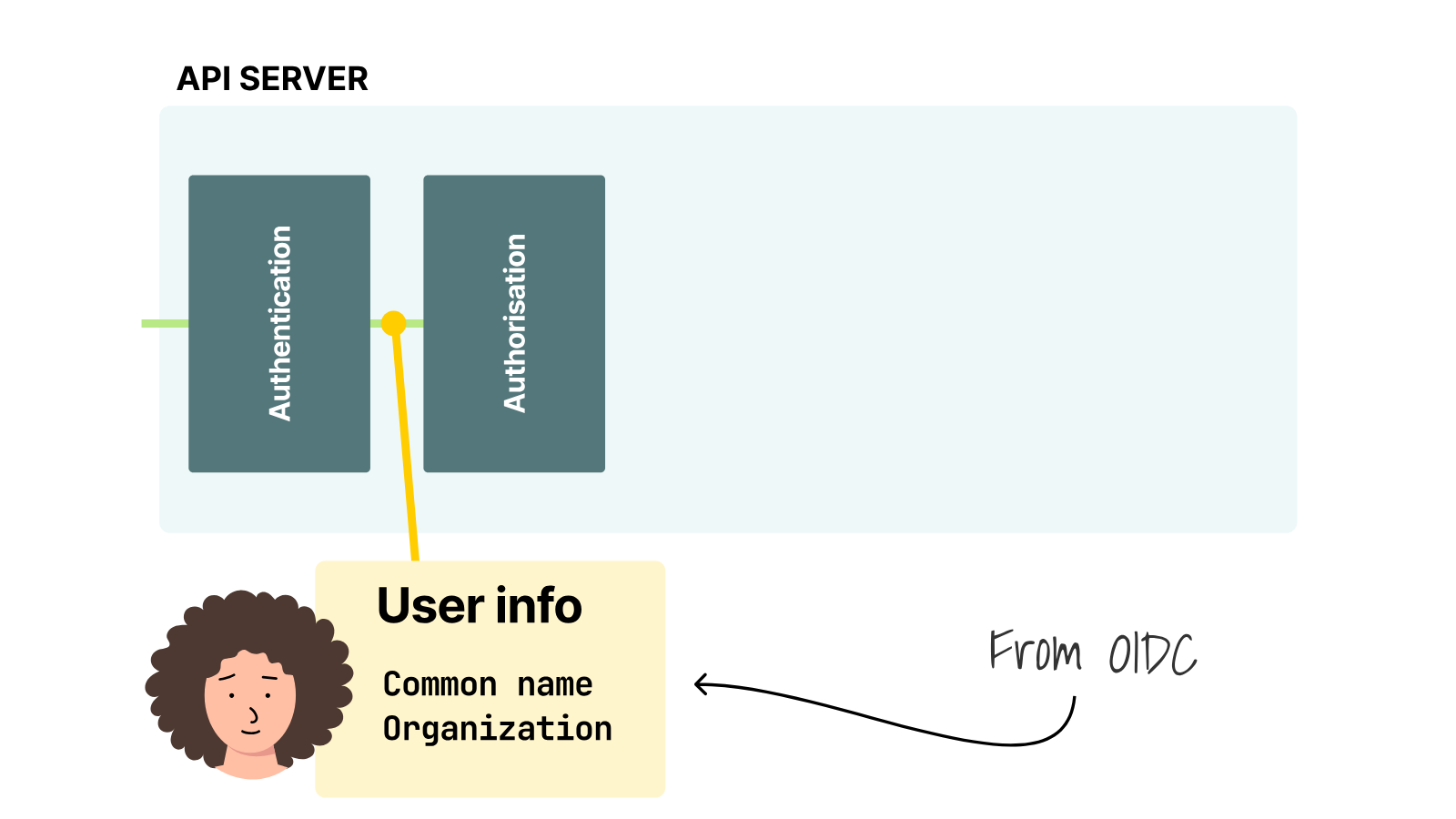
The API server reads the common name as the username and the organizations as groups.
So the certificate supplies system:admin (user) and system:masters (group).
Next, let's ask what this identity can do across all namespaces:
kubectl auth can-i '*' '*' --all-namespaces

yes
Every copy gets that same yes.
They all have unrestricted access as system:admin.
For comparison, verbose output shows an ordinary request and its response:
kubectl get namespaces -v=8

I0824 09:39:04.390843 round_trippers.go:527] "Request" verb="GET" \
  url="https://0.0.0.0:54780/api/v1/namespaces?limit=500"
I0824 09:39:04.394418 round_trippers.go:632] "Response" status="200 OK"

NAME              STATUS   AGE
default           Active   14m
kube-node-lease   Active   14m
kube-public       Active   14m
kube-system       Active   14m
In that exchange, the certificate established the system:admin identity.
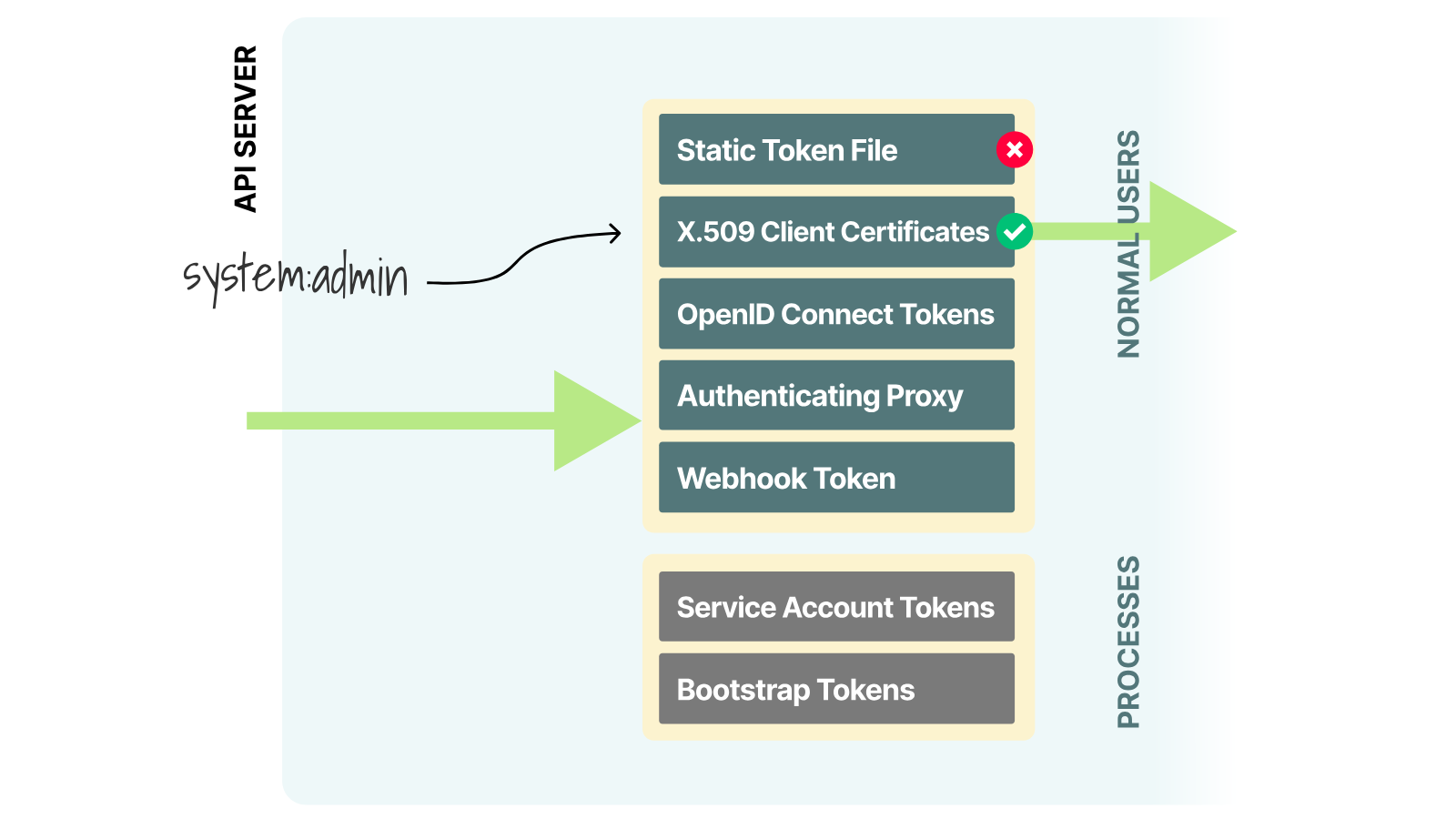
Authorization allowed the list operation, so the API server returned 200 OK.
The credentials are fully open (which is already a big problem), but even more importantly, Kubernetes cannot cancel just one copy of this certificate.
Every copy stays valid until the certificate runs out or the cluster stops trusting its certificate authority (CA).
Why the Certificate is Hard to Revoke
First, decode the client certificate from the k3d kubeconfig and inspect its lifetime:
yq -r '.users[0].user.client-certificate-data' ~/.kube/config \
  | base64 -d \
  | openssl x509 \
  -noout -subject -issuer -serial -dates

subject=O=system:masters, CN=system:admin
issuer=CN=k3s-client-ca@1787466259
serial=2A4097DE8F1053B6
notBefore=Aug 23 06:24:19 2026 GMT
notAfter=Aug 23 06:24:19 2027 GMT
The API server accepts the certificate because k3s-client-ca signed it, and it has not expired.
The serial number identifies this certificate, but Kubernetes does not maintain a list of client certificates to cancel.
Does deleting its CertificateSigningRequest revoke it?
Let's issue a certificate through the Kubernetes certificates API and test that exact action.
Alice belongs to platform-admins instead of system:masters, which keeps her permissions under RBAC control.
Create Alice's private key:
openssl genrsa -out alice-rbac.key 2048
Use that key to create a certificate request.
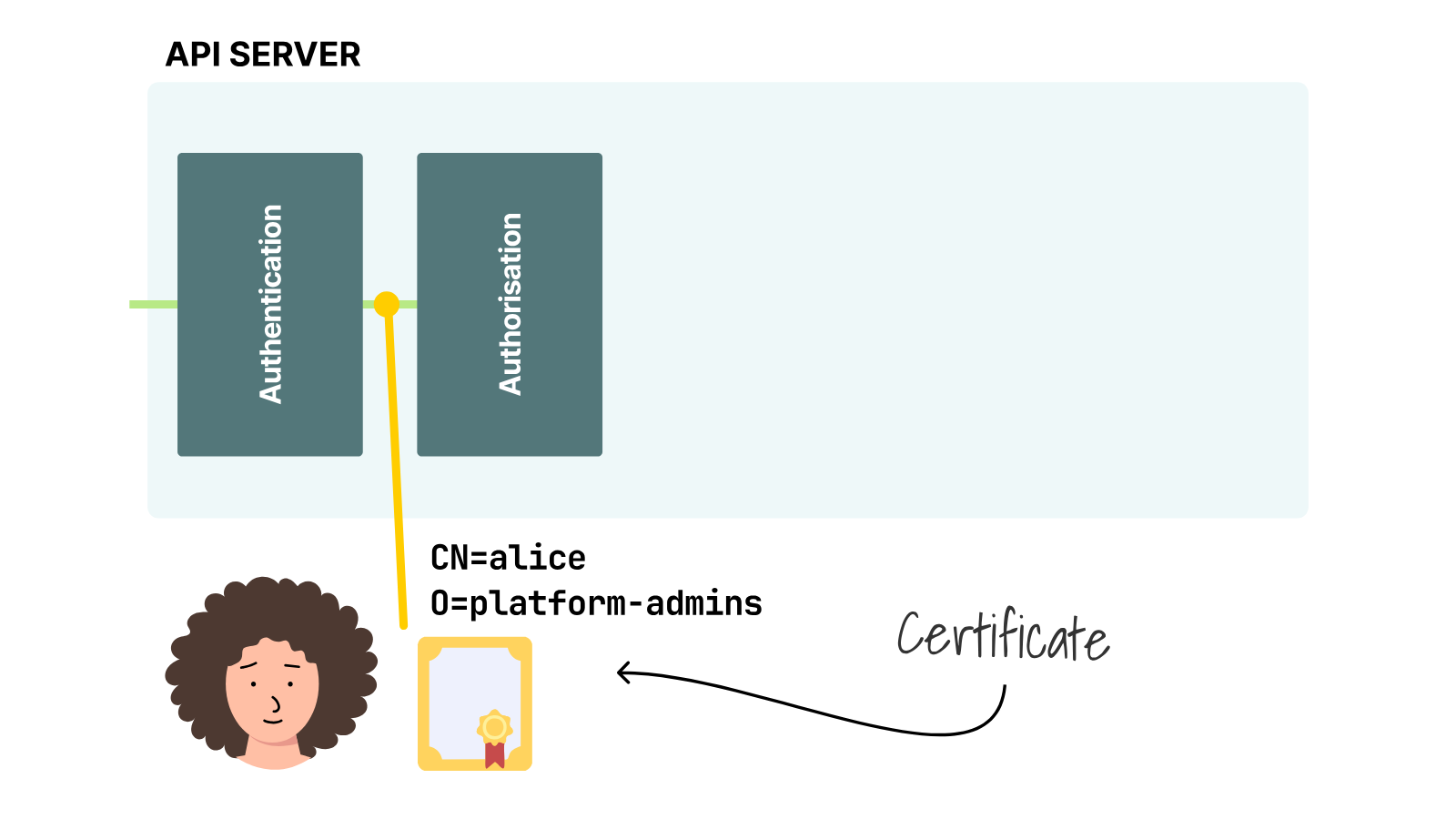
The common name (CN) becomes the username, and the organization (O) becomes the group:
openssl req \
  -new \
  -key alice-rbac.key \
  -out alice-rbac.csr \
  -subj '/CN=alice/O=platform-admins'
The Kubernetes API expects the request as a base64-encoded value:
CSR_REQUEST=$(base64 -w0 alice-rbac.csr)
Submit that value as a Kubernetes CertificateSigningRequest for client authentication:
kubectl apply -f - <<EOF
apiVersion: certificates.k8s.io/v1
kind: CertificateSigningRequest
metadata:
  name: alice-rbac
spec:
  request: ${CSR_REQUEST}
  signerName: kubernetes.io/kube-apiserver-client
  expirationSeconds: 86400
  usages:
    - client auth
EOF

certificatesigningrequest.certificates.k8s.io/alice-rbac created
An administrator must approve this request before the built-in signer returns a certificate:
kubectl certificate approve alice-rbac

certificatesigningrequest.certificates.k8s.io/alice-rbac approved
The CSR status now shows that the request is approved and issued:
kubectl get csr alice-rbac

NAME         AGE   SIGNERNAME                            REQUESTOR       REQUESTEDDURATION   CONDITION
alice-rbac   0s    kubernetes.io/kube-apiserver-client   system:admin   24h                 Approved,Issued
The API stores the issued certificate as base64 data.
Decode it and save the certificate as alice-rbac.crt:
kubectl get csr alice-rbac -o jsonpath='{.status.certificate}' \
  | base64 -d \
  | openssl x509 -out alice-rbac.crt
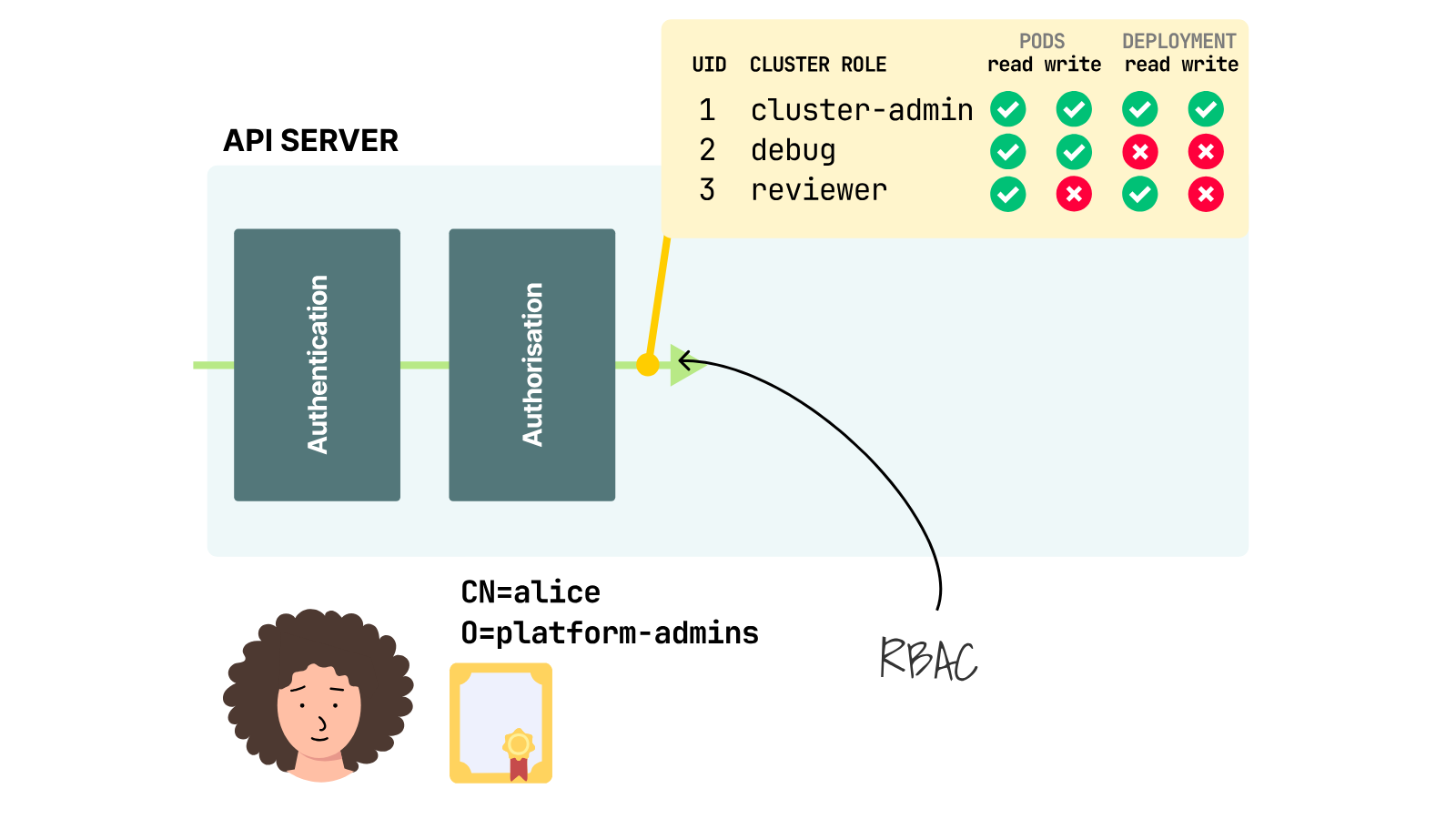
The certificate authenticates Alice, but it does not grant permissions on its own.
Bind platform-admins to the built-in cluster-admin role so that we can test authorization separately:
kubectl create clusterrolebinding platform-admins \
  --clusterrole=cluster-admin \
  --group=platform-admins

clusterrolebinding.rbac.authorization.k8s.io/platform-admins created
Now build Alice's kubeconfig.
First, read the API endpoint from the current kubeconfig:
SERVER=$(kubectl config view --minify -o jsonpath='{.clusters[0].cluster.server}')
The new kubeconfig also needs the server CA.
Decode it from the current kubeconfig:
yq -r '.clusters[0].cluster.certificate-authority-data' ~/.kube/config \
  | base64 -d > k3d-server-ca.crt
Create the cluster entry with the API endpoint and server CA:
kubectl config set-cluster k3d-lms-cluster \
  --server="$SERVER" \
  --certificate-authority=k3d-server-ca.crt \
  --embed-certs=true \
  --kubeconfig=alice-rbac.yaml
Create Alice's user entry with her certificate and private key:
kubectl config set-credentials alice \
  --client-certificate=alice-rbac.crt \
  --client-key=alice-rbac.key \
  --embed-certs=true \
  --kubeconfig=alice-rbac.yaml
Create a context that joins the cluster entry to Alice's user entry:
kubectl config set-context k3d-lms-cluster \
  --cluster=k3d-lms-cluster \
  --user=alice \
  --kubeconfig=alice-rbac.yaml
Select that context when this kubeconfig is used:
kubectl config use-context k3d-lms-cluster --kubeconfig=alice-rbac.yaml
The certificate contains the identity and expires after one day:
openssl x509 -in alice-rbac.crt -noout -subject -issuer -serial -dates

subject=O=platform-admins, CN=alice
issuer=CN=k3s-client-ca@1787466259
serial=552324C39D60644E9C231EC70C2E29C8
notBefore=Aug 24 07:02:53 2026 GMT
notAfter=Aug 25 07:02:53 2026 GMT
Alice's kubeconfig authenticates as the username and groups from her certificate:
kubectl --kubeconfig=alice-rbac.yaml auth whoami \
  -o jsonpath='{.status.userInfo.username}{"\n"}{.status.userInfo.groups}{"\n"}'

alice
[platform-admins system:authenticated]
The ClusterRoleBinding lets that group perform every action:
kubectl --kubeconfig=alice-rbac.yaml auth can-i '*' '*' --all-namespaces

yes
Delete the CertificateSigningRequest:
kubectl delete csr alice-rbac

certificatesigningrequest.certificates.k8s.io "alice-rbac" deleted
The issued certificate still authenticates Alice:
kubectl --kubeconfig=alice-rbac.yaml auth whoami -o jsonpath='{.status.userInfo.username}{"\n"}'
alice
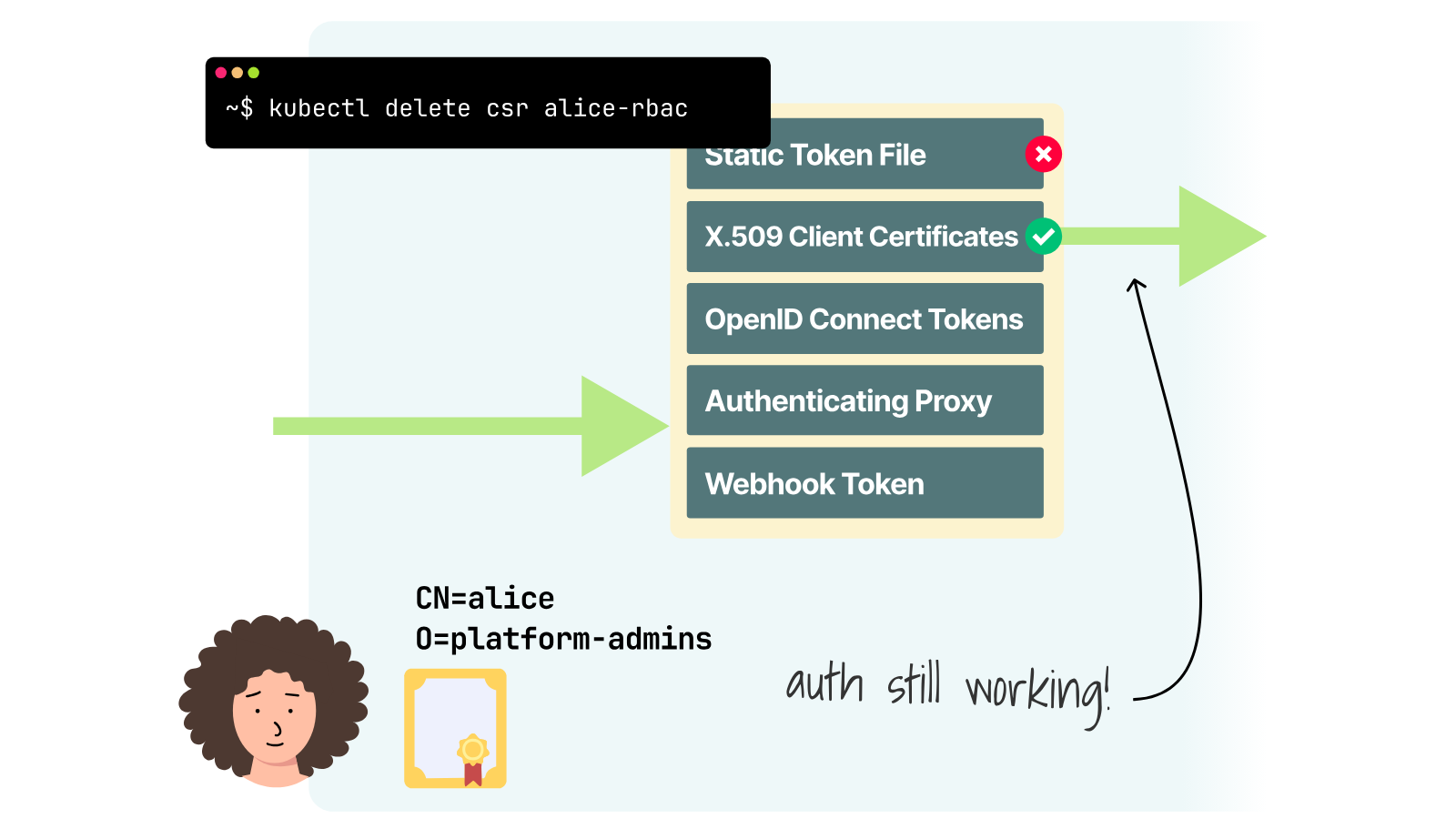
Her group also keeps its permission:
kubectl --kubeconfig=alice-rbac.yaml auth can-i '*' '*' --all-namespaces
yes
Deleting the CSR removes the record of the certificate, but the signed certificate still works until it expires.
Can you remove Alice's access without revoking the certificate?
Yes, because Alice receives her permissions through RBAC.
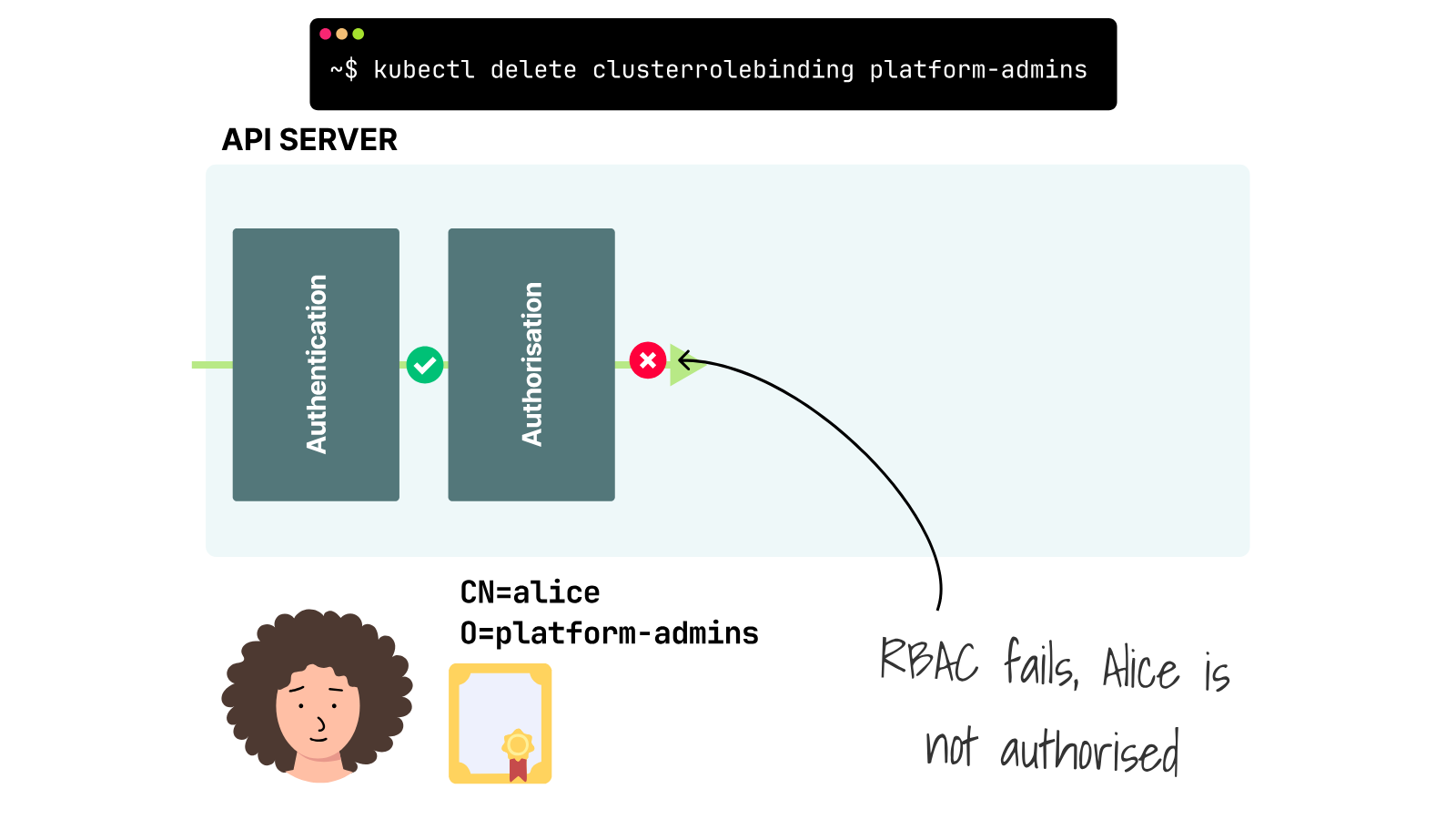
Delete the binding:
kubectl delete clusterrolebinding platform-admins

clusterrolebinding.rbac.authorization.k8s.io "platform-admins" deleted
The certificate still authenticates Alice:
kubectl --kubeconfig=alice-rbac.yaml auth whoami -o jsonpath='{.status.userInfo.username}{"\n"}'
alice
Without the binding, Alice no longer has unrestricted access:
kubectl --kubeconfig=alice-rbac.yaml auth can-i '*' '*' --all-namespaces
no
RBAC took away Alice's permission right away, but her certificate still identified her as alice.
Could you keep the shared kubeconfig and fix it to use RBAC?
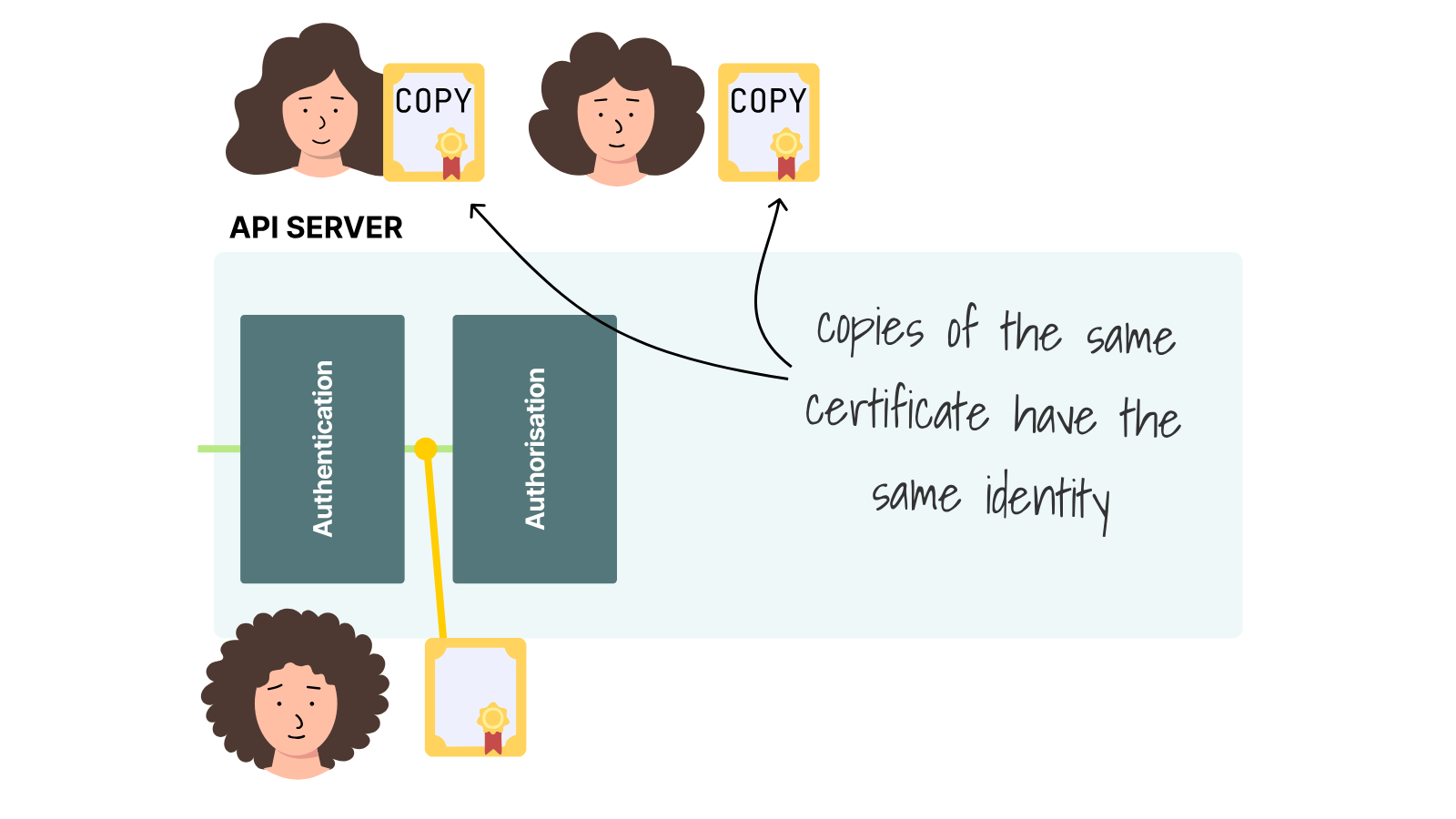
No, because RBAC controls access based on the username and groups the API server has already verified.
If five people copied alice-rbac.yaml, each would appear as alice and get the same RBAC permissions for the same request.
Deleting the binding would remove that permission from all five copies, not just one person's.
Can RBAC restrict the shared system:admin (user) certificate?
Its system:masters (group) bypasses RBAC and webhook authorization.
No RoleBinding or ClusterRoleBinding can limit that credential.
You have to wait for it to expire or remove its certificate authority (CA) from the API server's trusted list.
The second option means replacing the CA for the whole cluster.
K3s uses the same client CA for the admin credentials and internal clients.
The K3s certificate command shows some of them:
docker exec k3d-lms-cluster-server-0 \
  k3s certificate check --output table

FILENAME                    SUBJECT                     USAGES
client-admin.crt            system:admin                ClientAuth
client-kube-proxy.crt       system:kube-proxy           ClientAuth
client-kubelet.crt          system:node:k3d-lms-cluster ClientAuth
client-k3s-controller.crt   system:k3s-controller       ClientAuth
Rotating only client-admin.crt does not revoke a copied kubeconfig.
The old certificate still links to the trusted k3s-client-ca.
K3s therefore requires a full CA replacement to invalidate a compromised admin kubeconfig.
The new CA files must be staged outside /var/lib/rancher/k3s/server/tls and loaded with:
docker exec k3d-lms-cluster-server-0 \
  k3s certificate rotate-ca \
  --path=/var/lib/rancher/k3s/server/rotate-ca
K3s must then restart on every server and agent.
A new root CA also changes secure join tokens and can require Pod restarts.
The rotation cancels the copied admin certificate, but it also changes trust for the cluster's other clients.
That is the cost of revoking this system:masters certificate before it expires.
If client certificates are this difficult to revoke, why use them for human access?
A small, single-user cluster may choose simple certificate authentication.
kubeadm also puts a client certificate in admin.conf, which must stay on the control plane nodes instead of being shared with additional users.
Would a shared bearer token be easier?
Revoke a Shared ServiceAccount Token
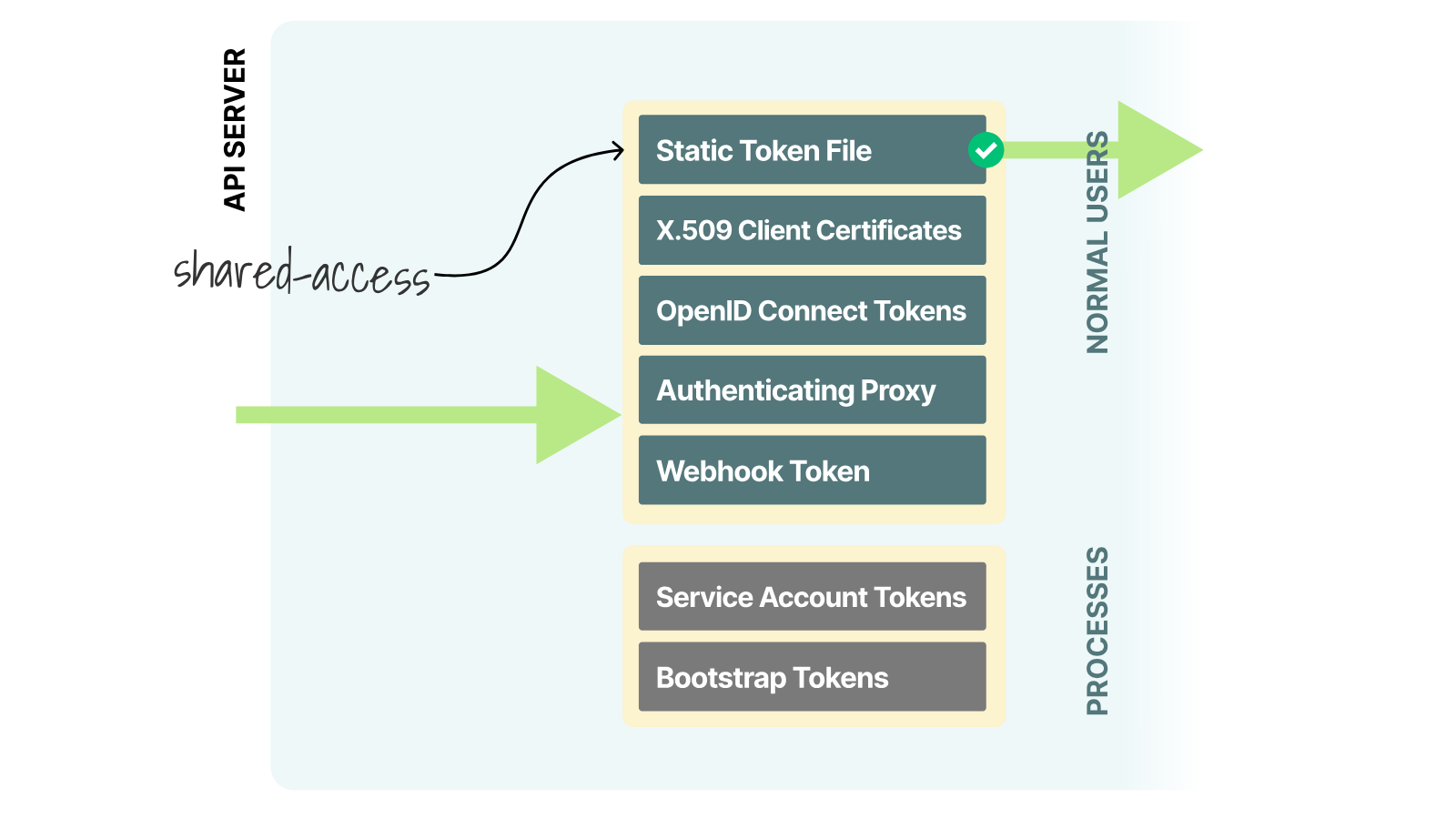
A bearer token in kubeconfig still gives every copy the same login details:
users:
  - name: shared-access
    user:
      token: <bearer-token>
Let's build two kubeconfigs using a single short-lived ServiceAccount token.
Create a namespace for the example:
kubectl create namespace kubeconfig-demo

namespace/kubeconfig-demo created
Create the shared-access ServiceAccount in that namespace:
kubectl --namespace=kubeconfig-demo create serviceaccount shared-access

serviceaccount/shared-access created
Give the ServiceAccount read-only access in the namespace:
kubectl --namespace=kubeconfig-demo create rolebinding shared-access-view \
  --clusterrole=view \
  --serviceaccount=kubeconfig-demo:shared-access

rolebinding.rbac.authorization.k8s.io/shared-access-view created
Request a token that expires after ten minutes and keep it in a shell variable:
TOKEN=$(kubectl --namespace=kubeconfig-demo \
  create token shared-access --duration=10m)
Read the API endpoint from the current kubeconfig:
SERVER=$(kubectl config view --minify -o jsonpath='{.clusters[0].cluster.server}')
Create the cluster entry in shared-token.yaml.
It uses the server CA that we extracted earlier:
kubectl config set-cluster k3d-lms-cluster \
  --server="$SERVER" \
  --certificate-authority=k3d-server-ca.crt \
  --embed-certs=true \
  --kubeconfig=shared-token.yaml
Create a user entry that contains the ServiceAccount token:
kubectl config set-credentials shared-access \
  --token="$TOKEN" \
  --kubeconfig=shared-token.yaml
Join the cluster and user entries in a context.
The context also selects kubeconfig-demo as the default namespace:
kubectl config set-context k3d-lms-cluster \
  --cluster=k3d-lms-cluster \
  --user=shared-access \
  --namespace=kubeconfig-demo \
  --kubeconfig=shared-token.yaml
Select that context:
kubectl config use-context k3d-lms-cluster --kubeconfig=shared-token.yaml
Copy the file to reproduce a shared kubeconfig:
cp shared-token.yaml shared-token-copy.yaml
The first file authenticates as the ServiceAccount:
kubectl --kubeconfig=shared-token.yaml \
  auth whoami -o jsonpath='{.status.userInfo.username}{"\n"}'
system:serviceaccount:kubeconfig-demo:shared-access
The copy returns the same username because it contains the same token:
kubectl --kubeconfig=shared-token-copy.yaml \
  auth whoami -o jsonpath='{.status.userInfo.username}{"\n"}'
system:serviceaccount:kubeconfig-demo:shared-access
The RoleBinding gives either copy permission to read Pods:
kubectl --kubeconfig=shared-token.yaml auth can-i get pods
yes
Kubernetes cannot revoke only one of these token copies because it does not keep a central record of individual short-lived ServiceAccount tokens.
Deleting and recreating the ServiceAccount changes its UID, invalidating all tokens issued under the old UID.
Does that happen the moment kubectl delete returns?
The token was already accepted, and the API server kept that result in memory for about ten seconds.
The timing test shows the gap:
system:serviceaccount:kubeconfig-demo:shared-access
delete started: 07:50:24 UTC
serviceaccount "shared-access" deleted from kubeconfig-demo namespace
delete returned: 07:50:24 UTC
attempt 1 at 07:50:24 UTC
system:serviceaccount:kubeconfig-demo:shared-access
attempt 2 at 07:50:29 UTC
system:serviceaccount:kubeconfig-demo:shared-access
attempt 3 at 07:50:34 UTC
error: You must be logged in to the server (Unauthorized)
After the cached result disappeared, the original file failed:
kubectl --kubeconfig=shared-token.yaml auth whoami
error: You must be logged in to the server (Unauthorized)
The copied file failed for the same reason:
kubectl --kubeconfig=shared-token-copy.yaml auth whoami
error: You must be logged in to the server (Unauthorized)
Deleting the ServiceAccount canceled every copy after a short delay, but it could not remove access for just one person.
The ten-minute expiry limited the damage if deletion failed or nobody knew which ServiceAccount created the token.
How can a kubeconfig avoid carrying the token in the first place?
Fetch a Credential When kubectl Runs
Replacing one shared secret with another does not fix the problem.
A better choice is to stop putting the secret in the kubeconfig from the start.
That is what the exec field is for: before making a request, kubectl asks another program for a credential.
The following entry uses kubelogin and an OpenID Connect provider:
users:
  - name: production-oidc
    user:
      exec:
        apiVersion: client.authentication.k8s.io/v1
        command: kubelogin
        args:
          - get-token
          - --oidc-issuer-url=https://login.example.com
          - --oidc-client-id=kubectl
        interactiveMode: IfAvailable
Look at what remains in the file.
The file has a command, an issuer, and a client ID, but no client certificate, private key, token, or password.
Those are login instructions.
Once kubectl needs a token, the plugin signs in whoever is at the keyboard and returns an ExecCredential on standard output.
I gave Dex a deliberately silly one-minute ID-token lifetime in the lab.
Production tokens usually last longer, but waiting an hour for each one to expire would slow the test.
Store Alice's demo password in a shell variable:
DEX_DEMO_PASSWORD=password
Ask kubelogin for Alice's token:
kubelogin get-token \
  --oidc-issuer-url=https://dex.k3d.test:5556/dex \
  --oidc-client-id=kubectl \
  --oidc-extra-scope=email \
  --certificate-authority=dex-tls.crt \
  --grant-type=password \
  [email protected] \
  --password="$DEX_DEMO_PASSWORD" \
  --token-cache-dir=alice-cache
The command returns an ExecCredential with the token and its expirationTimestamp.
Until that time, kubectl can reuse the credentials.
A 401 Unauthorized from the API server also sends it back through the login path.
Of course, the API server also has tasks to handle.
It must trust the issuer and client ID, then map one of the token claims to a username.
These are API server startup flags.
For the lab, I passed them through K3s when I created the K3d cluster:
k3d cluster create lms-cluster \
  --volume "$PWD/dex-tls.crt:/var/lib/rancher/k3s/server/tls/dex-ca.crt@server:*" \
  --k3s-arg '--kube-apiserver-arg=oidc-ca-file=/var/lib/rancher/k3s/server/tls/dex-ca.crt@server:*' \
  --k3s-arg '--kube-apiserver-arg=oidc-client-id=kubectl@server:*' \
  --k3s-arg '--kube-apiserver-arg=oidc-issuer-url=https://dex.k3d.test:5556/dex@server:*' \
  --k3s-arg '--kube-apiserver-arg=oidc-username-claim=email@server:*'
The volume mounts the Dex CA into each server container.
The --k3s-arg options forward the four OIDC settings to the Kubernetes API server.
With the email claim in place, Alice's kubeconfig returns her email address:
kubectl --kubeconfig=alice-oidc.yaml auth whoami

ATTRIBUTE   VALUE
Username    [email protected]
Groups      [system:authenticated]
Bob's kubeconfig returns a different identity:
kubectl --kubeconfig=bob-oidc.yaml auth whoami

ATTRIBUTE   VALUE
Username    [email protected]
Groups      [system:authenticated]
To the API server, these are two different people, not two copies. They can have separate RBAC permissions and separate audit logs.
There is a catch, and it matters whenever a kubeconfig comes from an unfamiliar source.
The exec command runs on the engineer's machine and executes a real program.
Now, let's revisit the revoking mechanism.
Revoke One OIDC User
For the offboarding test, Alice and Bob both started with tokens that expired at 07:34:36Z:
alice token expires at 2026-08-24T07:34:36Z
bob token expires at 2026-08-24T07:34:36Z
At 07:33:36Z, I disabled Alice's account in Dex.
This removed her ability to obtain another token but did not invalidate her current token.
Alice's next request still succeeded.
The token in Alice's cache was already signed, and the API server could verify it without calling Dex.
For the remainder of that minute, her old identity still worked:
kubectl --kubeconfig=alice-oidc.yaml \
  auth whoami -o jsonpath='{.status.userInfo.username}{"\n"}'
[email protected]
Bob's identity also continued to work:
kubectl --kubeconfig=bob-oidc.yaml \
  auth whoami -o jsonpath='{.status.userInfo.username}{"\n"}'
[email protected]
Alice also kept her existing permission:
kubectl --kubeconfig=alice-oidc.yaml auth can-i get pods
yes
Five seconds after the deadline, Alice tried again.
Her cached token was now useless, so kubelogin went back to Dex for a fresh login and found that the account was gone:
Password:
error: get-token: authentication error: ropc error: oauth2: "access_denied" "Invalid username or password"
Unable to connect to the server: getting credentials: exec: executable kubelogin failed with exit code 1
Bob's cache expired, too, but this is where the separate identities paid off.
Dex still knew Bob, issued him another token, and his command was completed:
kubectl --kubeconfig=bob-oidc.yaml auth whoami

Password:
ATTRIBUTE   VALUE
Username    [email protected]
Groups      [system:authenticated]
Please note that the password prompt is only a quirk of this reproducible lab, which uses the Dex local-password connector. In production, you should expect a browser, a device flow, or a company CLI instead.
Removing the account did not erase Alice's current token, but it blocked her next login.
Bob's access was untouched.
Remember that the one-minute delay was not a special feature of Dex or Kubernetes.
It came from the token lifetime configured for the lab.
Without extra checks to cancel tokens, the token's lifetime is the longest delay before access is removed.
The replacement kubeconfig can still contain the cluster endpoint and login command.
The plugin must return a separate, short-lived credential with an expiration time for each user (an expiration time).
After it expires, kubectl asks the plugin again instead of reusing the old login.
RBAC works on the username and groups from that login.
Summary
The important result from this lab is that each credential behaves differently when you try to remove access.
- Deleting a CSR did nothing to its signed certificate.
- RBAC stopped an ordinary certificate identity, but it could not distinguish five people using that identity.
- Recreating a ServiceAccount killed every token for the old UID, and removing a client CA also took out the control plane clients that still depended on it.
That leaves me with a simple rule: if a kubeconfig contains a reusable certificate or token, treat the entire file as a production credential.
For most people, an exec plugin and an individual SSO login are a much less painful combination.
There is still an offboarding delay while the final token remains valid, but a disabled account no longer removes access for everyone else.
Individual Kubernetes Access With Teleport
Each engineer needs a separate login and a credential that expires to replace a shared production kubeconfig.
Teleport supports this model with company SSO and short-lived certificates for access through its proxy.
Engineers continue to use kubectl, while Teleport roles control which clusters they can access and which Kubernetes identities they can assume.
This allows team to grant access to Alice and Bob individually rather than share copies of one production credential.
Learn more about Kubernetes access with Teleport.

Daniele Polencic
Daniele is the founder of LearnKube, where he writes and teaches about Kubernetes. His work turns complex infrastructure topics into practical guidance for engineers who build and operate production systems.

Gulcan Topcu
Gulcan is a Kubernetes engineer and instructor at LearnKube. She writes about Kubernetes security, networking, and the challenges engineers face in production.
Table Of Contents
Teleport Newsletter
Stay up-to-date with the newest Teleport releases by subscribing to our monthly updates.
Tags
Tags
Teleport Newsletter
Stay up-to-date with the newest Teleport releases by subscribing to our monthly updates.
Related Articles
SSO-Backed kubectl Access Across Many Clusters
Learn how to configure multi-cluster kubectl access.
Kubernetes for Agentic AI: Best Practices for Security and Observability
Discover 18 Kubernetes security, observability, and availability best practices for container-based agentic workloads.
Securing kubectl on Remote Kubernetes Clusters Without Static Credentials or VPNs
Learn how to secure Kubernetes access across remote fleets without creating risk.