How to Reduce Overprivileged Kubernetes Service Accounts
Table Of Contents
- IN THIS BLOG
- How service accounts end up with cluster-admin
- How cluster-admin bindings spread
- The blind spot between Kubernetes RBAC and cloud IAM
- Secrets and certificates have a similar lifecycle problem
- Eliminate static and shared credentials
- Apply least privilege to Kubernetes access
- How to scale Kubernetes RBAC across multi-cluster and multi-cloud environments
- Conclusion
IN THIS BLOG
Overprivileged Kubernetes ServiceAccounts persist when broad RBAC, cloud IAM permissions, and long-lived credentials outlive their intended use. Reduce overprivileged access with least privileged RBAC, scoped cloud permissions, and short-lived certificates that eliminate static credentials.
I spent two days last quarter tracking down why a developer could delete production secrets. The RBAC looked fine. The ClusterRoleBinding said edit, not cluster-admin. But someone had bound the default service account to cluster-admin permissions in a CI namespace three years ago, and that developer’s pod was using it. Because the pod could make Kubernetes API calls with cluster-wide privileges, the blast radius spanned the entire cluster.
Most overprivileged Kubernetes access starts as a temporary workaround: a CI pipeline needs to deploy across namespaces, an operator needs to watch all CustomResources, or a monitoring tool needs read access to the entire cluster.
But when the permissions a workload needs aren’t clear, someone may grant cluster-admin, leaving broader access in place indefinitely.
Cloud IAM adds another layer. That same service account can federate to a cloud identity with permissions Kubernetes RBAC doesn’t manage. A workload locked down to one namespace in Kubernetes might have write access to production S3 buckets through its cloud role. The two permission systems are managed separately, with no coordination, and the effective permissions are the union of both.
Before Kubernetes 1.24, static service account tokens were automatically generated with no expiration. Secrets mounted into pods and stayed readable. The pod could die, but its service account token remained valid, leaving behind a reusable credential that could be exfiltrated.
How service accounts end up with cluster-admin
Teams often grant cluster-admin permissions to service accounts because they’re blocked and need to ship.
I’ve watched it happen in real time. A developer hits a permission error deploying a new CRD. They’re not sure which specific verbs and resources they need. The RBAC documentation is dense, and they have a sprint deadline. cluster-admin fixes the error immediately. The PR ships, and broad permission remains in place without a follow-up ticket to restrict it.
This is the RBAC binding that gives a CI service account unrestricted access:
apiVersion: rbac.authorization.k8s.io/v1
 kind: ClusterRoleBinding
 metadata:
   name: ci-deployer-adminz
 roleRef:
   apiGroup: rbac.authorization.k8s.io
   kind: ClusterRole
   name: cluster-admin
 subjects:
 - kind: ServiceAccount
   name: ci-deployer
   namespace: ci
Applying least-privilege in Kubernetes RBAC can become a tedious, iterative process of testing which resources and verbs a workload requires. You can’t easily ask “what does this pod actually need?” The tooling can help verify what a service account is allowed to do, but defining the right permission set can still involve trial and error. So teams often grant broad permissions to avoid debugging auth errors under time pressure.
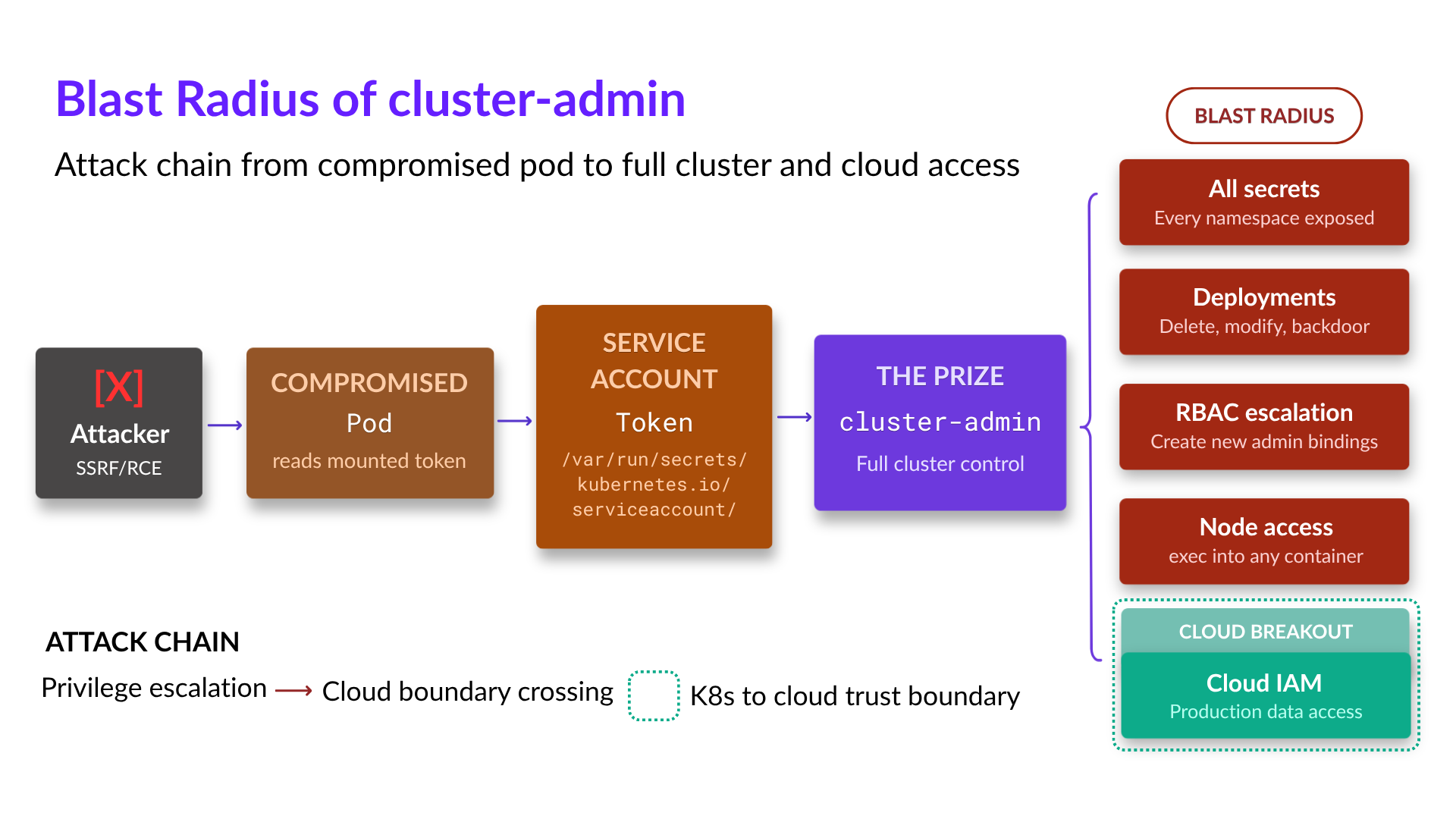
The blast radius this approach creates is significant. That service account can read every secret in the cluster, delete deployments in any namespace, or create new ClusterRoleBindings and escalate other identities. If a container in that pod gets compromised through a dependency vulnerability or an SSRF attack, the attacker now inherits full cluster control.
Warning:
A cluster-admin binding on a service account grants the same privileges as kubectl with cluster-admin access. Any container compromise in a pod using that service account gives an attacker full cluster control — secrets, workloads, RBAC, everything.
How cluster-admin bindings spread
These overprivileged bindings can quickly replicate across clusters.
I audited a platform team last year that had identical cluster-admin bindings in 14 clusters across three clouds. The original binding was in a Terraform module for their “base cluster” configuration, meaning every new cluster inherited it, and the binding persisted as part of the shared baseline configuration.
Overprivileged RBAC can also be baked into Helm charts. For example, teams find a chart that deploys their operator, install it without reading the RBAC templates, and wonder later why the operator can do anything it wants. The chart author included cluster-admin because it was the easiest way to make the chart work in all environments. One shortcut upstream became a fleet-wide default.
In a GitOps-managed environment, the binding can become part of the desired state. When the ClusterRoleBinding is in the repo, it syncs to every cluster the GitOps controller manages. Delete it manually, and ArgoCD or Flux puts it right back. The “one exception” becomes a permanent fleet standard because it’s checked into version control.
Bootstrap scripts are the most common source of this. Teams write scripts to stand up new clusters quickly, and those scripts include whatever RBAC was needed for the first cluster. Three years later, the script still runs on every new cluster, creating the same overprivileged binding each time.
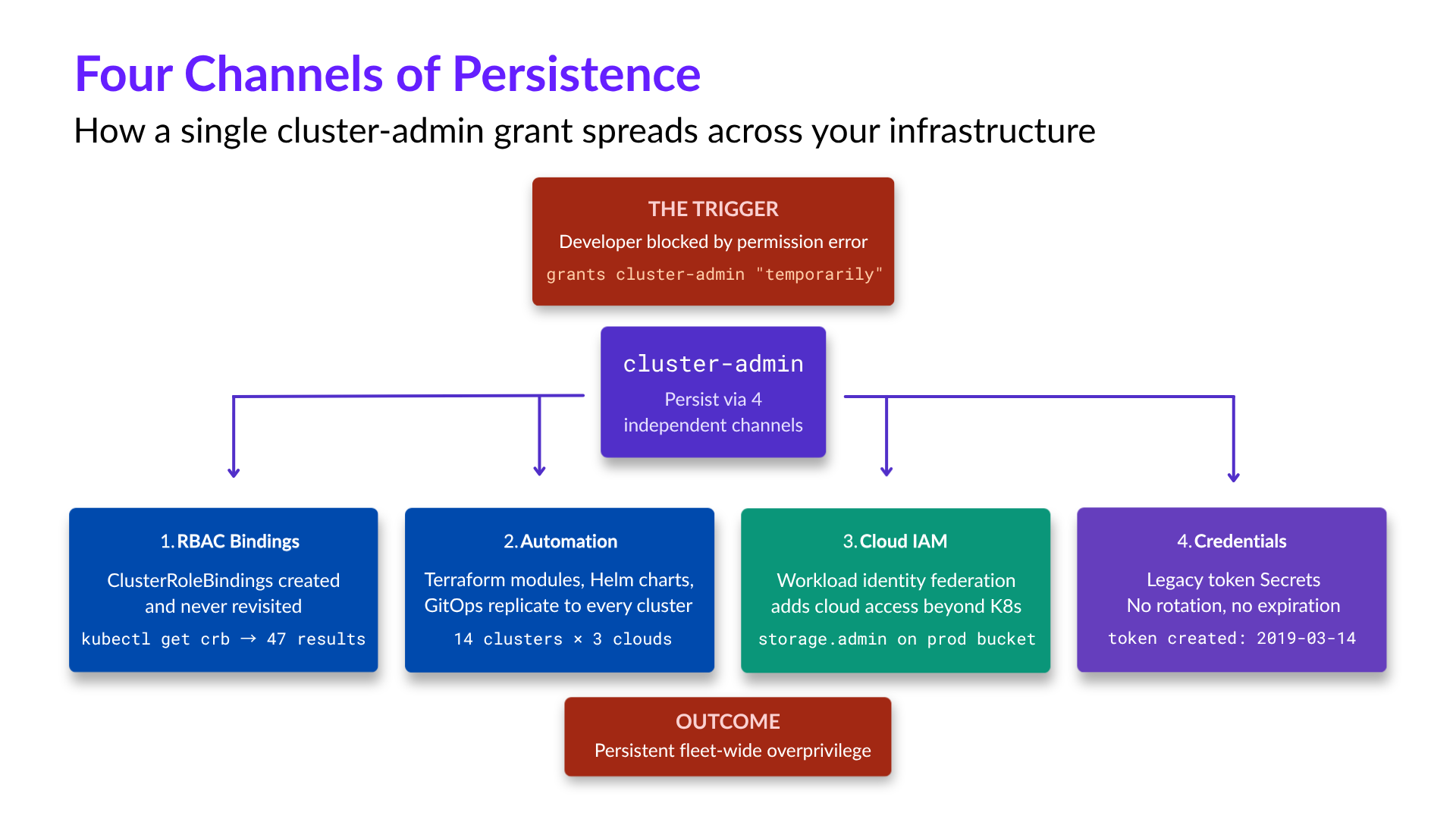
Overprivileged Kubernetes access persists through four channels: RBAC bindings, shared automation, cloud permissions, and long-lived credentials.
The blind spot between Kubernetes RBAC and cloud IAM
Kubernetes RBAC and cloud IAM are separate systems that make separate decisions. Neither knows what the other allows.
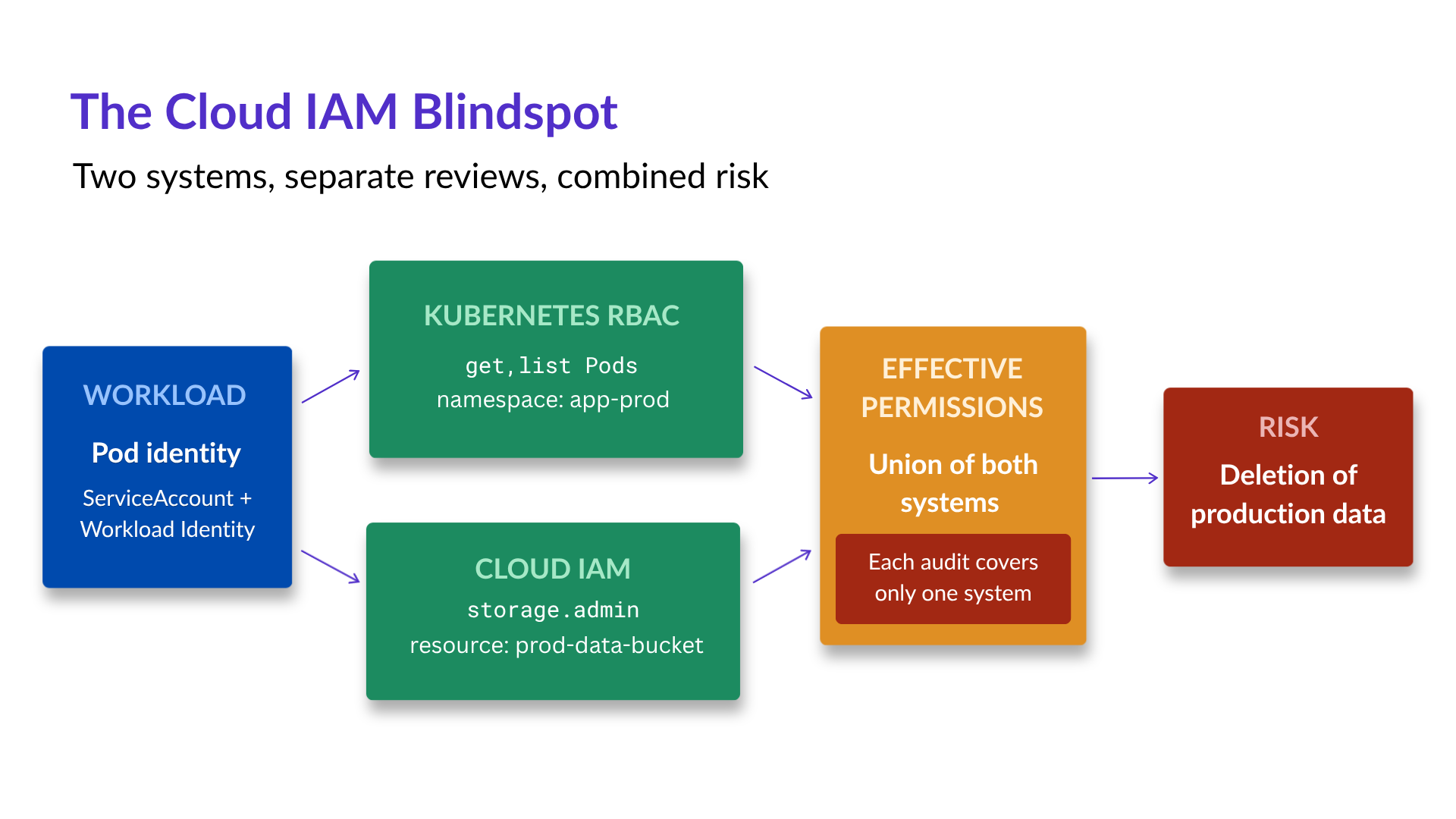
I spent a full day on an incident where the Kubernetes permissions looked correct. The service account had get and list permissions on pods in its own namespace. Minimal RBAC, exactly what least privilege should look like. However, the cloud role bound through workload identity had storage.admin on the production bucket. The compromised pod couldn’t escalate inside the cluster, but it could delete the entire data tier.
A blind spot in access reviews appears when Kubernetes RBAC and cloud IAM are assessed in isolation. The Kubernetes side passes because RBAC is limited to one namespace. The cloud side passes because the role is “only used by that one workload.” But without tracing the full path from container to cloud, it’s difficult to confidently determine what an attacker controlling that container could access.
Investigators must reconstruct that same access path through workload identity federation. This means that when something goes wrong, you’re now debugging two permission systems with separate logs, principals, and evaluation logic. For example, the Kubernetes audit log shows the service account made an API call, while the cloud audit log shows a different principal accessed a bucket. Connecting them requires understanding exactly how the identity federation is configured, which requires analyzing annotations, IAM bindings, and trust policies across both systems.
The effective permissions a service account is left with are the union of both layers. A workload is only as locked down as the more permissive of its Kubernetes RBAC and its cloud IAM. Auditing each layer separately does not account for this combined risk.
Secrets and certificates have a similar lifecycle problem
Long-lived credentials outlast the workloads that created them. Before Kubernetes 1.24, creating a ServiceAccount automatically generated a static token stored in a Secret. If you’re running clusters upgraded from earlier versions, those secrets might still exist. I’ve found static tokens from 2019 in clusters running current Kubernetes versions, often because the ServiceAccount was still in use.
Here’s how to find legacy token secrets in your cluster:
kubectl get secrets --all-namespaces -o json | \
   jq -r '.items[] | select(.type=="kubernetes.io/service-account-token") |
   "\(.metadata.namespace)/\(.metadata.name) - created: \(.metadata.creationTimestamp)"'
Certificate rotation failures hit harder because they cause outages. I got called into a production incident where service-to-service calls were failing intermittently. The error was TLS handshake failures, which made it look like a network issue. It turned out that the service mesh certificate authority’s (CA) certificate had expired. New pods couldn’t get valid certificates, but existing pods kept working until their certificates expired, too. The failure cascaded slowly over hours, which made it harder to correlate with the root cause.
Warning:
Legacy service account tokens created before Kubernetes 1.24 have no expiration. The BoundServiceAccountTokenVolume feature became GA in 1.22, but existing secrets weren’t removed during upgrade. You have to find and delete them manually.
Static credentials are not inherently difficult to rotate. Automated rotation systems can replace them on a defined schedule or policy, reducing manual coordination. Applications that cache or embed a credential still need a way to retrieve or reload the current value after rotation. For example, Kubernetes containers that mount a Secret with subPath don’t receive updates, so they keep using the old value until the pod restarts, and rotation can break silently.
Short-lived X.509 or SSH certificates use a different lifecycle: each certificate is issued with a defined validity period, so its validity ends at expiration rather than depending on a later rotation or revocation event.
ServiceAccount risk spans both credentials and permissions, and changes to either can affect CI jobs, controllers, and workloads that depend on the existing configuration. Start with visibility into existing credentials, permissions, and dependencies, then prioritize remediation based on risk and operational impact. Broad cluster-wide access may take priority over a legacy token with limited permissions and exposure, and some credentials cannot be retired until another authentication path exists.
From there, remediation can focus on three areas: eliminating static and shared credentials, narrowing ServiceAccount permissions, and keeping RBAC consistent across clusters.
Eliminate static and shared credentials
Eliminating overprivileged service accounts requires replacing long-lived credentials with identity-based authentication that doesn’t require secrets.
For humans accessing clusters, federate to your identity provider through OIDC. Users authenticate through SSO, and their identity provider issues short-lived certificates. Authentication stays tied to the individual instead of embedded kubeconfig credentials or shared ServiceAccount tokens for “the dev team.” Each user is a distinct principal with auditable access.
For workloads, configure ServiceAccounts to not auto-mount tokens when they don’t need Kubernetes API access:
apiVersion: v1
 kind: ServiceAccount
 metadata:
   name: web-frontend
   namespace: production
 automountServiceAccountToken: false
Most application pods don't call the Kubernetes API, and don’t need a token mounted. Disabling automount removes the credential from the container entirely, leaving nothing to steal.
For workloads calling cloud APIs, use workload identity federation instead of static cloud credentials. This way, the pod gets a Kubernetes token, exchanges it for cloud credentials, and those credentials expire. As a result, there is no need to store IAM user access keys in Secrets. However, provider-native federation ties each workload’s identity to a single cloud’s IAM. SPIFFE gives workloads a vendor-neutral identity that stays consistent across clusters and clouds. Its reference implementation, SPIRE, issues short-lived credentials for service-to-service mTLS and cloud federation through OIDC.
The hardest static credentials to remove are the ones that cross organizational boundaries: integration tokens for SaaS platforms, API keys for third-party services that don’t support OIDC federation, and webhook secrets that external systems use to call into your cluster.
These persist because you can’t unilaterally switch to a better auth model. The other side has to support the replacement authentication method.
Run an audit to surface and inventory where static credentials still exist in your secrets:
# Find manually-created service account tokens (legacy pattern)
 kubectl get secrets --all-namespaces -o json | \
   jq '.items[] | select(.type=="kubernetes.io/service-account-token") |
   {namespace: .metadata.namespace, name: .metadata.name,
    created: .metadata.creationTimestamp}'

 # Check which secrets haven't been modified in over a year
 kubectl get secrets --all-namespaces -o json | \
   jq --arg cutoff "$(date -d '1 year ago' -Iseconds 2>/dev/null || date -v-1y +%Y-%m-%dT%H:%M:%SZ)" \
   '.items[] | select(.metadata.creationTimestamp < $cutoff) |
   {namespace: .metadata.namespace, name: .metadata.name}'
Prioritize removing the ones that provide broad access, then work through the long tail.
Apply least privilege to Kubernetes access
The next step to eliminating overprivileged service accounts is to replace cluster-admin with granular RBAC matched to actual job or task requirements using the principle of least privilege.
The theory is simple: grant only the permissions each principal needs for the task. The challenge is determining what a workload needs without having to trace every API call it makes. Many teams don’t have that visibility, and may overprovision to avoid failed deployments or disrupted workloads.
To apply least privilege, start by auditing who has cluster-admin:
kubectl get clusterrolebindings -o json | \
   jq '.items[] | select(.roleRef.name == "cluster-admin") |
   {name: .metadata.name, subjects: .subjects}'
You’ll probably find more bindings than you expected: legitimate cluster operators, CI service accounts that only need access to specific namespaces, and legacy bindings with no clear owner or documented reason for existing.
That CI deployer from earlier? Replace it with a namespace-bound Role instead of a cluster-wide ClusterRole:
apiVersion: rbac.authorization.k8s.io/v1
 kind: Role
 metadata:
   name: ci-deployer
   namespace: staging
 rules:
 - apiGroups: ["apps"]
   resources: ["deployments", "replicasets"]
   verbs: ["get", "list", "watch", "create", "update", "patch"]
 - apiGroups: [""]
   resources: ["services", "configmaps"]
   verbs: ["get", "list", "watch", "create", "update", "patch"]
 - apiGroups: [""]
   resources: ["pods"]
   verbs: ["get", "list", "watch"]
 ---
 apiVersion: rbac.authorization.k8s.io/v1
 kind: RoleBinding
 metadata:
   name: ci-deployer
   namespace: staging
 roleRef:
   apiGroup: rbac.authorization.k8s.io
   kind: Role
   name: ci-deployer
 subjects:
 - kind: ServiceAccount
   name: ci-deployer
   namespace: ci
Now, this service account can deploy to staging, but nowhere else, including secrets access, other namespaces, or other cluster-level resources.
Next, test what permissions a service account actually has before and after your changes:
# List all permissions for a service account
 kubectl auth can-i --list --as=system:serviceaccount:ci:ci-deployer

 # Test specific actions
 kubectl auth can-i delete secrets --as=system:serviceaccount:ci:ci-deployer -n production
 kubectl auth can-i create clusterrolebindings --as=system:serviceaccount:ci:ci-deployer
For human access, require MFA for any privileged operation. Use just-in-time elevation so that admins don’t have standing cluster-admin access. Instead, they request elevated permissions, approve through a separate channel, and the elevation expires automatically. This creates an audit trail and reduces the window where a compromised admin credential has broad access.
The hardest part is narrowing existing cluster-admin bindings. With live dependencies, you can’t remove the binding and see what breaks in production. Instead, enable audit logging at the RequestResponse level, let the workload run for a cycle, and analyze what API calls it actually makes. Then, you can create a custom Role with only those permissions.
For machine identities, including AI agents and autonomous workflows running in Kubernetes, one overprivileged ServiceAccount can become a reusable permission path across automated actions. An agent may use its ServiceAccount for Kubernetes API access and federate that workload identity to cloud IAM, extending its effective permissions beyond the cluster. Applying least privilege starts by scoping those Kubernetes and cloud permissions to only what the agent needs.
How to scale Kubernetes RBAC across multi-cluster and multi-cloud environments
As clusters multiply, the access matrix gets more complex. Clusters accumulate their own exceptions and workarounds, and the same users or groups may need varying permissions across environments. The result is more RoleBindings, group mappings, and local exceptions to manage consistently.
To prevent access changes from becoming cluster-by-cluster work, manage RBAC definitions in one place: version control. Use the same Helm chart or Kustomize base for roles across all clusters. When you need to grant a new permission, update it in one place, and if GitOps manages those clusters, sync the change through that workflow. When you need to revoke access, follow the same managed process so outdated bindings do not remain in a cluster that was missed or forgotten.
Federation to a common identity provider that handles authentication and group membership can give clusters a consistent source of user identity. Whether users access an EKS cluster in us-east-1 or a GKE cluster in europe-west1, they authenticate through the same IdP with the same policies. Group memberships map to cluster roles consistently, and onboarding and offboarding happen in one place.
EKS, AKS, and GKE each have different mechanisms for identity federation, different native RBAC integrations, and different audit log formats. Self-managing clusters running upstream Kubernetes, whether on-prem or on cloud VMs, have none of this built in. Teams have to configure authentication themselves, such as OIDC on the API server or a webhook authenticator like aws-iam-authenticator, and audit logging stays off until they define an audit policy. Tooling that abstracts these differences into a consistent policy layer reduces the daily workload. Without abstraction, every cluster is a special case, and security controls drift.
The only way to maintain consistency at scale is through automation. Build pipelines that validate RBAC configurations against policy, detect drift from the approved configuration, and enforce standards. Without automated checks and review, one-off exceptions can persist across clusters long after the original need has passed.
Conclusion
Broad Kubernetes access starts as a shortcut and persists through RBAC bindings that nobody revisits, shared automation that replicates them, cloud permissions that add to the risk, and long-lived credentials.
Reducing overprivileged ServiceAccount access requires working on all four channels:
- Audit who has
cluster-adminand why. - Trace your automation to find where bindings replicate.
- Map the full path from service account to cloud permissions.
- Find the static credentials and replace them with identity-based auth.
Prioritize the highest-risk access first, then use automation to keep changes consistent as clusters scale. The goal is to eliminate unnecessary cluster-admin access.
Eliminate overprivileged Kubernetes ServiceAccounts with Teleport
Learn how Teleport eliminates standing Kubernetes ServiceAccount credentials and privileges by:
- Replacing long-lived credentials with short-lived certificates that are issued and renewed automatically.
- Restricting which clusters a machine or workload can access using role and cluster selectors rather than broad cluster access.
- Authenticating with ServiceAccount identity, so workloads don't rely on a long-lived shared secret.
Table Of Contents
- IN THIS BLOG
- How service accounts end up with cluster-admin
- How cluster-admin bindings spread
- The blind spot between Kubernetes RBAC and cloud IAM
- Secrets and certificates have a similar lifecycle problem
- Eliminate static and shared credentials
- Apply least privilege to Kubernetes access
- How to scale Kubernetes RBAC across multi-cluster and multi-cloud environments
- Conclusion
Teleport Newsletter
Stay up-to-date with the newest Teleport releases by subscribing to our monthly updates.
Tags
Tags
Teleport Newsletter
Stay up-to-date with the newest Teleport releases by subscribing to our monthly updates.
Related Articles
How to Eliminate Shared Production Kubeconfigs
Learn how to eliminate shared Kubernetes kubeconfigs.
SSO-Backed kubectl Access Across Many Clusters
Learn how to configure multi-cluster kubectl access.
Kubernetes for Agentic AI: Best Practices for Security and Observability
Discover 18 Kubernetes security, observability, and availability best practices for container-based agentic workloads.